Android SMAPI 1.6 FAQ
Please take the time to read all of this, so we don't ask the same questions over and over.
Reminder
Always back up your saves. Sometimes the launcher crashes and removes ALL saves and mods. You can back up your mods too I guess if you want to save the configs but you can always just download them again from Nexus. Your saves are more important.
When asking for help, dontasktoask.com. Just post your question in #🍥・support-🍥. Don't also just post logs without explanation, and especially do not hijack someone else's forum post unless you are having the same issue.
No log = no help. We can't help you diagnose what's wrong with modded saves when you don't give us anything to work with. Your SMAPI log has your mods in a list, and what those mods are doing to your game.
For Beginners:
Please read #📖・how-to-install and this FAQ. It might look confusing at first, but this page exists for a reason. SMAPI Android helpers are volunteers, we are not here to spoonfeed. Don’t be the person asking nonstop questions while ignoring advice. This guide is as detailed as possible with its instructions. Just check here first when you run into a problem. You don't need to read everything at once. If you still can't find what you need, then ask. - Aki (@ashryyyver on Discord)
- Launcher Buttons TL;DR
- General
- SMAPI Launcher
- Q: I can't open the launcher! It keeps kicking me out!
- Q: Why am I getting a SMAPI Installer Error?
- Q: How do I update the launcher?
- Q: Do I have to update to SMAPI beta? I want to stay on the stable release.
- Q: Why am I getting a system exception error?
- Q: How do I install a .rar file?
- Q: Disable SaveBackup by SMAPI Android? What does that mean?
- Q: The game loads so slow!
- Q: My mods are gone!
- SMAPI Logs
- Q: How do I share my SMAPI log?
- Q: How do I read my SMAPI log?
- Q: "...it needs SMAPI 4.x.x or later"
- Q: "...because it's no longer compatible"
- Q: "...mod couldn't be added because it requires mods..."
- Q: "...because it contains files, but none of them are manifest.json"
- Q: There's orange lines in my SMAPI log!
- Q: What's the 50/50 Method?
- Mod Related
- Q: How do I update mods?
- Q: What are the mods that work?
- Q: "...suggest mods"
- Q: This mod doesn't work and gives me an error!
- Q: Should I download this mod's Android version?
- Q: When will this mod get patched for Android?
- Q: How do I change my mod configuration?
- Q: My config file is formatted correctly but the launcher can't read it and I’m getting errors!
- Q: How do I have multiple saves with different mods?
- Q: I tried to build on another farm, but the building menu only shows the main farm!
- Q: My custom farm doesn't show in the farm chooser!
- Q: I am unable to exit menus from a mod!
- Q: I downloaded a recolor but some places are still in the vanilla color!
- Q: How do I install a mod with .xnb files?
- Q: This NPC stayed in bed all day!
- Q: This NPC is out of bounds!
- Q: Custom animals at Marnie's shop don't have names or descriptions!
- Specific Mods
- Mods/frameworks that do not work
- Configs / Notes for specific mods
- Alchemistry
- Alternative Textures
- Baubles
- Buildable Ginger Island Farm
- Content Patcher
- CJB Item Spawner
- Custom Menu Background
- Custom Skill Mods
- East Scarp
- Easy Chest
- Extra Machine Configs
- Fashion Sense
- Generic Mod Config Menu
- Happy Home Designer
- Immersive Scarecrows
- Immersive Sprinklers
- Livestock Bazaar
- Log Spam Filter
- Lookup Anything
- Misc Map Actions Properties - MMAP
- NPC Map Locations
- Portraiture
- QuickSave (Save Midday)
- So Many Toolbars
- SpaceCore
- Special Power Utilities
- Stardew Valley Expanded
- Sunberry Village
- UI Info Suite 2
- UI Recolors
- Unlockable Bundles
- Vanilla Tweaks - Interface Edition
- Virtual Keyboard
- ZeroXPatch's mods
- Translations
- Contributors
- Changelog
Launcher Buttons TL;DR
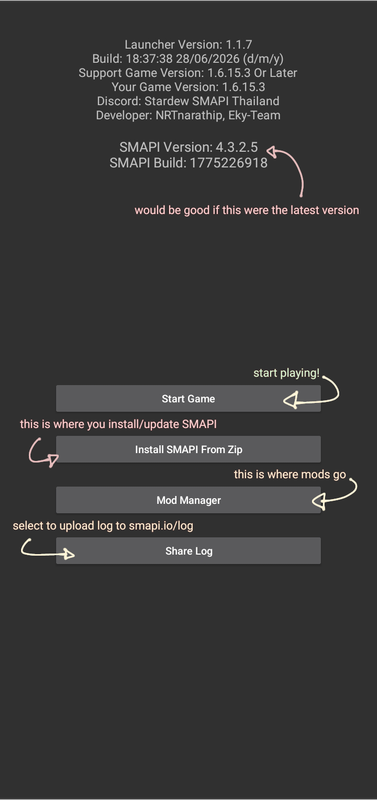
Latest SMAPI Launcher version: v1.1.7 Latest SMAPI version and build: SMAPI-Android-4.3.2.5-(1775226918)
General
Q: Does this SMAPI run on 32-bit?
A: No, there's no 32-bit support. As of Stardew Valley 1.5.5, the vanilla PC game stopped supporting 32-bit operating systems, and mobile followed suit when 1.6 rolled out. It's not just a SMAPI thing.
Q: Does this SMAPI run on emulators?
A: It might work in some cases (like using GBox on Huawei), but emulators aren't officially supported. You can try it if you’ve got no other option. Just keep in mind that if it breaks on an emulator, we can’t really help with that.
Q: Does this SMAPI run on Chromebook?
A: No one has ever managed to use SMAPI Android on Chromebook. If your Chromebook has Linux on it, you can try using the original PC SMAPI for the Steam version of the game. Support for that, however, will have to be on the main Stardew server as there's not much people on the English side that play on PC.
Q: Who is the developer?
A: NRT narathip (@NRTnarathip)
Q: Where can I find my saves?
A: Since the launcher is considered a different app, the saves are in a different place from the original game. You can keep the vanilla and modded saves separate.
- The original game's saves should be at
/data/com.chucklefish.stardewvalley/files/Saves - The launcher's saves should be at
/data/abc.smapi.gameloader/files/Saves
Copy/Zip up the entire folder that is named [FarmName]_12346789 and move it to the new save location. Make sure to UNZIP/EXTRACT the zip files if you have zipped them, otherwise it will NOT be detected.
Same goes for backing up saves. It is recommended to place backed up saves somewhere else in your internal or SD card, though (or you can upload it to your Google Drive so you can access it on other devices too!)
Q: How do I access the Android/data folder?
A: If you're on Android 11 and above, it is a restricted folder. You can use Shizuku app / alt link / alt (if other versions don't work / for Android 16) with any of the compatible file managers below:
- MiX File Explorer (official website) or MiXplorer Silver File Manager (paid version on Play Store)
- FV File Manager
- Cx File Explorer
- ZArchiver
See this this youtube video for the tutorial. Shizuku uses ADB to provide access to the file manager, which if successful will give access to the launcher. This means that the device will not be rooted with this method.
Shizuku tutorial text version
- Turn on Developer Options
- Open Settings > About phone > Software information
- Tap
Build number7 times until it says "You're now a developer!"
- Enable Wireless Debugging
- Go to Settings > Developer options
- Turn ON
Wireless debugging. - Tap or hold Wireless debugging to open the next page.
- Pair Shizuku
- Open Shizuku app and tap Pairing (wireless debugging)
- Open Developer options and tap Pair device with pairing code
- When a code appears, enter it in the Shizuku notification to enable the pairing.
- Start Shizuku
- Tap Start in Shizuku
You might need to toggle Wireless debugging off and back on. - Wait for "Shizuku is running"
- Tap Authorized # applications and authorize your file manager.
- Tap Start in Shizuku
- Link Shizuku with your File Manager
- Open your chosen file manager
- Tap ⋮ (three dots) > Settings or Root or Advanced Settings
Look for the option mentioning Shizuku, they're all different. - Under Type of root access, choose
Shizuku - If the app was open before pairing, close and reopen it
- Access the Data Folder
- Open
/Android/data - Allow permission if the prompt comes up
- Check if you can access the data files.
- If yes, try running the SMAPI launcher and start the game.
- If not, install one of the other compatible file managers and repeat this process.
- You can keep trying with different file managers until it works.
- Open
Q: Can I use this on 1.5?
A: Nope. This SMAPI is for 1.6. The old SMAPI 1.5 for Android was made by ZaneYork. There's no legal way to downgrade versions on mobile. There is the forum in the server #⭐mods-แนะนำ-1-5-6 for mods that work, but that's pretty much all the support we can offer. The launchers between the game versions are too different. Most mods on Nexus would have been updated to 1.6 by now since it's been more than a year, which will make the search harder.
SMAPI Launcher
Q: I can't open the launcher! It keeps kicking me out!
A: Most likely you have pirated/cracked the game, which is also against the #rules. Buy it from the Play Store or Samsung Galaxy Store.
For Huawei users:
- You need GBox and follow the steps in this tutorial sent by Alex.
- Short version: Use Gbox and make sure you can use Play Store in it. Login to your Google account inside the Play Store in Gbox and download the official Stardew Valley game there. Then, inside Gbox, download SMAPI for Android 1.6 and follow the rest of the steps on #📖 • how-to-install
- If you know how, you can also use GmsCore to sign into the Play Store using the Google account you bought the game on. Make sure you get the Huawei version of the GmsCore.
If you have bought the game legitimately and it still kicks you out:
- Try to reinstall the launcher.
- It could also be an access issue. If you can't access the data folder, the launcher can have trouble with it too so check the earlier Q&A for how to access the data folder.
Q: Why am I getting a SMAPI Installer Error?
- If you are getting the pop-up window that says ‘Please select file SMAPI-4.x.x.xxxx.zip for Android’, then one of the following is happening:
- You downloaded a SMAPI version for a different platform (original PC SMAPI or Cinderbox).
- You selected the wrong file.
- Your SMAPI zip file is named incorrectly. The rest of the section covers this situation.
- Make sure you downloaded the file from Nexus Mods. It is already named correctly, so don't rename it. For reference, the file name should start with
SMAPI-Android. - If it isn't named that, then rename the file so it starts with
SMAPI-Android. - You could also manually install it with the following method found by Hatsumo:
- Make sure you have access to the data folder.
- Manually extract the SMAPI zip file.
- Rename the folder to
Stardew Assemblies. - Move that to
storage/emulated/0/Android/data/abc.smapi.gameloader/files. - Why would you do that? That's so much work. I know you downloaded somewhere else that's why it keeps getting borked. Just get it from Nexus.
Q: How do I update the launcher?
A: Simply install it over the old launcher. Deleting the old version and installing the new one is fine too, but you'll lose your saves and mods unless you've backed them up.
Q: Do I have to update to SMAPI beta? I want to stay on the stable release.
A: It's not required to, but it is recommended. Last stable release is 4.1, while latest beta is on 4.3. You get a bigger pool of working mods from getting beta alone. Newer builds also fix a few common bugs and issues from previous versions.
Q: Why am I getting a system exception error?
A: It's usually an access issue when trying to install SMAPI. Refer to this to open up Android/data and then try to install the SMAPI zip again. Make sure you have also ran the base game at least once to let the first time processes set up.
Other times, it's because the main game isn't letting the launcher copy the game assets. Reinstalling the base game, launcher, and SMAPI zip solves the issue. Make sure you have backups of your saves on the base game if you have any.
Q: How do I install a .rar file?
A: You can use the RAR app to do it manually or convert it:
- Extract the files into the Mods folder. Make sure all the files are in one folder, preferably with the mod name. Or;
- Extract the files while it's in its download location, then compress it again to .zip and install using the Mod Manager.
Q: Disable SaveBackup by SMAPI Android? What does that mean?
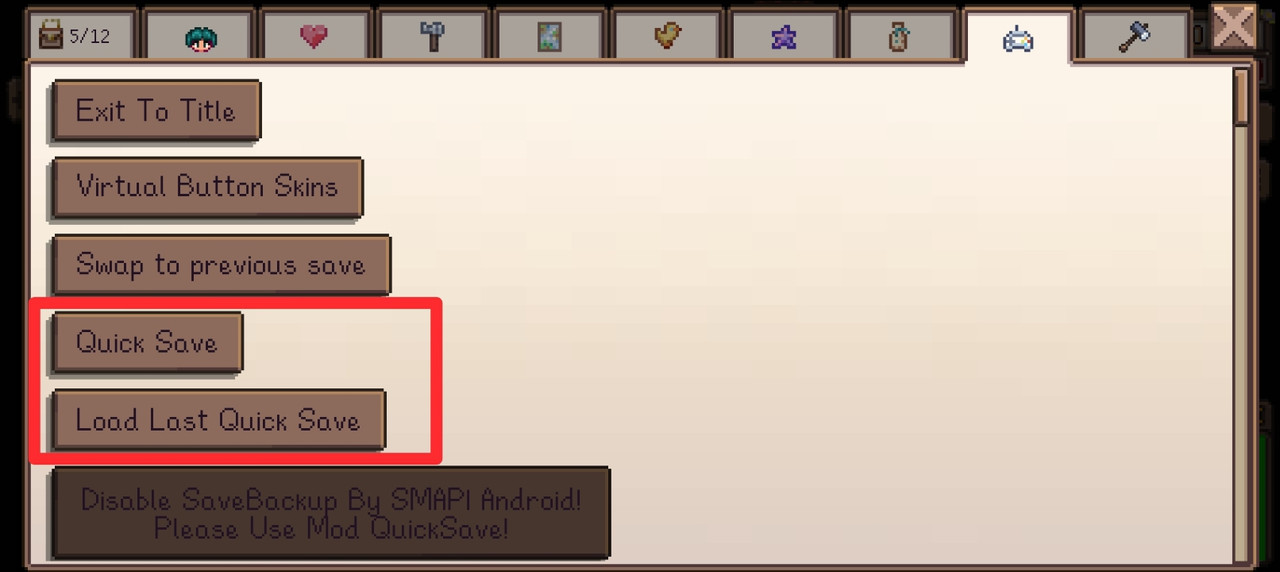
A: Android's base game Save Backup feature a.k.a. QuickSave a.k.a. Auto Save a.k.a. midday Save.
Mods that disable/break the vanilla save backup option:
- Custom Farm Loader
- Farm Type Manager
- SpaceCore
- Unlockable Bundles (doesn't grey out the button, but it doesn't work and throws errors in the log)
Only the vanilla save backup option doesn't work. Saving by sleeping still works.
As of 4.3, support has been added to QuickSave (Save Midday) v1.3.1. If this mod and the latest launcher version are installed, buttons to save and load appear in addition to the vanilla save backup
Q: The game loads so slow!
A: If you're playing with expansions or any mod that adds a lot of new items, it might be SMAPI or your device (could be either, or both) struggling to process the load. Avoid touching your screen while loading too so it doesn't crash. Try not to have (m)any background apps while playing; Chrome in particular is heavier than it seems.
If you have a powerful device and still find it frustrating that you can't run all the mods you want, do understand that the latest SMAPI for Android is still in beta and while there was improvements in optimization compared to 4.2, it's still not fully stable.
Q: My mods are gone!
A: As mentioned before, sometimes the launcher crashes and removes ALL saves and mods so please, please, please, BACK THEM UP regularly.
When the app not responding popup appears, don't tap on wait. If you do it, after a few times, it automatically deletes all your mods and crashes the launcher. Tap on okay, QuickSave (if you can), then clear the launcher's cache (NOT data). If it's happening still, try deleting some of your mods. SMAPI may be struggling to run all of them.
SMAPI Logs
Q: How do I share my SMAPI log?
A: Make sure to share it right after the error happens, or rerun the game first and wait until the start screen loads. If the issue is tied to a specific mod, load your save and try to trigger the error again. Then close the app, tap 'Share Log' on the launcher and paste everything in chat. Do not delete the additional info that shows the game, launcher and SMAPI versions so the helpers can help fix your issue quicker. On that note, if you just wanna read your own log without asking for help, you can paste it to your notepad and click the link to see your SMAPI log.
Q: How do I read my SMAPI log?
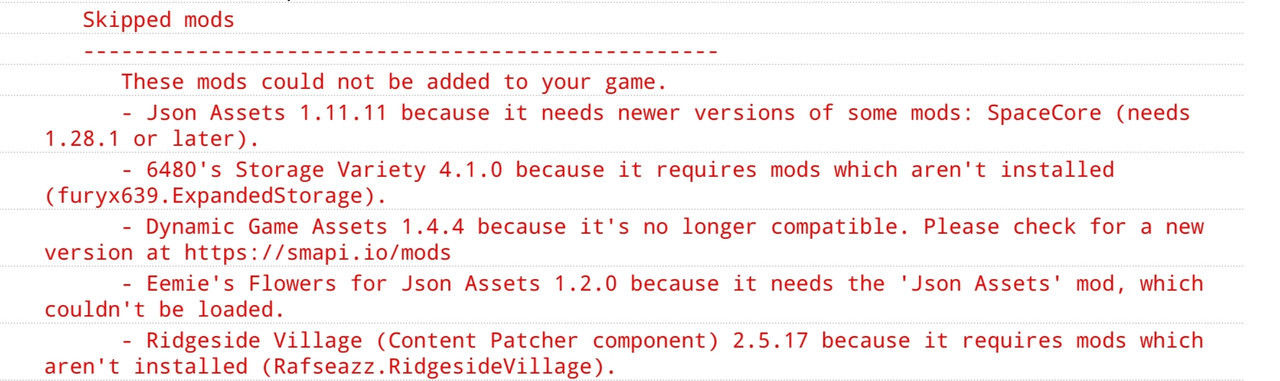
A: For the most part, just read the red lines starting on Skipped mods. It tells you what you need to do.
Q: "...it needs SMAPI 4.x.x or later"
A: Make sure your SMAPI is updated. It is always a good idea to get the latest zip in #🪲・smapi-beta instead unless it says testers only, but no one's stopping you from trying it if you want to. Make sure that it is the Android version from either NRT narathip's Github or the SMAPI Thai discord, not the PC version on nexus.
If it's still incompatible, you can try older mod versions if any are available.
Q: "...because it's no longer compatible"
A: Update your mod. If it's the latest version yet still showing this error, then it doesn't work on Android. You can try older versions if any are available.
Q: "...mod couldn't be added because it requires mods..."
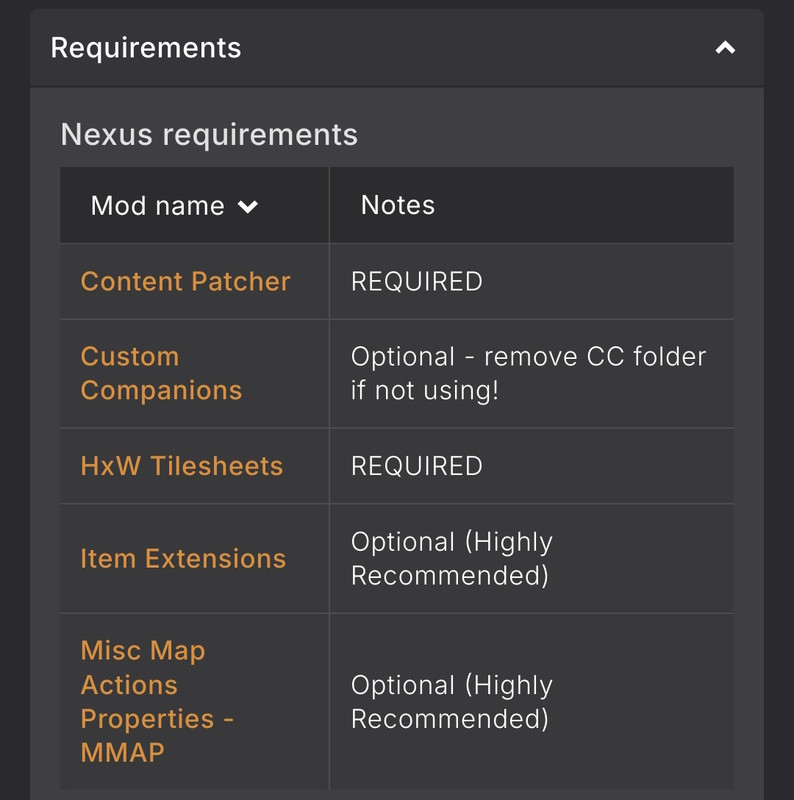
A: Read. Install the required mods. Check the Nexus mod page also, get all the mods under the Requirements tab. You only need to get the ones under Nexus requirements and Off-site requirements if there are any. If mods under the requirements are listed by the mod author as optional, you don't need to get them.
Q: "...because it contains files, but none of them are manifest.json"
A: Check the files inside the mod folder. The file should be named manifest.json exactly, not Manifest.json with a capital M. If the manifest is not there then redownload the mod from Nexus and try to install it again.
This error can also appear if the mod does not unzip inside a folder and the files are scattered. If this is the case, open the Mods folder and look for the files that are part of the mod. Create a folder with the same name as the mod and move the mod files there. This can also be done outside the data folder: extract the mod into a folder with a matching name, compress it again into a zip file and install as usual.
Some mods, like Portraiture, can have instructions to move the files into a folder within the main mod. Just read the mod description for the process.
For translations (i18n):
- They may not have manifests, so to install them just follow the instructions on the Nexus page. Also install Improve Game to enable mod translations.
Q: There's orange lines in my SMAPI log!
A: If they aren't affecting your game in any way, it's fine to ignore them. You only need to fix the red lines.
If you have orange lines about how an NPC cannot be found or a custom location is ignored after you've deleted them midsave, it's fine. It's just the game wondering where they went. It's a one time occurence and will be gone after you sleep to save.
Q: What's the 50/50 Method?
A: If you don't see any errors, or the errors don't clearly show which mod is causing the issue, or something just feels off and you really want to fix it, you can try the 50/50 method.
Make a copy of your Mods folder and rename it to something the launcher won’t load (like Mods1, ModsOriginal, or whatever you want). The folder still named Mods will be the one the launcher reads.
Next, try running half your mods on a test save.
- If the game works fine, the issue is in the other half.
- If it doesn’t, it’s in the half you tested.
Keep halving the problem group and testing again until you narrow down to whatever's causing the issue.
Mod Related
Q: How do I update mods?
A: Delete the mod's folder(s) in /data/abc.smapi.gameloader/files/Mods, then install the mod in the launcher as usual. If the mod has a config file and you want to keep it, open the old mod folders and copy just the config.json. Some updates may change the config options so you can rename the old config and use it as reference before deleting it.
Q: What are the mods that work?
A: Please check #✅・mods-working and #⭐mods-แนะนำ-1-6. In general, it's just trial and error and most should work
Q: "...suggest mods"
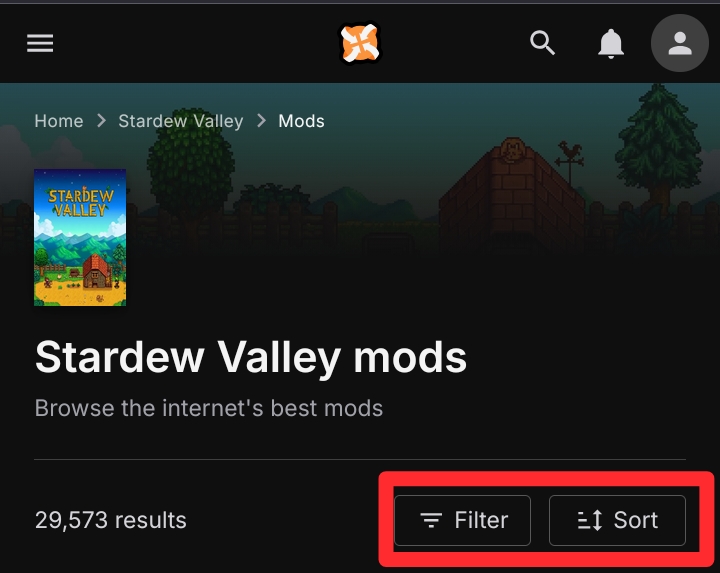
A: If you've asked this and not gotten enough or any answers, you can look it up yourself. Aside from seaching up on Nexus, you can also filter by Category, scroll down to select your language if it involves dialogue, and sort by Last Updated to make sure you're starting with mods updated for the current version.
Q: This mod doesn't work and gives me an error!
A: First of all, not all mods that work on PC work on Android due to the difference in how they're coded, especially for mods that edit the UI. Second, check #🐳mod-android-patch-fix for any Android ports. Some Android versions of mods are also up on Nexus, like UI Info Suite 2 Redux and NPC Map Locations. Also see mods that don't work and this question.
Q: Should I download this mod's Android version?
A: Half the time, it's going to be the 1.5 version (PC got 1.6 update on March 2024, and everyone else on November 2024), so just make sure that it is updated on or after March 2024. Else, getting the latest for everything is best practice, unless you need a newer SMAPI version or the mod edits the UI.
Q: When will this mod get patched for Android?
A: We don't know. If we're lucky, someone might be interested to take a look and try to port it. While we do have a few people in #🧪・making-mods that do know how to make this and that work, do not harass or force them to make Android versions of mods.
Q: How do I change my mod configuration?
A: Generate the config file by running the game at least once with the mod installed. There should be 'Mod Manager' in the launcher, then press 'Open Folder Mods'. Look for the mod's folder, then there should be the config.json file. Edit that file to adjust configs based on what you need. Or use Generic Mod Config Menu to make your life easier.
- When using GMCM
- Scrolling doesn't work on mobile. You can tap and hold for scrolling down, but you can't scroll back up.
- When manually editing
config.json(Good luck doing so for mods that have a million configs lol)- For Content Patcher:
- Look at the config names, find the config name inside the
ConfigSchemaobject incontent.json, and then copy the value you want to set the config insideAllowValuesand paste back in theconfig.json
- Look at the config names, find the config name inside the
- For non CP mods:
- Your best bet is just reading the mod description, and then asking the mod author if you don't understand anything
- For any mod that has an i18n folder, you can also just look in the
default.jsonfor the configs' keys to understand what they do. I recommend searching up the specific keys so you can avoid spoilers if you have dialogue/story related mods.
- For Content Patcher:
Q: My config file is formatted correctly but the launcher can't read it and I’m getting errors!
A: This can happen when using the device's stock text editor. Check if the file extension is still .json. If everything looks right but the errors still come up, delete the config file, reload the game to regenerate it and use a different text editor like QuickEdit or Code Editor. You can use the JSON validator to make sure you got the syntax right.
You could also get a permission error if you edit the file using an external device (like a PC). Just edit with the same thing you're playing on.
Q: How do I have multiple saves with different mods?
A: You can put a dot next to the folder name to disable them ex: .ContentPatcher or you can rename the mods folder to something else like ModsSVE, Mods1 to keep it, because the launcher will only read the one exactly called Mods.
Q: I tried to build on another farm, but the building menu only shows the main farm!
A: See Buildable Ginger Island Farm.
Q: My custom farm doesn't show in the farm chooser!
A: First of all, make sure that you got ALL mod requirements. Then check the mod page to see if it ADDS a new farm type instead of replacing a vanilla farm. If it does the latter, just choose the corresponding vanilla farm and you'll see it ingame.
Q: I am unable to exit menus from a mod!
A: You will have to use your phone's back button to exit it.
If you have So Many Toolbars, there is an option to assign Escape as a virtual key on a QuickAction toolbar. Enable it to stay on top of menus and this can be your back button. Escape is also the key to open the player menu, so if there's nothing to exit you'll be opening that.
Q: I downloaded a recolor but some places are still in the vanilla color!
A: First, check that the recolor and tilesheets (if there are any required) are updated for 1.6. Then if you have new maps/places, you can check if it's compatible with that recolor. Popular recolors like Earthy and VPR are more likely to have patches for custom maps and places.
Q: How do I install a mod with .xnb files?
A: These types of mods are intended to be used as replacements of game files, and are no longer recommended. It's too easy to mess up your game by replacing things directly. Look for a Content Patcher (CP) version of the mod you want.
If there is no CP version, XNB Retex Helper is a CP mod that can add .xnb assets. Follow the instructions in the mod description.
For Portraiture, follow instructions on the Portraiture description.
For non-Portraiture portraits, there is also a template you can try to convert them to CP. There is a web XNB converter to convert the images to .png, and if you want to try checking out game assets yourself.
Q: This NPC stayed in bed all day!
A: Custom NPCs added midsave will sleep for one day to correct their schedules.
Q: This NPC is out of bounds!
A: Skipping ahead or going back in time makes NPCs confused with their schedules. They'll reset after you sleep.
Q: Custom animals at Marnie's shop don't have names or descriptions!
A: Common issue, but we don't actually know if it's an Android bug or SMAPI bug. See Livestock Bazaar.
Specific Mods
Mods/frameworks that do not work
If any mod requires these mods, then obviously those will not work too.
With Alternatives
| Mod Name | Alternative Mod(s) |
|---|---|
| Animal Husbandry Mod | Rose's Cruelty Free Meat |
| Chests Anywhere | Easy Chest + note |
| Event Lookup | MH Event List Play Event is bugged so set ShowPlayEventButton to false. |
| Expanded Storage | Unlimited Storage Experience may vary depending on your screen. Try adjusting Menu Padding in the in-game settings if the items cover the scroll arrows. |
| Mastery Extended / Skill Prestige / Vanilla Plus Professions / Walk of Life | Apex Mastery |
| Market Town | Buildable Farmers Market |
| Wear More Rings | Combine Many Rings You will have to wait until you reach the forge, though. |
No Known Alternatives
- Any backpack mod that adds inventory space (such as Bigger Backpack, Custom Backpack Framework)
- No direct alternative, but Easy Chest makes you no longer worry about inventory space anyway (as long as you have chests to dump items into!)
- Any mod that requires you to hold down a key
- Better Crafting
- Birb Core
- DaLionheart
- Desert Bloom Farm
- No direct alternative. Try other farm maps
- Extra Animal Configs
- Wrath says it works but with errors in the SMAPI logs (
Mod crashed on entry and might not work correctly.). Use at your own risk
- Wrath says it works but with errors in the SMAPI logs (
- Farmer Portraits
- Mobile Phone
- PoohCore
- Secret Note Framework
- Solid Foundations
- Billy says it works as a dependency and will enable mods that require it even with the errors. Use at your own risk.
- Sword and Sorcery
- Vanilla Plus Professions
- Someone has managed to brute force it to work before, but it involved editing a SMAPI file and there was a lot of errors. Not recommended unless you know what you're doing.
Technically, these mods can work on Android. The catch is, you would need to have Stardew Valley bought from Steam or GOG first.
Cinderbox runs the PC Stardew Valley natively on Android, which eliminates the gap for modding between PC and mobile as much as possible.
Configs / Notes for specific mods
Alchemistry
- Refer to this forum post for the Android patch.
- Installing instructions here
- No need to install Better Crafting (incompatible with Android), get Extra Machine Configs instead
Alternative Textures
- As of Android SMAPI 4.2, AT floors and wallpapers are bugged. Reloading the save breaks them and turns them invisible, causing a void house. It happens on both vanilla and modded farmhouses
- Use a buttons control mode (Joystick & buttons, or whichever) to apply changes
- Searching for names of textures doesn't work
- Use the arrow keys to scroll
- To exit the texture menu, use your phone's back button, otherwise you will have to choose a texture so the window closes on its own.
Baubles
- Refer to this forum post for the Android patch.
- Installing instructions here
- No need to install Better Crafting (incompatible with Android), get Extra Machine Configs instead
- Tested only on original EMC 1.6, but it should work on EMC Android patch
- A few crafting items and recipes are missing, however the author has left the community and will not be able to update further.
Buildable Ginger Island Farm
- If you ever tried to build on an extra farm, like SVE's Grampleton Fields, East Scarp's Meadow Farm, a PIF farm or something else, and found that Robin's menu doesn't show the extra location, then congrats! That is definitely a problem. For some reason, this mod fixes it and lets you build on extra farms. Just install it, you'll probably be building on the island anyway.
Content Patcher
- 2.8.1 is recommended until we get the Android version for SMAPI 4.4, but the latest works anyway for some reason so why question it.
CJB Item Spawner
- Use Android version
Custom Menu Background
- Use Android version under
Optional Files
Custom Skill Mods
- As of SMAPI 4.3, only two custom skill mods are confirmed to be working:
- Custom skills won't show on the skill page because the Android UI is built differently from the PC UI. The Experience Bars mod lets you see your progress.
East Scarp
- Barber Shop isn't compatible in Android, so you can delete the ESBarberShop folder.
- Most add-on NPCs work.
Sword and Sorcery
- While not recommended, it's still possible for this to run as most things that make up a character (base data, schedules, events) are made with Content Patcher. You will get red errors and the RPG mechanics may not play out properly. Use at your own risk.
Easy Chest
- Use with Easy Valley to swap chests
- Open the Easy Valley menu (default Q) then click on
Display Chests- See youtube tutorial
- Or
DefaultOpenListtotrueand add theEasyChestKey(default R) to your Virtual Keyboard to open the Display Chests menu by default. - Turn off
Show Chest Infoand the Workbench options.
Extra Machine Configs
- Use Android version
Fashion Sense
- Nexus version works fine, but it varies from device to device
- You can try following the instructions of this fix if the hand mirror doesn't show up at Pierre's
- Or you can set
Require Hand Mirrortofalseand just use the keybind (no default key, use what you like)
- Use a buttons control mode (Joystick & buttons, or whichever) for the mirror.
- If you use the volume button on the outfit naming screen, it unlocks the OK button and lets you save the outfit.
Generic Mod Config Menu
- Changing keybinds and text inputs aren't possible in this. You will have to configure the mod manually
Happy Home Designer
- As of version 2.4.2, Android support has been officially added.
Immersive Scarecrows
- There seems to be a bug with it and Immersive Sprinklers that makes it crash when you try to save on the 28th of each season.
Immersive Sprinklers
- There seems to be a bug with it and Immersive Scarecrows that makes it crash when you try to save on the 28th of each season.
Livestock Bazaar
- Use version 1.5.4 as latest needs SMAPI 4.4+
- See this.
- Fixes the bug where custom livestock's names and descriptions don't show up at Marnie's shop.
Log Spam Filter
- Useful if you have a high tolerance for errors but the device doesn't and slows down far too quickly. If you're not sure of how to configure it, try the following:
- While this makes the log size file smaller, it does not provide the entire SMAPI log, which can rarely make diagnosing problems harder. This is not to scare people away from using it, just for info in case someone wants to yap that using this mod magically removed/solved their error problems.
Lookup Anything
- The search feature only works (albeit with a little bug) on Lookup Anything 1.53
- You will have to change the keybind for
ToggleSearchto a single key instead of the default,LeftShift + F1which won't work because the VK doesn't support multi-key combinations.
Misc Map Actions Properties - MMAP
- Use version 1.12.5 as latest needs SMAPI 4.4+
- To use newer versions, you may go into the
manifest.jsonand edit theMinimumApiVersionto4.3.- Take note that compatibility is not guaranteed and you may receive errors still.
- Do not attempt this on other mods unless you know what you are doing.
NPC Map Locations
- The only difference between Official and Android version is map sizes in the menu. Choose whichever is preferred, or choose based on your screen size.
Portraiture
- When using NRT's Virtual Keyboard, it doesn't show up during dialogue, so change the config in Portraiture so that it's
VolumeDownorVolumeUpinstead ofP, then when dialogue is up, press your volume button to change/fix the portrait. - The Nexus version of the Virtual Keyboard by DoubleZ would be better for this. Simply set
AboveMenuin the config to1to have it appear above dialogue.
QuickSave (Save Midday)
- Version 1.5 works.
- As of 4.2, there is no need to add the keybinds. There are buttons in the in-game settings.
- Still, remember to not use the default keybinds for another mod OR change this mod's keybinds to a key you know you won't use so you don't accidentally quicksave/quickload.
- Not automatic, you will have to manually quicksave and quickload via the options menu. See "
Disable SaveBackup by SMAPI Android? What does that mean?"
So Many Toolbars
- Aside from the coolness of being able to customize the stuff on your screen, the QuickAction toolbar option is also a good alternative or addition to a Virtual Keyboard as you can assign Virtual Keys to them in-game without having to mess with the config file. The toolbars can be enabled to stay on top of menus, and there is now also an option to add commands as keys.
SpaceCore
- Use the Android version with the latest #🪲・smapi-beta version
Special Power Utilities
- Works but the Special Powers tab has a transparent background. This is due to the mobile UI being built differently from the PC UI.
Stardew Valley Expanded
- There's a bug that allows you to enter the bus and teleport to the Calico Desert even without repairing it first
- It is not recommended to install or remove this mid-save
Sunberry Village
- Use the Android version. Do note that as of SMAPI 4.2, it is buggy and users have had mixed results
UI Info Suite 2
- For any version, you will need to sleep at least once and save the game to generate a save-specific config file.
- Redux
- This is the most recent version for mobile, without the error spam problem of the other Android version, and with new features such as options to move the info icons and experience bar.
- Official Nexus version
- Can't change the settings in-game, you'll have to go the mod folder, then
/data/[Save name].jsonand manually configure it. - The built in NPC locations on the map are misaligned. Use NPC Map Locations
- Can't change the settings in-game, you'll have to go the mod folder, then
UI Recolors
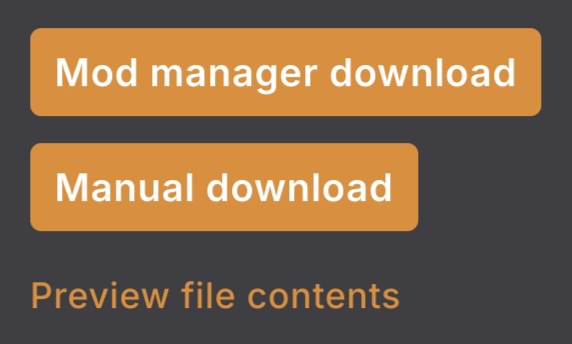
- if you're unsure whether or not a UI recolor works on Android, you can click on
Preview file contentsand look underLooseSpritesfolder for a png file calledmobileatlas_manually_madeorMobileAtlas_manually_made
- Minsun made a tutorial on how to make a UI mod on Android if you want to do it yourself. It is in Thai though, but you can translate by screenshotting the text and putting it on Google Lens.
Unlockable Bundles
- You can use the Android version under
Optional Files.
Vanilla Tweaks - Interface Edition
- Not 100% working. The inventory and collections menu tabs won't change, but the rest of the icons work fine
- If you know how, you can edit those tab icons on the mobile atlas yourself if you're using any of the supported UI recolors (assuming they even support mobile), and with a simple Content Patcher mod if you're just on vanilla UI
Virtual Keyboard
How do I add keys?
- Generate the config file by running the game at least once with the mod installed. There should be 'Mod Manager' in the launcher, then press 'Open Folder Mods'. Look for the Virtual Keyboard folder, then there should be the
config.jsonfile. Edit that file to add and remove keys based on what you need - For NRTnarathip's version
- see this screenshot
- For Nexus/DoubleZ version
- follow instructions in the mod description
- Additional: set
AboveMenuin the config to1to have it appear above dialogue
- The only difference between the two is that the first one can use console commands, and the second one appears even when there's dialogue (very useful for mods like Portraiture). The DoubleZ version can also use the alias on keys (for example, L key is used for Reset Terrain Features, so I aliased the L key to "RTF" instead so I don't have to remember the key)
What keybinds can I use for Virtual Keyboard?
- As long as they're not part of the vanilla controls, you're free to set it to any key you wish to.
- This is more of a suggestion than an actual rule. You might one day transfer your mods to PC and be surprised when the mod keybind does something else.
- If you have trouble using these vanilla control keys as mod keybinds, well. Just change them into something else, there's a lot of keys in a single keyboard and I doubt every single one is occupied.
- You can check button codes here. These are the 'names' of the keybinds that you put into the config
- It is recommended to stay on a mod's default keybinds, but it's totally understandable to change it if more than one mod uses the same keybind. SMAPI doesn't stop mods using overlapping keys.
- Multi-key combos do not work on the VKs, so just edit that into a single key if a mod needs one.
- You can also set alternate keybinds for a mod
- For example, for a mod I use
NumPad5for activating it, but I also want to useLeftStick(I use controller sometimes lol) while keeping the main keybind. So in the config, it's going to beNumPad5, LeftStick, so using any of those triggers the mod.
- For example, for a mod I use
ZeroXPatch's mods
- Their mods are made with AI. Not recommended trusting their optimization mods.
Translations
There are no translations at the moment!
If you are looking for the Chinese translation, the link has been taken down due to an invite link to a group sharing repackaged modpacks. This is considered mod piracy and SMAPI Thai does not condone it.
Contributors
- aki (@ashryyyver on discord)
- lia
- the people at the SMAPI Thai discord who:
- keep trying despite being told things wouldn't work
- report mod bugs
Changelog
Jul 10, 2026
- Added entry
How do I update the launcher?under SMAPI Launcher. - Minor edit to
"...mod couldn't be added because it requires mods..."entry to reflect updated Nexus' mod page layout. - Removed Bee Paths as the incompatibility has been fixed.
- Edited
MMAPentry.
Jul 9, 2026
- Updated launcher version number and button overview image.
- Added entry
Why am I getting a SMAPI Installer Error? - Updated Content Patcher and QuickSave entries.
- Appended to
Does this SMAPI run on 32-bit?
Apr 10, 2026
- Removed recommendations for the expansion performance fixes and Furniture Framework android patch as the author has taken them down.
- Edited Unlockable Bundles entry.
- Linked launcher and SMAPI public download sources, and SMAPI Thailand discord.
- Updated button overview and changed host for some images.
- Minor syntax edits.
- Removed note to ping Aki as they are on break.
Mar 10, 2026
- Edited
- Took down the Chinese translation link. Someone reported that it contains an invite link to a QQ group that shares modpacks.
Feb 24, 2026
- Edited QuickSave entry.
- Added link to Cinderbox Modloader.
Feb 13, 2026
- Added to the beginner's guide message.
- Added "Does this SMAPI run on Chromebook?" under General.
- Shortened
I can't install the SMAPI zip. When I do, the launcher gives me a system exception error.toThe launcher gives me a system exception error.+ edited entry. - Added
My mods are gone!under SMAPI Launcher. - Added
How do I have multiple saves with different mods?under Mod-related. - Renamed
Something's wrong and the log isn't clear!toWhat's the 50/50 Method? - Edited
How do I change my mod configuration? - Edited entries for these mods:
- Fashion Sense
- Furniture Framework
- Livestock Bazaar
- Added these mods under the Configs/Notes subsection of Specific Mods:
- custom skill mods
- MMAP
- ZeroXPatch's mods
Jan 24, 2026
- Edited "Where can I find my saves?"
- Added "Custom animals at Marnie's shop doesn't have names/descriptions!" under Mod-Related.
- Removed Livestock Bazaar under mods that don't work and added notes fo it under Mod Specific.
Jan 12, 2026
- Removed Lookup Anything notes under "Should I download this mod's Android version?"
- Added Content Patcher warnings under Specific Mods.
- Added warnings for both Immersive Scarecrows and Immersive Sprinklers.
- Edited Lookup Anything entry.
Jan 10, 2026
- Edited Easy Chest notes.
DefaultOpenListonly works when Easy Valley is installed.
Jan 9, 2026
- Removed general channel link on the beginning note, hopefully to keep problems and solutions from spamming the chatting channels.
- Renamed
How do I move my Stardew Valley saves to the SMAPI launcher?toWhere can I find my saves? - Added another solution for the system exception error.
- Added link to gotakea_shower's performance fixes for big expansion mods under "The game moves so slow!"
- Added info for orange lines talking about NPCs/modded locations disappearing after deleting them midsave under "There's orange lines in my SMAPI log!"
- Added questions for common NPC bugs under Mod Related
- Removed custom skill mods general statement under Mods/frameworks that do not work, since custom skill mods like Travelling Skill and Cloths and Colors work. Birbcore and DaLionheart skill mods are the ones not working.
- Alchemistry and Baubles Android version now working properly
- Removed note for Esca's Modding Plugins, as latest (1.7.2) works fine.
- Added more info for Log Spam Filter
- Linked the performance fixes under each respective expansions (just the general link bcs I'm lazy -Aki)
Jan 8, 2026
- Added "Does this SMAPI run on emulators?" under General.
Jan 5, 2026
- Edited answer for "Should I download this mod's Android version?"
Dec 18, 2025
- Edited Happy Home Designer entry.
Dec 17, 2025
- Edited answer for "I am unable to exit menus from a mod!"
- Edited So Many Toolbars entry.
Dec 13, 2025
- Replaced Android UI Info Suite 2 recommendation with Redux version by Eky.
- Added So Many Toolbars under the Configs/Notes subsection of Specific Mods.
- Added a note for MH Event List.
- Edited answer for "How do I share my SMAPI log?"
Dec 12, 2025
- Edited East Scarp and added Sword and Sorcery under it.
- Edited Fashion Sense and QuickSave mods' entries as Fashion Sense doesn't actually have a default keybind. My bad. -Aki
Dec 11, 2025
- Added MH Event List as Event Lookup alternative.
- Edited Unlockable Bundles and UI Info Suite 2 entries.
- Added "Do I have to update to SMAPI beta?" question under SMAPI Launcher.
- Moved "How do I install a .rar file?" under SMAPI Launcher.
- Moved "How do I update mods?" under Mod Related.
- Added info for Lookup Anything under "Should I download this mod's Android version?" question.
- Added "When will this mod get patched for Android?" under Mod Related.
- Pointed out Fashion Sense and QuickSave mods' possible conflict when using the default keybinds (F5)
Dec 9, 2025
- Added Unlimited Storage as Expanded Storage alternative.
- Added question for .xnb mods under Mod Related.
Dec 8, 2025
- Changed image host for some photos.
Dec 6, 2025
- Renamed
SMAPIsection toSMAPI Launcher. - Added solution for system exception errors when installing the SMAPI zip under SMAPI Launcher section.
- Added questions under Mod-related section for:
- Exiting mod menus
- Mismatched map/tiles when using recolors
- Added Buildable Farmers Market as Market Town alternative.
- Added these mods under the Configs/Notes subsection of Specific Mods:
- Alchemistry
- Baubles
- NPC Map Locations
Dec 5, 2025
- Added question for 1.5 under General section.
- Moved the Virtual Keyboard notes + "What buttons can I use for Virtual Keyboard" under the Specific Mods subsection.
- Added instructions for DoubleZ Virtual Keyboard to appear during dialogue.
- Added more explanation under the "The game loads so slow!" question and also linked to it in the "This mod doesn't work and gives me an error!" question.
- Added info to use Easy Chest without Easy Valley.