0# Rollback for LO using RetroArch
 SETUP
SETUP
- Install RetroArch from Steam
- Go on this page, click on the checkmark (✓) in the first row of the backup column to get the BIOS.
- In Steam, Right click on RetroArch:
Properties > Installed Files > Browse, unzip & put all the Saturn BIOS files in thesystemfolder (if it doesn't exist, create it). - Start RetroArch
- In the sidebar, select
Import Content > Scan Directory, go to your ROM folder & click <Scan This Directory>. Settings > Latency:- Run-Ahead to Reduce Latency: OFF
Settings > Input > RetroPad Binds > Port 1 Controls- Map your input as your default xbox/PS controls, NOT the game input (btw Retroarch notation uses Nintendo's layout).
Netplay > Network- Use Relay Server: ON
- Relay Server Location: Custom
- Custom Relay Server Address: retro.supercombo.gg for US (East) / seed.pipe-strip.com for EU
- If you don't see this, go to
Settings > User Interface > Show Advanced Settings, toggle it ON.
- If you don't see this, go to
- Netplay Check Frames: 0
- Input Latency Frames: 2
- Frames Range: 3
Netplay > Lobby Filtersset everything to ON.- In the sidebar, click on
Saturn, find & launch LimitOver. Select SEGA Saturn (Beetle Saturn) for the core.
I don't find LimitOver in the list!
Your rom might be shown as "Asuka 120% Limited", click on Limited & go to Information at the bottom to see which one is the correct file then rename it.
- Press F1,
Control > Port 1 Controls- Assign the previously set RetroPad buttons (shown on the left) to the current console controller (on the right).
- Here the recommended button layout:
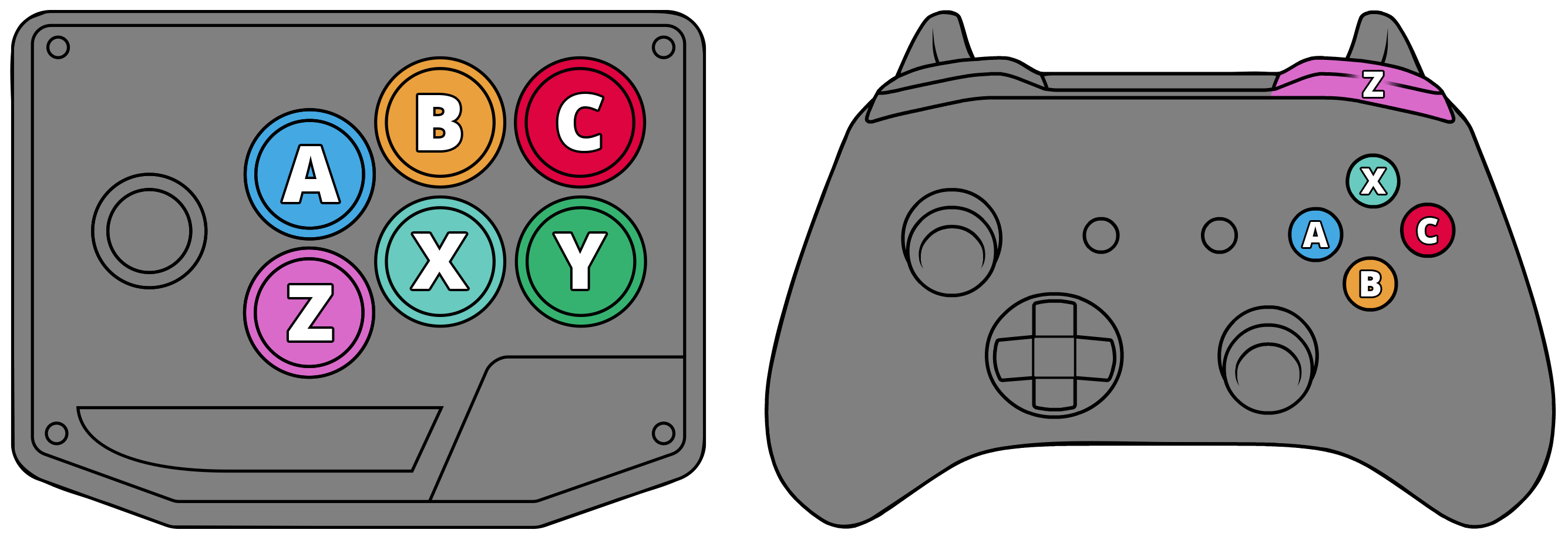
This part is NOT intuitive!
Don't worry, it's not you, it's the emulator's fault 💀.
Press F1, to go back in game & test your buttons. Good luck.
- Once done, go to
Control > Manage Remap Files > Save Remap File Asso you never have to do this again. - Now just set up your name in
Settings > Users > Usernameand you're finally ready to play!
 HOST
HOST
Netplay > Host > Start Netplay Host- Start the game you want to host. Wait for your opponent

JOIN
- In
Netplay > Refresh Netplay Host List - Find your opponent in the list, click on them. Fight .
- If your game doesn't start: boot up the game and retry.
- If you don't see a list: try to click Refresh LAN list then Resfresh host list again. If that doesn't do it restart RetroArch (sometimes restarting twice works too :V).
👀 SPECTATE
- In Netplay > Network, toggle Netplay Spectator Mode ON
- Once done, go back to Netplay, click on Refresh Netplay Host List: find the match you want to spectate & click on them. Enjoy✨.
Swap players, kinda.
Alternatively, if you're already in a match & want to leave your place to someone while spectating, you can also press the "I" key.