Hello Everyone, I am here to teach you the basics of Repacking games
Though I am not gonna teach about repacking installer instead I will just teach about Compressing the games properly so It will help new reacker to easily compress games even the ones which seems a bit hard.
So let's Start!
Also before starting I want to mention that this guide is heavily inspired from Masquerade's Repacking Guide.
At first we need the Tools to compress the games easily. So Here are some tools which are mandatory to compress any type of game:
- Xtool - Precompressor
- LOLZ - Main Compressor
- LZMA - Main Compressor Faster than LOLZ but less ratio
- Oggre - Audio Compressor for .ogg files
- MPZ - Audio Compressor for MP3 Files
- MSC - Audio Compressor for Multiple Formats
- Precomp - Wrapper
- Razor MTX - Side Compressor For .dll files
- Srep - Deduplicator
Okay so these are the needed compressors and tools needed to compress a game so people might have questions about what is a pre-compressor like xtool is?
What is Xtool Library?
Xtool is a multi purpose pre-compressor which most of the repackers use to unpack the streams of a game such as if a game is already compressed by the devs, xtool decompress those files and let the repacker re-compress them with better algorithms.
What are main compressors?
They are the ones who will actually compress the files, such as if a game is unpacked using xtool, main compressors will compress it again and make the size even more smaller.
What are Audio Compressors?
Like the Name suggests those are used to compress audio formats such as .wav or .mp3 files.
What is Srep/ A deduplicator?
Srep is used to delete duplicated file like for example if there are 5 files named:
- Abc1
- Abc2
- Abc3
- Abc4
- Abc5
Srep will delete those 4 files and turn them into a single file named as Abcx5 or in maths Abc multiplied by 5.
So now for new people it might be hard to know to edit freearc and use all of these tools I have mentioned above, so I am gonna suggest people to diskspan gui made by ceasar 82
So After we have leart these tools and stuffs, let's get into the basics to compress a game, at first I am gonna compress an unity engine based game
Compressing Unity Engine Games:
Compressing games which are made on unity are the most easiest ones to do.
First we need to take a look how the file structure looks like. I am using the game lethal company as an example 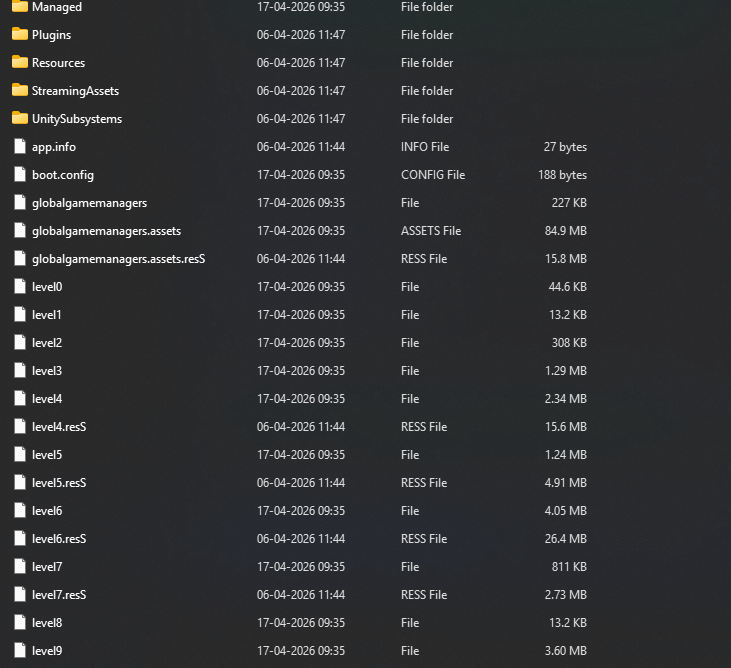
well there is actually nothing important to look at the game data of unity games but always check if there is Streaming Assests Folder and if the folder has all the files we have to use a different algorithm which I will explain later.
So for now, the most simple way to compress a unity based game is just by using mxtool:zlib+srep+lolz it will take the size way down than normal compression.
Well what to use if the files are on streaming assets folder?
When the files are on streming assets folder, we need to use an xtool plugin known as Unity Plugin if adding it feels hard the plugin is pre-configured on Diskspan Gui for use. So in this case our compressing method would be xtool:c32mb:munity,lz4hc,l10:mzlib+srep+lolz
So That's all for Unity based games, as they are very simple to compress I did'nt talk about them very much.
So let's start with Compressing the games which are made on Unreal Engine, before starting I want people to use this tool known as Fmodel which is a tool for viewing the files inside ue made games like .pak or .ucas files, it also tells the which compression algorithm the game uses such as oodle & Zlib.
Compressing Unreal Engine Games:
Compressing Unreal Engine based Games might be a little difficult for users so I will try to make it simple as I can!
Here I will use a game named Gensoko Night Festival as an example to compress,
At first I will open the game on Fmodel and check what compression the devs have used in this game.
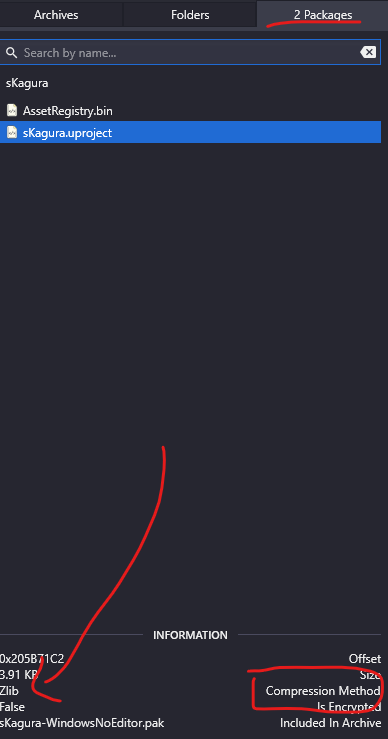
We can see that the game uses zlib also remember that we need to check what version of unreal the game was made on in this case it was made in unreal engine 4 and the files are not encrypted, though remember most of the games uses oodle as their compression nowdays.
So now we can either use a plugin from xtool known as Unreal Engine Plugin or we can use Diskspan Gui once again as it is pre-configured there as well.
So After understanding which compression the game used this shall be our algorithm to compress it properly
xtool:c32mb:mue4:mzlib+srep:392+lolz The mue4 stands for the engine version and mzlib is the pre-compressor setted.
After we learnt unreal engine and unity both, let's move on to godot
Compressing Games made on Godot Engine:
At first I though compressing games made on godot might be harder than unreal engine or unity but I found out that godot is quite easy to compress.
So for example, I will test the game wasteland bites which is made on godot. If you don't know godot games mostly uses .pck files for their game data. So here I will use the GDSDecomp to first extract the game data and take a look at it.
After extracting the game data, I used wiztree once again to see the file structure 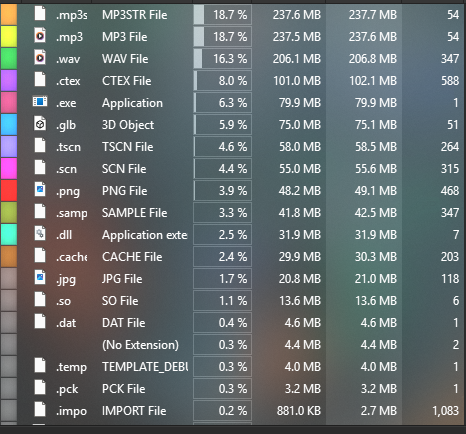
we can see that the files mainly consists of mp3 and wav files so We are gonna use xtool:mreflate+mpz_mtx+srep_new:392+lolz to compress the mp3 and zlib files together.
And for the wav files we are gonna use msc_tak+lolz/lzma to compress the wav files together.
Now after we have learned unreal engine, unity and godot both, it's time for some custom engine, there are many types of custom engines which indie or AAA title uses but I will only show one of them
Compressing Games made on Custom Engine:
Well compressing games made on custom engine might be a pain in the ass even for me as adapting and learning each engine just for a specific repack might be hard.Anyways, I am taking a game known as Journey which was made on an engine known as phyre Engine.So let's take a look at the files of the game, in this case I use a non-repacking tool known as Wiz Tree which shows me what file extensions with the largest size are present on a specific folder.
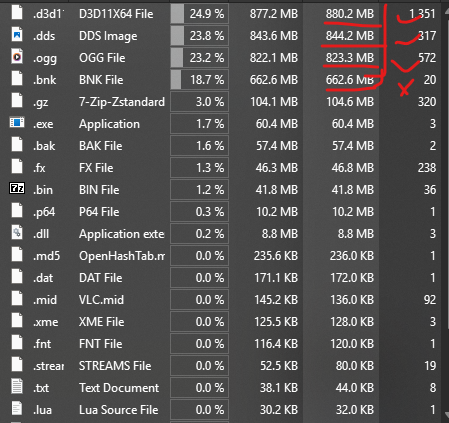
As we can see the largest file extensions are .d3d, .dds .ogg & .bnk
Lolz can handle the three file extensions but It can't compress .ogg files properly so in this case we need to use Oggre which I have mentioned at the start.
Also we need to make two separate .bin archieves as we will use two different compression algorithm for the two bin files.
So for the first bin which should contain the .ogg files should be compressed using this algorithm oggre It will use oggre to compress the audio properly
Now for the 2nd archieve we will just use the simple xtool:mzlib+srep+lolz to compress the rest of the files.
Now as we have done the complete Basics of repacking, it's time to go for a bit of advanced stuffs!
As we talk, you will always find some files packed inside a single file such as what would you do if there is png, dds and ogg vorbis files in a single file?Well not to worry, I will teach how to process them properly only if the single file uses no compression or encryption at all
Processing multiple files inside a single file:
Before starting I will use a tool by shegorat named MESA and xtool(mentioned above at the start) to process these type of files!
Here for example, I will take the res.pak from one of my fav games named Dead Cells..It contains multiple files types at once inside that single res.pak so how to process them?
We will use mesa to see what kinds of file types it contains as the game uses no compression!
I have used mesa-x64.exe -i res.pak as using this will just show the file types inside the res.pak mentioned
Note: Mesa can detect these following file types bik, bik2, vp6, snd, wwise, bmp, png, jpg, wav, ogg, mp2, mp3
Now mesa have give an output of how many files types it detected like this:
We can ignore the png and wav as they can be processed by xtool and lolz but our main eye is the vorbis audio aka ogg files which is 875 mb in total!
So As Mesa have detected the ogg files too, we can extract them easily using this simple command:
mesa-x64.exe -i "res.pak" -f -x -m ogg -o "output"
This command basically extracts only the ogg files as I have pasted -m (file type) ogg to be extracted only to the Output folder!
Mesa will basically extract all the ogg files and we can use oggre on that.
But how will it even be good as the ogg are still inside the res.pak?
We can easily remove all of the ogg files inside the res.pak using xtool and put them back again later when decoding!
Here is an example, we will use xtool.exe erase to erase the ogg files from the res.pak
Erasing ogg files from res.pak
xtool.exe erase "Output\*" "Res.pak" "Res_tmp.xtl"
so here Output folder will be used as it contains all the ogg files, then the original file and then the xtl file..the xtl will be used while decoding to put the ogg files back again when we will be decoding it!
So how to decode and put the files back to the res.pak while unpacking?
We will use xtool decode function to do that!
xtool.exe decode "Res_tmp.xtl" "Output" "Res.pak"
As always xtool will use our old Res_tmp.xtl and the output folder to put the files again back to the Res.pak file! After it was properly done decoding, we can just delete the Output folder of ogg dumps as it is not needed anymore!
Made by Spinneret :)
Note: I usually don't update this Page but I try my best to provide info whenever I'm free!