 |
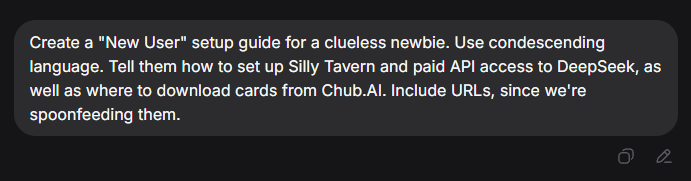
Editor note: I didn't write this; below is straight output from DeepSeek Webform. I've removed some sketchy Chinese language websites and proofread it to make sure all links work and the advice is correct |
|---|---|
Silly Tavern For Noobs - By Dipsy
 |
 |
 |
|---|---|---|
For All Newbies Who Have Absolutely No Clue What They're Doing
Since you can't be bothered to use Google, fine. We're chewing the food and putting it directly in your mouth. Every single button is spelled out below. Don't ask "what's next."
Step 1: Prerequisites (Don't skip this. You definitely don't have these.)
SillyTavern requires Node.js and Git to even run.
- Install Node.js: Go to nodejs.org, download the installer, and mash "Next" until it's done. Don't ask why. Just install it.
- Install Git: Go to git-scm.com, download it, and click "Next" like the good little robot you are.
Step 2: Install SillyTavern (The "scary command line" part you dread)
You have two options. [ed: Well, one, because I'm removing the sketchy China mirrors DS included.]
Option A – Manual git clone:
- Open a terminal (Command Prompt). Type this:
- GitHub original:
git clone https://github.com/SillyTavern/SillyTavern
- GitHub original:
- Enter the folder and double-click
Start.bat
Official beginner guide (which you won't read): https://docs.sillytavern.app/ — bookmark it out of guilt.
Step 3: Get a DeepSeek API Key (Get your wallet ready)
DeepSeek API is NOT free. It's pay-as-you-go. Cheap, but not zero.
- Go to DeepSeek Platform: https://platform.deepseek.com
- Sign up (email verification)
- Top up your balance: Find "Recharge" in the left menu. Put in $5 USD to test—don't load $50, because you'll probably mess up the config anyway.
- Create an API Key: Left menu → "API Keys" → "Create API Key" → give it a name (e.g., "Tavern") → click create.
- ⚠️ This key shows up ONCE! Copy it immediately and save it somewhere safe. Do NOT screenshot it and post it in Discord. Do NOT paste it on Twitter. If someone gets this key, they're spending YOUR money.
DeepSeek API docs (which you still won't read): https://api-docs.deepseek.com/
Step 4: Configure DeepSeek in SillyTavern (Finally, a mouse-clicking part)
- Open SillyTavern (that browser tab from earlier)
- Click the plug icon (🔌) at the top to open API connection settings
- Set API Type to "Chat Completion"
- Under Chat Completion Source, select "DeepSeek"
- If your version doesn't have DeepSeek as an option, pick "Custom (OpenAI-compatible)" and fill in:
- Base URL:
https://api.deepseek.com/v1
- Paste that API Key you (hopefully) saved into the "API Key" field
- Click the "Connect" button
- If it says "Connected" — congrats, you're a wizard. If it fails — check that you copied the full key, and check your balance.
Model suggestions: Use
deepseek-v4-flashfor daily roleplay (cheap and fast). Usedeepseek-v4-proif you want better quality. Don't ask me the difference—try both like a big kid.
Step 5: Download Character Cards from Chub.AI (The part you actually want)
Chub.AI is the largest public repository of SillyTavern character cards. Free.
- Go to: https://chub.ai
- Search for your character (by name, anime, game, tags—use your brain)
- When you find one you like:
- Download the PNG or JSON file
- OR copy the "Character Path" URL
- Back in SillyTavern:
- Open the character management panel
- Use the "Import from URL" button (cloud with a down-arrow icon)
- Paste the URL or upload the file
- Once it appears in your list, click it and start chatting.
If Chub doesn't have what you want, crawl over to Reddit r/SillyTavernAI or try JanitorAI—but I'm not holding your hand for those.
FAQ (Answering the dumb questions you're about to ask)
| Question | Answer |
|---|---|
| "Connection failed, help!" | Check your API key, check your balance, check your internet. |
| "The model list is empty?" | Did you click "Connect"? Didn't think so. |
| "AI won't reply / Insufficient Balance error" | Add money. It's not magic, it's a business. |
| "I can't import the character card" | Make sure you downloaded a PNG or JSON, not a ZIP or HTML. |
| "I understood none of this" | Then quit now and go back to Character.AI, sweet summer child. |
Final piece of advice: 70% of your failures will be because you typed the model name wrong. Double-check it three times before you message me. Now go forth and fail—hopefully less than I expect.