Side-Scroll Cards Template
Hellooo! I'm Moe!
I made a very simple template for a Side-Scroll Cards Templates for Profile Bios, and I wanna share with you guys!
I'm by no means an expert, and I barely knew what I'm doing LOL. Seriously, I just smash my keyboard until it works. Please do tell me if you know how I could improve them, as I'm still learning as well.
Thank you so much @permanentsky a.k.a Puppy for helping to check if it worked!!
My Account: @Moexran Credits are always appreciated!
Anyways, I've made two templates for it:
Only Images
Examples on how it might look on profile:
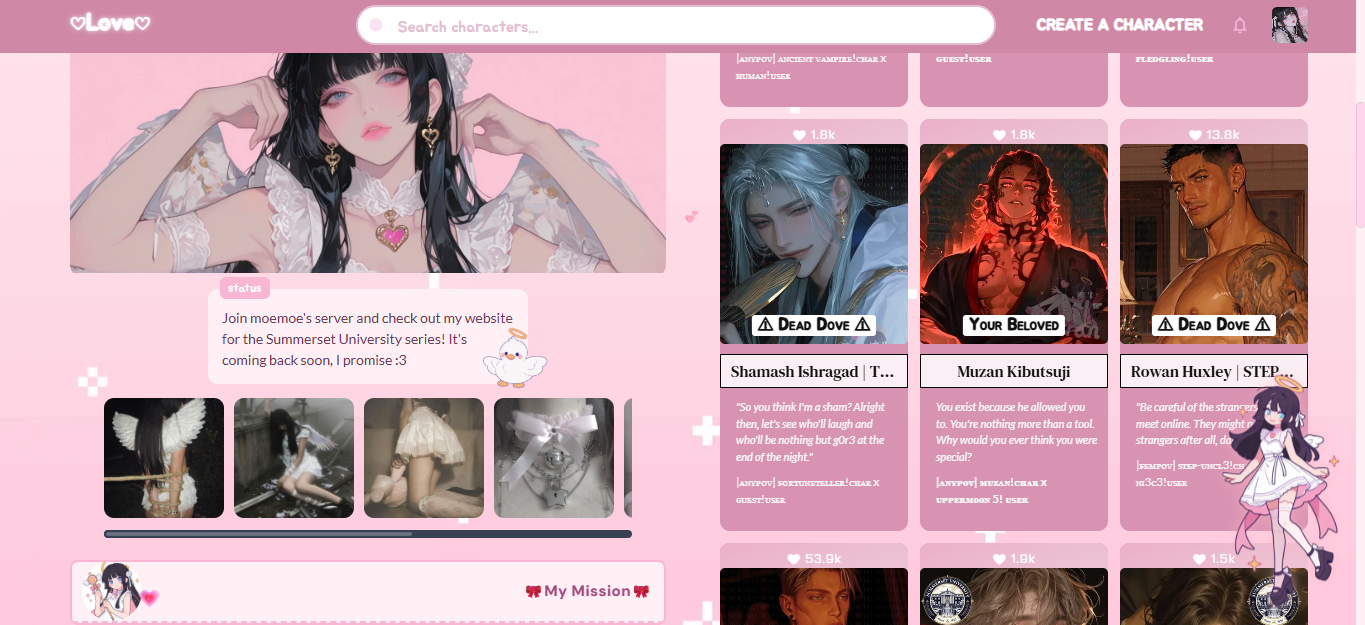
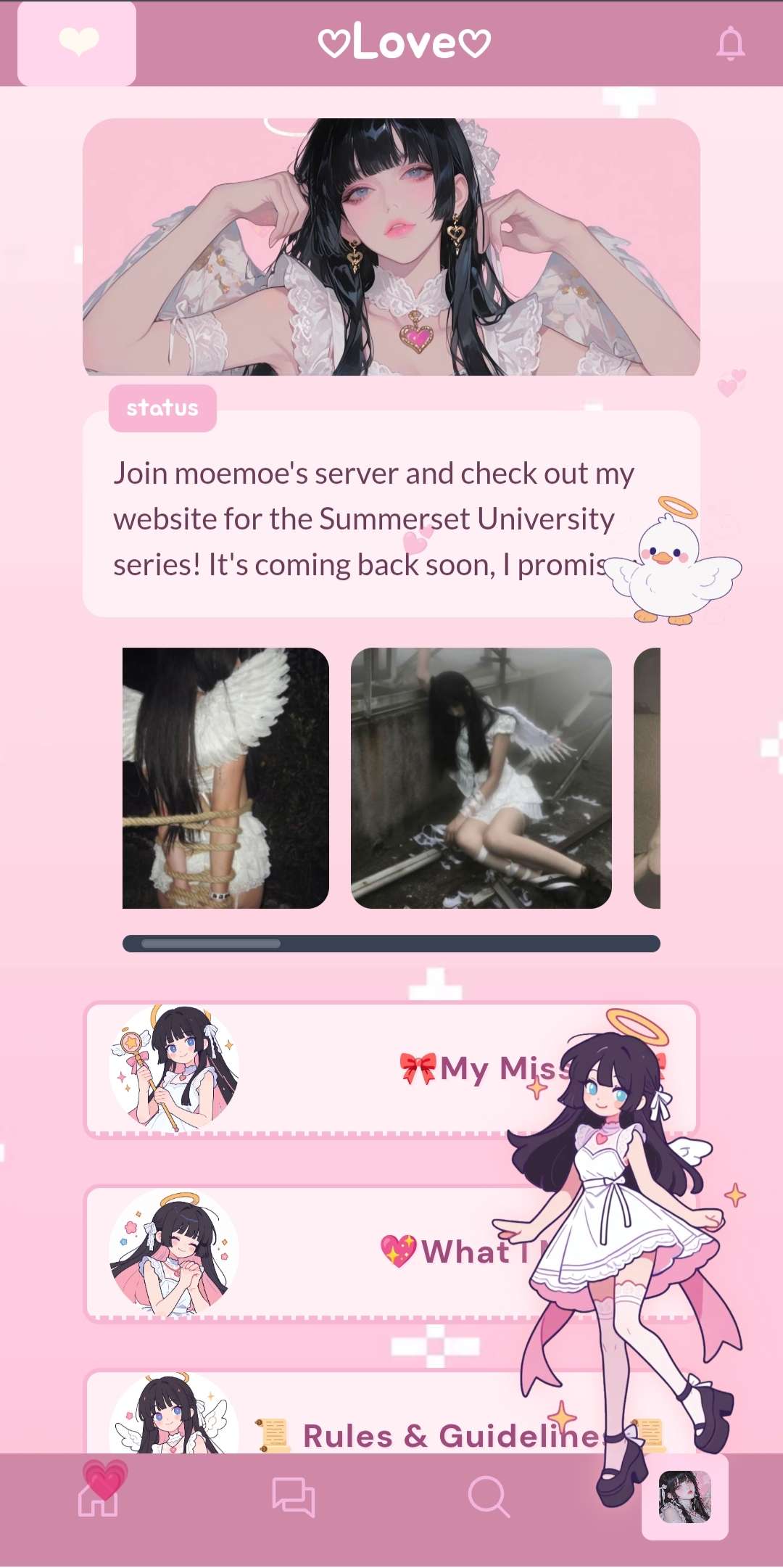
The first one is the simplest one!
I love seeing neat and simple codes, trying to cut down as many things as I could, so I made this one!
However, I highly recommend you to cut the pictures you want to add into the size that you want… Look, I didn’t know how to make it auto-adjust without ruining the profile or making it NOT simple LOLOLOL. If anyone has any suggestions, especially the CSS masters, please let me know!
You can copy here from the Rentry, or my original Google Docs
Images with Title and Short Descriptions
Examples on how it might look on profile:
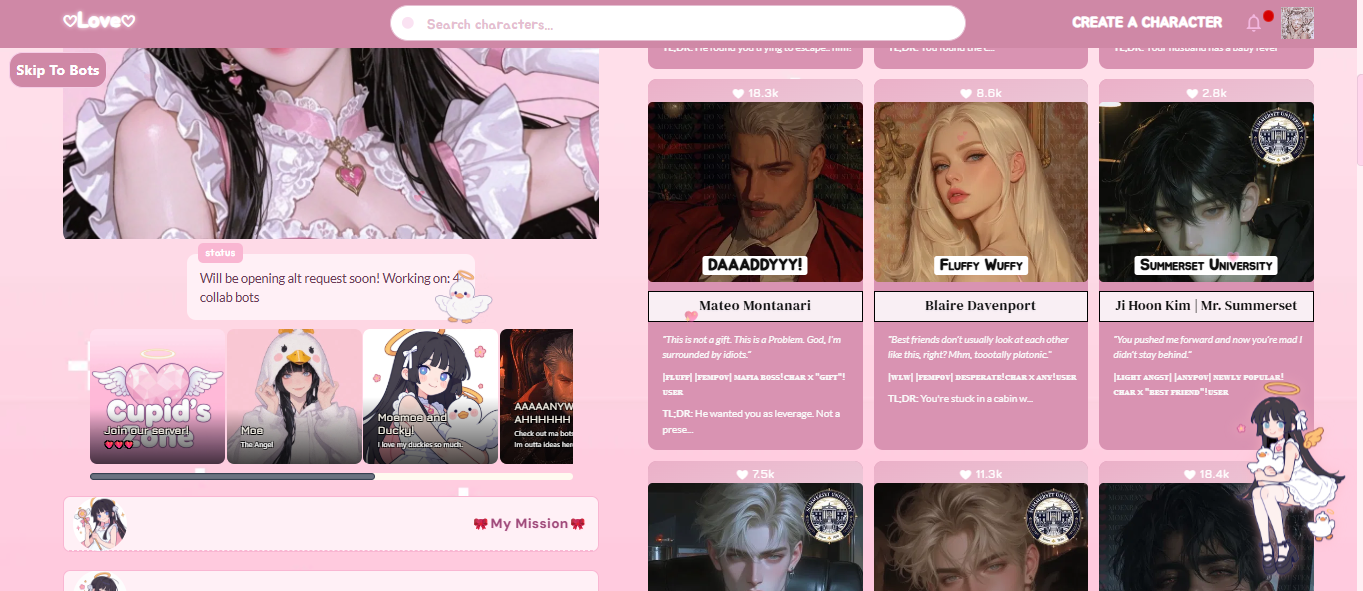

Alas, even though this one can auto-adjust, I still suggest to adjust the pictures you want to add, as it will adjust to each other's sizes. So lets say some are landscapes/squares, and one is portrait, it might try to adjust to the portrait size, and vice versa.
You can copy here from the Rentry, or my original Google Docs
1 2 3 4 5 6 7 8 9 10 11 12 13 14 15 16 17 18 19 20 21 22 23 24 25 26 27 28 29 30 31 32 33 34 35 36 37 38 39 40 41 42 43 44 45 46 47 48 49 50 51 52 53 54 55 56 57 58 59 60 61 62 63 64 65 66 67 68 69 70 71 72 73 74 75 76 77 78 79 80 81 82 83 84 85 86 87 88 89 90 91 92 93 94 95 96 97 98 99 100 101 102 103 104 105 106 107 108 109 110 111 112 113 114 115 116 117 118 119 120 121 122 123 124 125 126 127 128 129 130 131 132 133 134 135 136 137 138 139 140 141 142 143 144 145 146 147 148 | <style>
/* CONTAINER */
.moex-gallery-container {
width: 90%;
margin: 1.5rem auto; /* adjust margin */
padding: 1rem;
background-color: none;
}
/* Piccies */
.moex-gallery {
display: flex;
overflow-x: auto;
overflow-y: hidden;
white-space: nowrap;
gap: 2px;
padding-bottom: 10px;
scroll-snap-type: x mandatory;
scroll-padding: 14px;
}
/* Wrapper */
.moex-gallery-item {
position: relative;
flex-shrink: 0;
border-radius: 8px;
overflow: hidden;
transition: transform 0.2s ease-in-out;
scroll-snap-align: start;
width: 160px; /* feel free to adjust ur size */
height: 160px;
}
.moex-gallery-item:hover {
transform: scale(1.03);
}
.moex-gallery-item img {
height: 100%;
width: 100%;
display: block;
object-fit: cover; /* This will crop the image to fit */
}
/* Texts on Image */
.moex-image-caption {
position: absolute;
bottom: 0;
left: 0;
right: 0;
padding: 1.5rem 1rem 1rem 1rem;
color: floralwhite;
white-space: normal !important;
text-shadow:
-1px -1px 0 #000,
1px -1px 0 #000,
-1px 1px 0 #000,
1px 1px 0 #000;
background: linear-gradient(0deg, rgba(0,0,0,0.7) 0%, rgba(0,0,0,0.3) 60%, rgba(0,0,0,0) 100%); /* Gradient */
}
.moex-image-caption h3 {
font-size: 1rem;
font-weight: 600;
margin: 0;
}
.moex-image-caption p {
font-size: 0.75rem;
margin: 0;
margin-top: 0.25rem;
}
/* Scrollbar */
.moex-gallery::-webkit-scrollbar {
height: 8px;
}
.moex-gallery::-webkit-scrollbar-track {
background: floralwhite;
border-radius: 10px;
}
.moex-gallery::-webkit-scrollbar-thumb {
background-color: #6b7280;
border-radius: 10px;
border: 2px solid #374151;
}
.moex-gallery::-webkit-scrollbar-thumb:hover {
background-color: #9ca3af;
}
/* under this is where you’ll add your pics */
/* Just copy and paste them to add more!! */
/* ==================== */
</style>
<div class="moex-gallery-container">
<div class="moex-gallery">
<figure class="moex-gallery-item">
<img src="https://files.catbox.moe/la3vny.png" alt="Image 1">
<figcaption class="moex-image-caption">
<h3>TITLE ONE</h3>
<p>DESCRIPTION HERE</p>
</figcaption>
</figure>
<figure class="moex-gallery-item">
<img src="https://files.catbox.moe/la3vny.png" alt="Image 2">
<figcaption class="moex-image-caption">
<h3>TITLE TWO</h3>
<p>DESCRIPTION HERE</p>
</figcaption>
</figure>
<figure class="moex-gallery-item">
<img src="https://files.catbox.moe/la3vny.png" alt="Image 3">
<figcaption class="moex-image-caption">
<h3>TITLE THREE</h3>
<p>DESCRIPTION HERE</p>
</figcaption>
</figure>
<figure class="moex-gallery-item">
<img src="https://files.catbox.moe/la3vny.png" alt="Image 4">
<figcaption class="moex-image-caption">
<h3>TITLE FOUR</h3>
<p>DESCRIPTION HERE</p>
</figcaption>
</figure>
<figure class="moex-gallery-item">
<img src="https://files.catbox.moe/la3vny.png" alt="Image 5">
<figcaption class="moex-image-caption">
<h3>TITLE FIVE</h3>
<p>DESCRIPTION HERE</p>
</figcaption>
</figure>
<figure class="moex-gallery-item">
<img src="https://files.catbox.moe/la3vny.png" alt="Image 6">
<figcaption class="moex-image-caption">
<h3>TITLE SIX</h3>
<p>DESCRIPTION HERE</p>
</figcaption>
</figure>
</div>
</div>
|
You can easily adjust the size of the images and texts, and margins and paddings. For example, on the second template:
.moex-gallery-item {
 width: 160px;
 height: 160px;
I hope to keep on learning and make more templates surrounding profile bios, wish me luck! It's not the best, but I had a lot of fun! I hope you'll find this useful!!