
This is my guide on how to do certain things on Rentry without needing to experiment a whole lot!

Recoloring gifs, pixels, etc
I'm going to be using a pixel! 
Go to https://ezgif.com
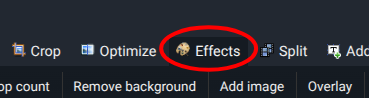
click effects, add your image
add grayscale and then add a tint, add the color of tint that you want
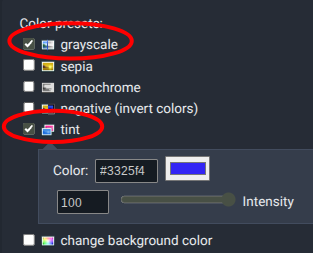
scroll down and press apply selected

and your recolor should be complete! 
Layouts
For layouts I use characters that are invisible, for example like and ㅤ, they come off as invisible but they help a lot when needing to space something out a whole lot!
I frequently use [](%transparent%ㅤㅤㅤ%) as it also helps space things out.
Metadata
For Metadata I usually try to stick with the same options but for some of my Rentry's they are far more different. My guide on Metadata is here as I do not want to crowd this with it.
Images
When adding images to your Rentry you can resize it, select where it goes, and more!

{100px:100px}
when adding a resized version of your picture changing the first px will make it stretched out, while the second px will make it longer. dealing with a non-square shape you will want to be courtesy of your sizing.

adding title in quotations in the link part of the text gives it a title
you can also ass a hashtag and the words right or left to your image, it makes it so you can type next to the image rather than under it.
Basic Information
-> all text figures
header1 # header1
header2 ## header2
italics *italics*
bold **bold**
strikeout ~~strikeout~~
mark ==mark==
colored text %red% colored text %%
list of colors
colored text hex %#ABCDEF% colored text hex %%
spoiler !>spoiler
simple underlined text !~simple underlined text~!
underlined text with color !~red; underlined text with color~!
underlined text plus style !~green;double; underlined text plus style~!
Underlined Plus Type !~blue;default;line-through; Underlined Plus Type~!
Underlined Text Plus Thickness !~orange;default;default;7; Underlined Text Plus Thickness~!
Combine With Text Color %violet% !~green; Combine With Text Color~! %%
Works The Other Way Too !~violet; %green% Works The Other Way Too %%~!
centered text -> centered text <-
right-aligned -> right-aligned ->
- checkbox 1
- [ ] checkbox 1 - checkbox 2
- [x] checkbox 2
`How to use quotes in Markdown?
>> How to use quotes in Markdown?Just prepend text with >
> Just prepend text with >
Single backtick generates inline code Single backtick generatesinline code`` <-
-> *not italics* \*not italics\*
| `Header | Header |
|---|---|
| Cell | Cell |
| Cell | Cell` <- |
| -> `Center | Right |
|---|---|
| Cell | Cell |
| Cell | Cell` <- |
| -> `Header line2 |
Header |
|---|---|
| Cell | Cell line2 line3 |
| Cell | Cell` <- |
!!! note Admonition title
    Admonition text
!!! info
    Title or text can be skipped
!!! warning
    Title or text can be skipped
!!! danger
    Title or text can be skipped