Kounaisha's Ultimate OpenRouter Proxy Guide


Take a look at my other guides too:
How to install and use SillyTavern on Windows - Jailbreak list for LLMs - How to use Proxies on janitorAI using ChutesAI
Hello! I am kounaisha and in this guide I'll teach you guys how to use free proxies on JanitorAI by using OpenRouter.
As you may already know, JLLM has its slight problems, besides having a very short memory (9001 tokens). Thanks to our beloved greedy fucking ass Sam Altman, OpenAI is not open source (how ironic) and you need to pay to use their API. However, there are many other models like META's Llama models that can be used with third-party APIs.
In this guide, I'll teach you how to configure the new AI that was released and that made OpenAI cry: Deepseek. There are several different models besides Deepseek that are very good too and I will bring them here eventually. All models in this guide (so far) have 128k memory tokens, making them perfect models for those who want to build a long adventure with their bots.
ㅤ

Instructions
1 - Make an account on OpenRouter (https://openrouter.ai/) by clicking the "Sign In" button in the top-right.
2 - On the drop-down menu with your profile image on it, click on the "Keys" button, and once you're at the keys page, click "Create Key".
3 - In the key creation window, you will have the option to enter a name and credit limit. You can enter whatever name you prefer, while the value is the amount of credits you want to use for that key. Since our model is free, no credits will be used, so leave it blank or put a random value if you want.
4 - Once you create the key, the key will pop up. It should start with sk-. Click on the clipboard button to copy it, then go to JanitorAI
5 - Enter any chat of any bot you want to chat with so you have access to the API settings in the top right corner.
ㅤㅤㅤㅤㅤㅤㅤㅤ
6 - With the API settings window open, you will click on the "+ Add configuration" button. The window should look like this:
ㅤㅤㅤㅤㅤㅤㅤㅤ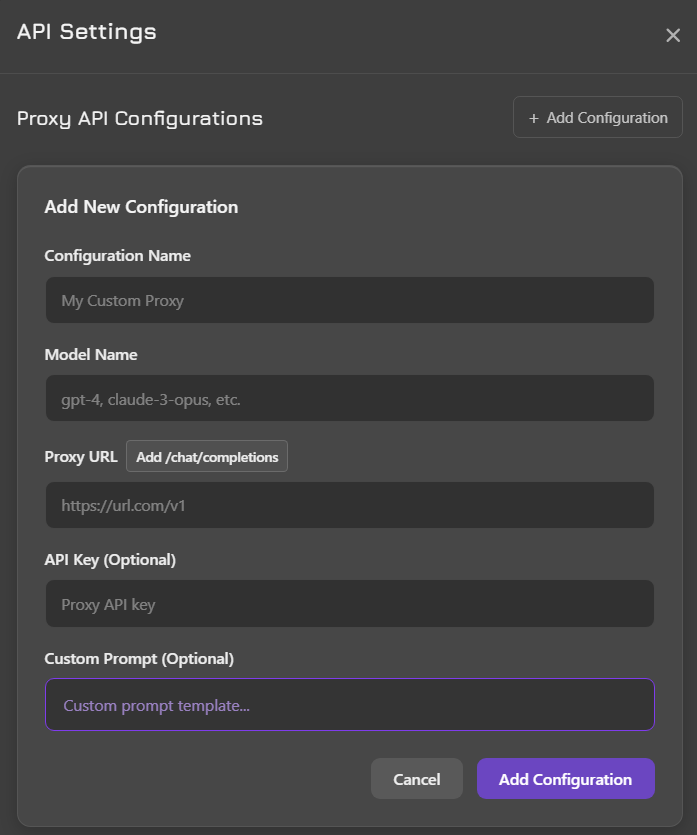
7 - As you can see, we need to configure three things: the configuration name (name it whatever you like), the model name, the proxy URL and the API key. If you followed the guide correctly, you have your API key in your clipboard, so just go to the API key text field and paste your key there.
8 - In the "Proxy URL" field, put the following link: https://openrouter.ai/api/v1/chat/completions
9 - In the model name section, you will select the one of the options below and paste it in the text field:
DEEPSEEK MODELS (Edit 11/16/2025 - deepseek models are instable due to overload. try using other models for now)
deepseek/deepseek-r1:free (DeepSeek R1 model, The first version released)
deepseek/deepseek-r1-distill-llama-70b:free (DeepSeek R1 bathed in some llama instructions. doesn't change much regarding roleplays.)
deepseek/deepseek-chat-v3-0324:free (Deepseek v3)
deepseek/deepseek-chat-v3.1:free (Newest free deepseek version, v3.1)
OTHER MODELS
nvidia/nemotron-nano-9b-v2:free (Memory Tokens: 256k | Response tokens: 32k)
mistralai/mistral-nemo:free (Memory Tokens: 131k | Response tokens: 131k)
qwen/qwen3-coder:free (Memory Tokens: 262k | Response tokens: 262k)
kwaipilot/kat-coder-pro:free (Memory Tokens: 256k | Response tokens: 32k)
google/gemma-3-27b-it:free (Memory Tokens: 131k | Response tokens: 131k)
I suggest you try them out and see for yourself which one suits you best. I personally prefer the newer versions of Deepseek, since it is made especially for roleplay.
10 - Custom prompt is recommended to be left as is. The current prompt is what janitor uses to break LLM limits. Just click on the purple "Add configuration" button, then click "save settings".
11 - Done! You're now chatting using proxy.
Bad and good news: Openrouter had a limit of 200 messages per day using the free models. A few days ago, that limit was reduced to 50. The "good news" is that if you deposit $10 into Openrouter, your daily messages go up to 1000200 per day. You don't have to spend the $10, just leave it there, just try not to use paid models (free models always has "free" written in their names).

Recommendations
The settings I personally use are:
- Temperature: 1. I had several problems like LLM repeating the same sentences all the time when the temperature was below 1. At the same time, it generates unreadable and very bizarre texts when it is above. LLM rarely presents problems at temperature 1 so that is the value I most recommend.
- Max tokens: 0. I've noticed that it's very rare for LLM to write more than 400 tokens, even with the limit set to 0. So if you'd rather make sure that LLM doesn't write too much in any given situation, I'd suggest setting the limit to 400 or less, depending on your taste, but it's possible that LLM will leave some text unfinished. If you're like me and don't care too much, leave it at 0.
- Context tokens: 128k tokens. As I said, the models that I recommend have a context memory of 128k tokens, but you can decrease this amount if you want in generation settings. Since the models are free, you don't need to worry about how much tokens they use.
FAQ
- "I got a 'network error', how do I fix it?"
If you get a "network error", it probably means that the specific model provider is offline. However, be sure to refresh janitor's website and try again. if the error persists, try another model.
- "I get 'network error' even after testing all LLMs"
The network error can also occur when you paste some information in the wrong place. Your API settings should look exactly like the photo below:
ㅤㅤㅤㅤㅤㅤㅤㅤ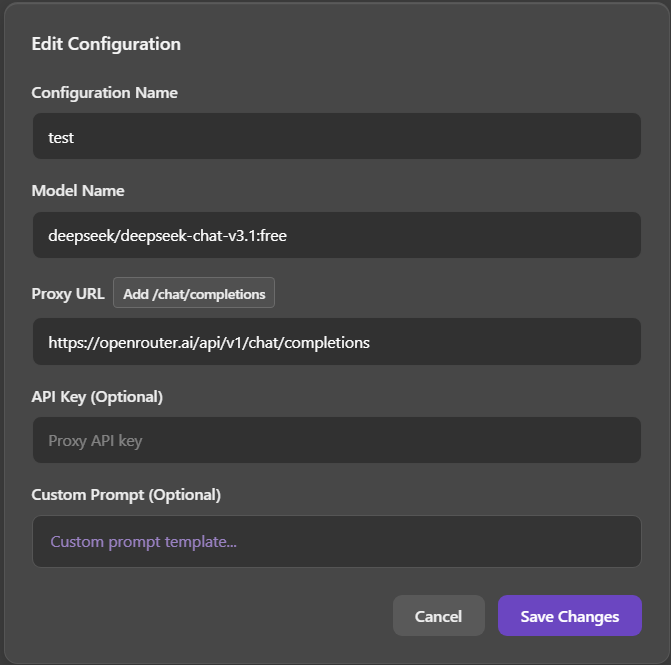
- "Which model works best for rp?"
The Deepseek R1 has proven to be the most immersive model of all so far. Unfortunately, the immersion is broken by its connection issues and its habit of forgetting that it is in a roleplay. That said, I recommend the Nvidia Llama and Mistral Nemo for stability because deepseek models are presenting problems very often...
- "Bot does not roleplay and only gives normal responses"
This problem seems to be present in some models like Deepseek R1, sometimes it juts forgets janitor's rules. Just refresh the bot's response and it will solve it, but I don't know how long the problem can persist. If it bothers you too much, I suggest changing it.
- "API key connects but I get random "unk" error when I try to chat"
This means that the LLM provider connection is unstable. This is a problem that seems to be common in Deepseek models. If you are having this problem, I suggest using Nvidia Llama or Mistral Nemo.
- "Confirmation popup does not appear when I test the connection"
This happens sometimes, especially with DeepSeek models. It is probably because DeepSeek always has response failures and this failure happened right at the time of confirmation. It does not mean that the model is not working, if you did not receive an error popup, it means that everything is fine.
- "Help! I'm getting a 'limit exceeded' error"
Unfortunately, OpenRouter imposes a limit of 200 50 messages that you can send per day, unless you deposit $10, which makes it go up to 1000 messages per day.
- "I'm recieving "ERROR 404: no endpoints found matching your data policy". I've tried everything, but nothing works!"
There is now a new openrouter privacy setting that blocks the use of free models. Go to the openrouter website, log into your account, and go to your account settings. There will be an option in the left corner of the screen "Training, Logging, & Privacy". Some privacy options will appear, activate the option that says "Enable free endpoints that may publish prompts" AND "Enable free endpoints that may train on inputs". With this, the proxy should work again.