✶ How to make nested PluralKit groups (UPDATED : 27/03) 𓂃
Screenshots at the end.
First, rename your groups!
Groups can have display names (Something we only found out after 3 years of using PK...), so theres no need to include fancy symbols or force a unicode organisation system in the base name of groups!
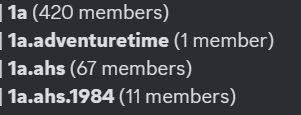
The way we organise groups is:
(with no spaces between the .'s of course)
1a
1a . name
1a.name.subgroup
2b
2b . name
2b.name.subgroup
3c
3c . name
3c.name.subgroup
etc
And that orders groups in a specific way, such as the 1a section being for sources, 2b being for sub-systems / groups, and 3c being for our roles. You can find your own way to organise things, so don't feel like you need to use this specific numbering system. That is just an example of how we personally organise things!
Then you change the display name!
We have a set template that we use, and it includes invisible spaces so the groups don't all go on the same line.
Headings look like this:
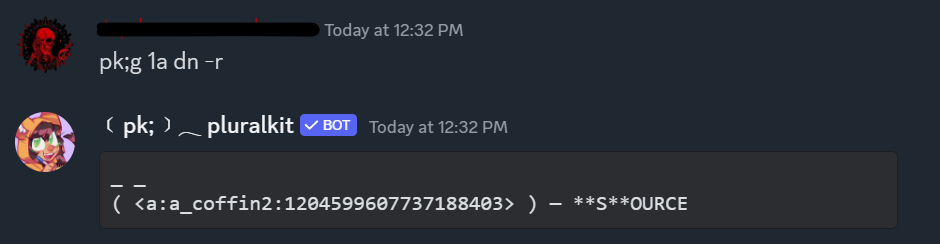
( e ) — NAME
Main groups look like this:
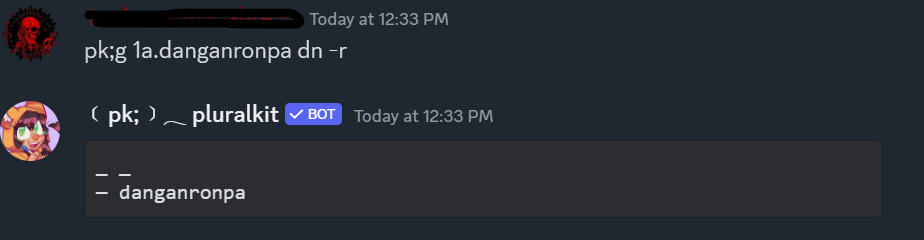
— group
And sub groups look like this:
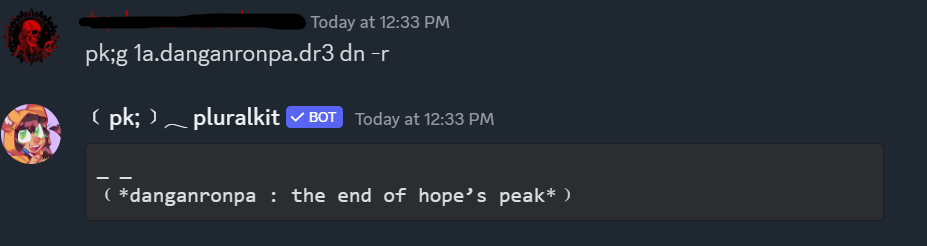
﹙sub group﹚
With the invisible spaces:
_ _
( e ) — **N**AME
_ _
— group
_ _
﹙*sub group*﹚
And there you go, you have nested / aesthetic PK groups that can make you fit in with the rest of your cool pluralkit using friends. Or something.
Screenshots
Naming system:
Display names (RAW):
Heading group --
Main group --
Sub group --
What it looks like on a PK profile:
Note that in order to hide group IDs on a PK profile, the profile has to be in 6 or more groups.
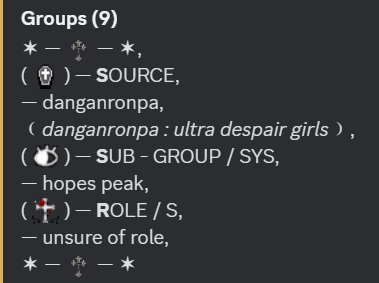
UPDATED : 27/03