QUEEN OF HEARTS: alice in wonderland inspired css template by Mauve07
Hello lovelies! Here is the guide / main thread of my Queen of Hearts css template!
Gentle reminder: Please remember that I put a lot of hard work into this and please don't remove the credit. It's very rude and I'm pretty sure it's against the janitor ai rules 😔.
Screenshots of the page:
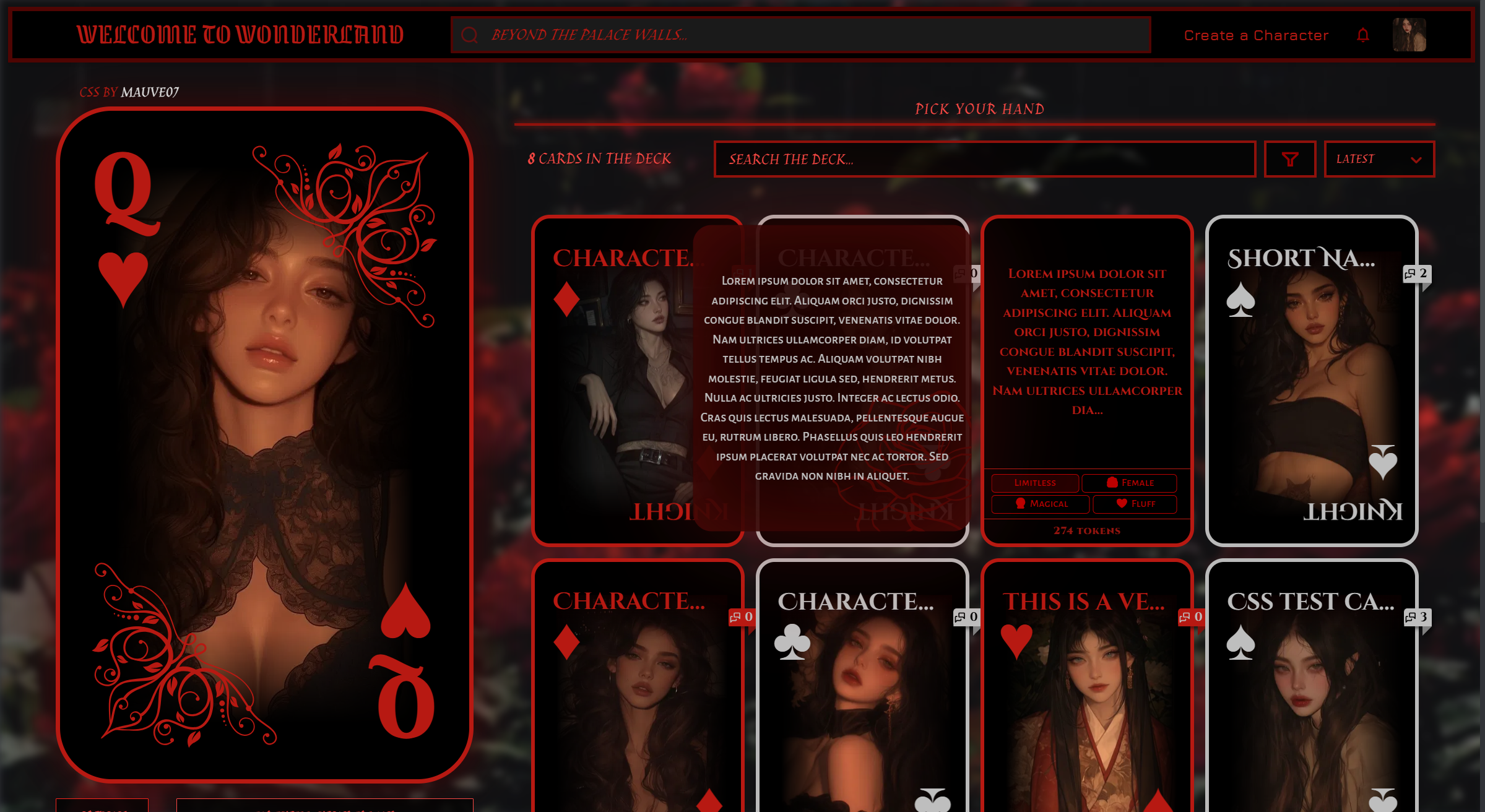
Table of Contents:
Link to css page
Link to bot announcement
Alright, now onto the template:
You are very welcome to modify this code however you like. I'm really curious to see what you do! Feel free to leave a comment under my janitor announcement bot so I can check it out! Just don't remove the credit box.
That said, I don't recommend changing any part of the code apart from colours, fonts, and descriptions text because it might break. I also don't recommend merging this with any other templates because the mobile integration is very specific to this (my lazy ahh didn't want to rewrite everything so I just used the zoom feature).
STEP 1: Set up
- Open janitor AI.
- Press your profile picture on the top right and press 'Settings'
- In the 'Account' section (default), scroll down past your pfp and username to your 'About Me' section.
- Press the 'show editor' button. Make sure it is empty.
STEP 2: Copy the HTML
Next, choose your preferred template between:
QUEEN VER
KING VER
ACE VER
Copy and paste all of the code into the janitor editor you just opened.
QUEEN VER:
1 2 3 4 5 6 7 8 9 10 11 12 13 14 15 16 17 18 19 20 21 22 23 24 25 26 27 28 29 30 31 32 33 34 35 36 37 38 39 40 41 42 43 44 45 46 47 48 49 50 51 52 53 54 55 56 57 58 59 60 61 62 63 64 65 66 67 68 69 70 71 72 73 74 75 76 77 78 79 80 81 82 83 84 85 86 87 88 89 90 91 92 93 94 95 96 97 98 99 100 101 102 103 104 105 106 107 108 109 110 111 112 113 114 115 116 117 118 119 120 121 122 123 124 125 126 127 128 129 130 131 132 133 134 135 136 137 138 139 140 141 142 143 144 145 146 147 148 149 150 151 152 153 154 155 156 157 158 159 160 161 162 163 164 165 166 167 168 169 170 171 172 173 174 175 176 177 178 179 180 181 182 183 184 185 186 187 188 189 190 191 192 193 194 195 196 197 198 199 200 201 202 203 204 205 206 207 208 209 210 211 212 213 214 215 216 217 218 219 220 221 222 223 224 225 226 227 228 229 230 231 232 233 234 235 236 237 238 239 240 241 242 243 244 245 246 247 248 249 250 251 252 253 254 255 256 | <!-- These are the decorations for the front of the card! (there are so many empty divs because it didn't work when I tried to insert the svg into the html, so I had to use clip-paths in the css)-->
<div class="profile-outline">
<div class="profile-symbol-top profile-symbol">
<h1>Q</h1>
<h2>♥︎</h2>
<div class="top-right-decoration">
<div class="top-right-decoration-component trd1"></div>
<div class="top-right-decoration-component trd2"></div>
<div class="top-right-decoration-component trd3"></div>
<div class="top-right-decoration-component trd4"></div>
<div class="top-right-decoration-component trd5"></div>
<div class="top-right-decoration-component trd6"></div>
<div class="top-right-decoration-component trd7"></div>
<div class="top-right-decoration-component trd8"></div>
<div class="top-right-decoration-component trd9"></div>
<div class="top-right-decoration-component trd10"></div>
<div class="top-right-decoration-component trd11"></div>
<div class="top-right-decoration-component trd12"></div>
<div class="top-right-decoration-component trd13"></div>
<div class="top-right-decoration-component trd14"></div>
<div class="top-right-decoration-component trd15"></div>
<div class="top-right-decoration-component trd16"></div>
<div class="top-right-decoration-component trd17"></div>
<div class="top-right-decoration-component trd18"></div>
<div class="top-right-decoration-component trd19"></div>
<div class="top-right-decoration-component trd20"></div>
<div class="top-right-decoration-component trd21"></div>
<div class="top-right-decoration-component trd22"></div>
<div class="top-right-decoration-component trd23"></div>
<div class="top-right-decoration-component trd24"></div>
<div class="top-right-decoration-component trd25"></div>
<div class="top-right-decoration-component trd26"></div>
<div class="top-right-decoration-component trd27"></div>
<div class="top-right-decoration-component trd28"></div>
<div class="top-right-decoration-component trd29"></div>
<div class="top-right-decoration-component trd30"></div>
<div class="top-right-decoration-component trd31"></div>
<div class="top-right-decoration-component trd32"></div>
<div class="top-right-decoration-component trd33"></div>
<div class="top-right-decoration-component trd34"></div>
<div class="top-right-decoration-component trd35"></div>
<div class="top-right-decoration-component trd36"></div>
<div class="top-right-decoration-component trd37"></div>
<div class="top-right-decoration-component trd38"></div>
<div class="top-right-decoration-component trd39"></div>
<div class="top-right-decoration-component trd40"></div>
<div class="top-right-decoration-component trd41"></div>
<div class="top-right-decoration-component trd42"></div>
<div class="top-right-decoration-component trd43"></div>
<div class="top-right-decoration-component trd44"></div>
<div class="top-right-decoration-component trd45"></div>
<div class="top-right-decoration-component trd46"></div>
<div class="top-right-decoration-component trd47"></div>
<div class="top-right-decoration-component trd48"></div>
<div class="top-right-decoration-component trd49"></div>
<div class="top-right-decoration-component trd50"></div>
</div>
</div>
<div class="profile-symbol-bottom profile-symbol">
<h1>Q</h1>
<h2>♥︎</h2>
<div class="bottom-left-decoration">
<div class="bottom-left-decoration-component trd1"></div>
<div class="bottom-left-decoration-component trd2"></div>
<div class="bottom-left-decoration-component trd3"></div>
<div class="bottom-left-decoration-component trd4"></div>
<div class="bottom-left-decoration-component trd5"></div>
<div class="bottom-left-decoration-component trd6"></div>
<div class="bottom-left-decoration-component trd7"></div>
<div class="bottom-left-decoration-component trd8"></div>
<div class="bottom-left-decoration-component trd9"></div>
<div class="bottom-left-decoration-component trd10"></div>
<div class="bottom-left-decoration-component trd11"></div>
<div class="bottom-left-decoration-component trd12"></div>
<div class="bottom-left-decoration-component trd13"></div>
<div class="bottom-left-decoration-component trd14"></div>
<div class="bottom-left-decoration-component trd15"></div>
<div class="bottom-left-decoration-component trd16"></div>
<div class="bottom-left-decoration-component trd17"></div>
<div class="bottom-left-decoration-component trd18"></div>
<div class="bottom-left-decoration-component trd19"></div>
<div class="bottom-left-decoration-component trd20"></div>
<div class="bottom-left-decoration-component trd21"></div>
<div class="bottom-left-decoration-component trd22"></div>
<div class="bottom-left-decoration-component trd23"></div>
<div class="bottom-left-decoration-component trd24"></div>
<div class="bottom-left-decoration-component trd25"></div>
<div class="bottom-left-decoration-component trd26"></div>
<div class="bottom-left-decoration-component trd27"></div>
<div class="bottom-left-decoration-component trd28"></div>
<div class="bottom-left-decoration-component trd29"></div>
<div class="bottom-left-decoration-component trd30"></div>
<div class="bottom-left-decoration-component trd31"></div>
<div class="bottom-left-decoration-component trd32"></div>
<div class="bottom-left-decoration-component trd33"></div>
<div class="bottom-left-decoration-component trd34"></div>
<div class="bottom-left-decoration-component trd35"></div>
<div class="bottom-left-decoration-component trd36"></div>
<div class="bottom-left-decoration-component trd37"></div>
<div class="bottom-left-decoration-component trd38"></div>
<div class="bottom-left-decoration-component trd39"></div>
<div class="bottom-left-decoration-component trd40"></div>
<div class="bottom-left-decoration-component trd41"></div>
<div class="bottom-left-decoration-component trd42"></div>
<div class="bottom-left-decoration-component trd43"></div>
<div class="bottom-left-decoration-component trd44"></div>
<div class="bottom-left-decoration-component trd45"></div>
<div class="bottom-left-decoration-component trd46"></div>
<div class="bottom-left-decoration-component trd47"></div>
<div class="bottom-left-decoration-component trd48"></div>
<div class="bottom-left-decoration-component trd49"></div>
<div class="bottom-left-decoration-component trd50"></div>
</div>
</div>
</div>
<!-- This is the credit that links to my profile. Please don't remove it -->
<div class="css-credit">
<h3>css by <a
href="https://janitorai.com/profiles/82cedff5-aced-42bc-bd83-f2b73e380d74_profile-of-mauve-07">mauve07</a></h3>
</div>
<!-- This is your entire description section -->
<div class="description-wrapper">
<!-- little text decoration right above all your stuff! -->
<h3 class="heading">entering the red court</h3>
<div class="separator"></div>
<!-- this is your status section. You can modify the content within the <p></p> tags -->
<div class="status section-wrapper" tabindex="0">
<h2>status</h2>
<p>your status here</p> <!-- edit here -->
</div>
<!-- this is the about me section. You can modify the content within the <p></p> tags. To add another paragraph, add another <p></p> tag -->
<div class="about-me section-wrapper" tabindex="0">
<h2>a word from the crown</h2>
<p>Hi! I'm Mo. I might publish some css templates here in the future!</p><!-- edit here -->
<p>Lorem ipsum dolor sit amet, consectetur adipiscing elit.</p><!-- edit here -->
<!-- add more paragraphs here -->
</div>
<div class="friends-and-favs">
<div class="friends-wrapper" tabindex="0">
<!-- this is your friends section. The default is 7 friends. To change this number, follow the instructions earlier -->
<h2>allies</h2>
<div class="friends-wrapper-inner">
<!-- friend 1 -->
<div class="friend-card">
<a href="yourfriendprofile.com"><!-- add a link to your friend's profile here -->
<div class="friend-card-inner">
<h1 class="name-top">friend 1</h1><!-- write your friend's name here -->
<img src="https://files.catbox.moe/t21mp2.jpg"><!-- add your friend's profile picture here -->
<h1 class="name-bottom">friend 1</h1><!-- write your friend's name again here -->
</div>
</a>
</div>
<!-- friend 2 -->
<div class="friend-card">
<a href="yourfriendprofile.com">
<div class="friend-card-inner">
<h1 class="name-top">friend 2</h1>
<img src="https://files.catbox.moe/90jpzc.jpg">
<h1 class="name-bottom">friend 2</h1>
</div>
</a>
</div>
<!-- friend 3 -->
<div class="friend-card">
<a href="yourfriendprofile.com">
<div class="friend-card-inner">
<h1 class="name-top">friend 3</h1>
<img src="https://files.catbox.moe/gf0nbk.jpg">
<h1 class="name-bottom">friend 3</h1>
</div>
</a>
</div>
<!-- friend 4 -->
<div class="friend-card">
<a href="yourfriendprofile.com">
<div class="friend-card-inner">
<h1 class="name-top">friend 4</h1>
<img src="https://files.catbox.moe/dhl4s0.jpg">
<h1 class="name-bottom">friend 4</h1>
</div>
</a>
</div>
<!-- friend 5 -->
<div class="friend-card">
<a href="yourfriendprofile.com">
<div class="friend-card-inner">
<h1 class="name-top">friend 5</h1>
<img src="https://files.catbox.moe/is1ogb.jpg">
<h1 class="name-bottom">friend 5</h1>
</div>
</a>
</div>
<!-- friend 6 -->
<div class="friend-card">
<a href="yourfriendprofile.com">
<div class="friend-card-inner">
<h1 class="name-top">friend 6</h1>
<img src="https://files.catbox.moe/x37105.jpg">
<h1 class="name-bottom">friend 6</h1>
</div>
</a>
</div>
<!-- friend 7 -->
<div class="friend-card">
<a href="yourfriendprofile.com">
<div class="friend-card-inner">
<h1 class="name-top">friend 7</h1>
<img src="https://files.catbox.moe/1hr53w.jpg">
<h1 class="name-bottom">friend 7</h1>
</div>
</a>
</div>
<!-- add more friends here -->
<div class="friend-card-hover-cover"></div>
</div>
</div>
<!-- put your favourite creators here! To add another favourite, copy this code: '<a href="yourfav.com">creator 1</a>' (without the quotation marks) and paste it below -->
<div class="favs-wrapper section-wrapper" tabindex="0">
<h2>rulers of other domains to follow</h2>
<p>
<a href="yourfav.com">creator
1</a><!-- edit the href="" to include the link to your favourite creator's page, edit the 'creator 1' to include their name -->
<a href="yourfav.com">creator 2</a><!-- repeat here -->
<a href="yourfav.com">creator 3</a><!-- repeat here -->
<a href="yourfav.com">creator 4</a><!-- repeat here -->
<a href="yourfav.com">creator 5</a><!-- repeat here -->
<a href="yourfav.com">creator 6</a><!-- repeat here -->
<a href="yourfav.com">creator 7</a><!-- repeat here -->
<a href="yourfav.com">creator 8</a><!-- repeat here -->
<a href="yourfav.com">creator 9</a><!-- repeat here -->
<!-- paste more favourites here -->
</p>
</div>
</div>
<!-- this is where all your other credits go! -->
<div class="credits-box section-wrapper" tabindex="0">
<h2>credits</h2>
<p>credits go hereee</p><!-- edit within the <p></p> tags to reference people you want to credit! -->
</div>
<!-- this is where all your links go. To add another link, copy this code: '<a href="https://third-link.com/" class="link-button">link 3</a>' and paste it below (I haven't tested it with too many links but you can try). -->
<div class="links">
<div class="links-container">
<a href="https://ko-fi.com/"
class="link-button">kofi</a><!-- edit the href="" to link to another page, and edit the 'kofi' to change the text. You need to include the https:// in your link, otherwise it won't work.-->
<a href="https://discord.com/" class="link-button">discord</a><!-- repeat here -->
<a href="https://third-link.com/" class="link-button">link 3</a><!-- repeat here -->
<!-- add more links here -->
</div>
</div>
</div>
<!-- this is the text for the loading screen (note: the loading screen is not supposed to show on mobile). Just delete this entire div if you don't want it: It's a bit buggy -->
<div class="loading-screen">
<h1>♠ ♦ ♣ ♥ WELCOME TO THE DOMAIN OF THE RED QUEEN ♥ ♣ ♦ ♠ </h1>
</div>
|
KING VER:
1 2 3 4 5 6 7 8 9 10 11 12 13 14 15 16 17 18 19 20 21 22 23 24 25 26 27 28 29 30 31 32 33 34 35 36 37 38 39 40 41 42 43 44 45 46 47 48 49 50 51 52 53 54 55 56 57 58 59 60 61 62 63 64 65 66 67 68 69 70 71 72 73 74 75 76 77 78 79 80 81 82 83 84 85 86 87 88 89 90 91 92 93 94 95 96 97 98 99 100 101 102 103 104 105 106 107 108 109 110 111 112 113 114 115 116 117 118 119 120 121 122 123 124 125 126 127 128 129 130 131 132 133 134 135 136 137 138 139 140 141 142 143 144 145 146 147 148 149 150 151 152 153 154 155 156 157 158 159 160 161 162 163 164 165 166 167 168 169 170 171 172 173 174 175 176 177 178 179 180 181 182 183 184 185 186 187 188 189 190 191 192 193 194 195 196 197 198 199 200 201 202 203 204 205 206 207 208 209 210 211 212 213 214 215 216 217 218 219 220 221 222 223 224 225 226 227 228 229 230 231 232 233 234 235 236 237 238 239 240 241 242 243 244 245 246 247 248 249 250 251 252 253 254 255 256 | <!-- These are the decorations for the front of the card! (there are so many empty divs because it didn't work when I tried to insert the svg into the html, so I had to use clip-paths in the css)-->
<div class="profile-outline">
<div class="profile-symbol-top profile-symbol">
<h1>K</h1>
<h2>♥︎</h2>
<div class="top-right-decoration">
<div class="top-right-decoration-component trd1"></div>
<div class="top-right-decoration-component trd2"></div>
<div class="top-right-decoration-component trd3"></div>
<div class="top-right-decoration-component trd4"></div>
<div class="top-right-decoration-component trd5"></div>
<div class="top-right-decoration-component trd6"></div>
<div class="top-right-decoration-component trd7"></div>
<div class="top-right-decoration-component trd8"></div>
<div class="top-right-decoration-component trd9"></div>
<div class="top-right-decoration-component trd10"></div>
<div class="top-right-decoration-component trd11"></div>
<div class="top-right-decoration-component trd12"></div>
<div class="top-right-decoration-component trd13"></div>
<div class="top-right-decoration-component trd14"></div>
<div class="top-right-decoration-component trd15"></div>
<div class="top-right-decoration-component trd16"></div>
<div class="top-right-decoration-component trd17"></div>
<div class="top-right-decoration-component trd18"></div>
<div class="top-right-decoration-component trd19"></div>
<div class="top-right-decoration-component trd20"></div>
<div class="top-right-decoration-component trd21"></div>
<div class="top-right-decoration-component trd22"></div>
<div class="top-right-decoration-component trd23"></div>
<div class="top-right-decoration-component trd24"></div>
<div class="top-right-decoration-component trd25"></div>
<div class="top-right-decoration-component trd26"></div>
<div class="top-right-decoration-component trd27"></div>
<div class="top-right-decoration-component trd28"></div>
<div class="top-right-decoration-component trd29"></div>
<div class="top-right-decoration-component trd30"></div>
<div class="top-right-decoration-component trd31"></div>
<div class="top-right-decoration-component trd32"></div>
<div class="top-right-decoration-component trd33"></div>
<div class="top-right-decoration-component trd34"></div>
<div class="top-right-decoration-component trd35"></div>
<div class="top-right-decoration-component trd36"></div>
<div class="top-right-decoration-component trd37"></div>
<div class="top-right-decoration-component trd38"></div>
<div class="top-right-decoration-component trd39"></div>
<div class="top-right-decoration-component trd40"></div>
<div class="top-right-decoration-component trd41"></div>
<div class="top-right-decoration-component trd42"></div>
<div class="top-right-decoration-component trd43"></div>
<div class="top-right-decoration-component trd44"></div>
<div class="top-right-decoration-component trd45"></div>
<div class="top-right-decoration-component trd46"></div>
<div class="top-right-decoration-component trd47"></div>
<div class="top-right-decoration-component trd48"></div>
<div class="top-right-decoration-component trd49"></div>
<div class="top-right-decoration-component trd50"></div>
</div>
</div>
<div class="profile-symbol-bottom profile-symbol">
<h1>K</h1>
<h2>♥︎</h2>
<div class="bottom-left-decoration">
<div class="bottom-left-decoration-component trd1"></div>
<div class="bottom-left-decoration-component trd2"></div>
<div class="bottom-left-decoration-component trd3"></div>
<div class="bottom-left-decoration-component trd4"></div>
<div class="bottom-left-decoration-component trd5"></div>
<div class="bottom-left-decoration-component trd6"></div>
<div class="bottom-left-decoration-component trd7"></div>
<div class="bottom-left-decoration-component trd8"></div>
<div class="bottom-left-decoration-component trd9"></div>
<div class="bottom-left-decoration-component trd10"></div>
<div class="bottom-left-decoration-component trd11"></div>
<div class="bottom-left-decoration-component trd12"></div>
<div class="bottom-left-decoration-component trd13"></div>
<div class="bottom-left-decoration-component trd14"></div>
<div class="bottom-left-decoration-component trd15"></div>
<div class="bottom-left-decoration-component trd16"></div>
<div class="bottom-left-decoration-component trd17"></div>
<div class="bottom-left-decoration-component trd18"></div>
<div class="bottom-left-decoration-component trd19"></div>
<div class="bottom-left-decoration-component trd20"></div>
<div class="bottom-left-decoration-component trd21"></div>
<div class="bottom-left-decoration-component trd22"></div>
<div class="bottom-left-decoration-component trd23"></div>
<div class="bottom-left-decoration-component trd24"></div>
<div class="bottom-left-decoration-component trd25"></div>
<div class="bottom-left-decoration-component trd26"></div>
<div class="bottom-left-decoration-component trd27"></div>
<div class="bottom-left-decoration-component trd28"></div>
<div class="bottom-left-decoration-component trd29"></div>
<div class="bottom-left-decoration-component trd30"></div>
<div class="bottom-left-decoration-component trd31"></div>
<div class="bottom-left-decoration-component trd32"></div>
<div class="bottom-left-decoration-component trd33"></div>
<div class="bottom-left-decoration-component trd34"></div>
<div class="bottom-left-decoration-component trd35"></div>
<div class="bottom-left-decoration-component trd36"></div>
<div class="bottom-left-decoration-component trd37"></div>
<div class="bottom-left-decoration-component trd38"></div>
<div class="bottom-left-decoration-component trd39"></div>
<div class="bottom-left-decoration-component trd40"></div>
<div class="bottom-left-decoration-component trd41"></div>
<div class="bottom-left-decoration-component trd42"></div>
<div class="bottom-left-decoration-component trd43"></div>
<div class="bottom-left-decoration-component trd44"></div>
<div class="bottom-left-decoration-component trd45"></div>
<div class="bottom-left-decoration-component trd46"></div>
<div class="bottom-left-decoration-component trd47"></div>
<div class="bottom-left-decoration-component trd48"></div>
<div class="bottom-left-decoration-component trd49"></div>
<div class="bottom-left-decoration-component trd50"></div>
</div>
</div>
</div>
<!-- This is the credit that links to my profile. Please don't remove it -->
<div class="css-credit">
<h3>css by <a
href="https://janitorai.com/profiles/82cedff5-aced-42bc-bd83-f2b73e380d74_profile-of-mauve-07">mauve07</a></h3>
</div>
<!-- This is your entire description section -->
<div class="description-wrapper">
<!-- little text decoration right above all your stuff! -->
<h3 class="heading">entering the red court</h3>
<div class="separator"></div>
<!-- this is your status section. You can modify the content within the <p></p> tags -->
<div class="status section-wrapper" tabindex="0">
<h2>status</h2>
<p>your status here</p> <!-- edit here -->
</div>
<!-- this is the about me section. You can modify the content within the <p></p> tags. To add another paragraph, add another <p></p> tag -->
<div class="about-me section-wrapper" tabindex="0">
<h2>a word from the crown</h2>
<p>Hi! I'm Mo. I might publish some css templates here in the future!</p><!-- edit here -->
<p>Lorem ipsum dolor sit amet, consectetur adipiscing elit.</p><!-- edit here -->
<!-- add more paragraphs here -->
</div>
<div class="friends-and-favs">
<div class="friends-wrapper" tabindex="0">
<!-- this is your friends section. The default is 7 friends. To change this number, follow the instructions earlier -->
<h2>allies</h2>
<div class="friends-wrapper-inner">
<!-- friend 1 -->
<div class="friend-card">
<a href="yourfriendprofile.com"><!-- add a link to your friend's profile here -->
<div class="friend-card-inner">
<h1 class="name-top">friend 1</h1><!-- write your friend's name here -->
<img src="https://files.catbox.moe/t21mp2.jpg"><!-- add your friend's profile picture here -->
<h1 class="name-bottom">friend 1</h1><!-- write your friend's name again here -->
</div>
</a>
</div>
<!-- friend 2 -->
<div class="friend-card">
<a href="yourfriendprofile.com">
<div class="friend-card-inner">
<h1 class="name-top">friend 2</h1>
<img src="https://files.catbox.moe/90jpzc.jpg">
<h1 class="name-bottom">friend 2</h1>
</div>
</a>
</div>
<!-- friend 3 -->
<div class="friend-card">
<a href="yourfriendprofile.com">
<div class="friend-card-inner">
<h1 class="name-top">friend 3</h1>
<img src="https://files.catbox.moe/gf0nbk.jpg">
<h1 class="name-bottom">friend 3</h1>
</div>
</a>
</div>
<!-- friend 4 -->
<div class="friend-card">
<a href="yourfriendprofile.com">
<div class="friend-card-inner">
<h1 class="name-top">friend 4</h1>
<img src="https://files.catbox.moe/dhl4s0.jpg">
<h1 class="name-bottom">friend 4</h1>
</div>
</a>
</div>
<!-- friend 5 -->
<div class="friend-card">
<a href="yourfriendprofile.com">
<div class="friend-card-inner">
<h1 class="name-top">friend 5</h1>
<img src="https://files.catbox.moe/is1ogb.jpg">
<h1 class="name-bottom">friend 5</h1>
</div>
</a>
</div>
<!-- friend 6 -->
<div class="friend-card">
<a href="yourfriendprofile.com">
<div class="friend-card-inner">
<h1 class="name-top">friend 6</h1>
<img src="https://files.catbox.moe/x37105.jpg">
<h1 class="name-bottom">friend 6</h1>
</div>
</a>
</div>
<!-- friend 7 -->
<div class="friend-card">
<a href="yourfriendprofile.com">
<div class="friend-card-inner">
<h1 class="name-top">friend 7</h1>
<img src="https://files.catbox.moe/1hr53w.jpg">
<h1 class="name-bottom">friend 7</h1>
</div>
</a>
</div>
<!-- add more friends here -->
<div class="friend-card-hover-cover"></div>
</div>
</div>
<!-- put your favourite creators here! To add another favourite, copy this code: '<a href="yourfav.com">creator 1</a>' (without the quotation marks) and paste it below -->
<div class="favs-wrapper section-wrapper" tabindex="0">
<h2>rulers of other domains to follow</h2>
<p>
<a href="yourfav.com">creator
1</a><!-- edit the href="" to include the link to your favourite creator's page, edit the 'creator 1' to include their name -->
<a href="yourfav.com">creator 2</a><!-- repeat here -->
<a href="yourfav.com">creator 3</a><!-- repeat here -->
<a href="yourfav.com">creator 4</a><!-- repeat here -->
<a href="yourfav.com">creator 5</a><!-- repeat here -->
<a href="yourfav.com">creator 6</a><!-- repeat here -->
<a href="yourfav.com">creator 7</a><!-- repeat here -->
<a href="yourfav.com">creator 8</a><!-- repeat here -->
<a href="yourfav.com">creator 9</a><!-- repeat here -->
<!-- paste more favourites here -->
</p>
</div>
</div>
<!-- this is where all your other credits go! -->
<div class="credits-box section-wrapper" tabindex="0">
<h2>credits</h2>
<p>credits go hereee</p><!-- edit within the <p></p> tags to reference people you want to credit! -->
</div>
<!-- this is where all your links go. To add another link, copy this code: '<a href="https://third-link.com/" class="link-button">link 3</a>' and paste it below (I haven't tested it with too many links but you can try). -->
<div class="links">
<div class="links-container">
<a href="https://ko-fi.com/"
class="link-button">kofi</a><!-- edit the href="" to link to another page, and edit the 'kofi' to change the text. You need to include the https:// in your link, otherwise it won't work.-->
<a href="https://discord.com/" class="link-button">discord</a><!-- repeat here -->
<a href="https://third-link.com/" class="link-button">link 3</a><!-- repeat here -->
<!-- add more links here -->
</div>
</div>
</div>
<!-- this is the text for the loading screen (note: the loading screen is not supposed to show on mobile). Just delete this entire div if you don't want it: It's a bit buggy -->
<div class="loading-screen">
<h1>♠ ♦ ♣ ♥ WELCOME TO THE DOMAIN OF THE RED KING ♥ ♣ ♦ ♠ </h1>
</div>
|
ACE VER:
1 2 3 4 5 6 7 8 9 10 11 12 13 14 15 16 17 18 19 20 21 22 23 24 25 26 27 28 29 30 31 32 33 34 35 36 37 38 39 40 41 42 43 44 45 46 47 48 49 50 51 52 53 54 55 56 57 58 59 60 61 62 63 64 65 66 67 68 69 70 71 72 73 74 75 76 77 78 79 80 81 82 83 84 85 86 87 88 89 90 91 92 93 94 95 96 97 98 99 100 101 102 103 104 105 106 107 108 109 110 111 112 113 114 115 116 117 118 119 120 121 122 123 124 125 126 127 128 129 130 131 132 133 134 135 136 137 138 139 140 141 142 143 144 145 146 147 148 149 150 151 152 153 154 155 156 157 158 159 160 161 162 163 164 165 166 167 168 169 170 171 172 173 174 175 176 177 178 179 180 181 182 183 184 185 186 187 188 189 190 191 192 193 194 195 196 197 198 199 200 201 202 203 204 205 206 207 208 209 210 211 212 213 214 215 216 217 218 219 220 221 222 223 224 225 226 227 228 229 230 231 232 233 234 235 236 237 238 239 240 241 242 243 244 245 246 247 248 249 250 251 252 253 254 255 256 | <!-- These are the decorations for the front of the card! (there are so many empty divs because it didn't work when I tried to insert the svg into the html, so I had to use clip-paths in the css)-->
<div class="profile-outline">
<div class="profile-symbol-top profile-symbol">
<h1>A</h1>
<h2>♥︎</h2>
<div class="top-right-decoration">
<div class="top-right-decoration-component trd1"></div>
<div class="top-right-decoration-component trd2"></div>
<div class="top-right-decoration-component trd3"></div>
<div class="top-right-decoration-component trd4"></div>
<div class="top-right-decoration-component trd5"></div>
<div class="top-right-decoration-component trd6"></div>
<div class="top-right-decoration-component trd7"></div>
<div class="top-right-decoration-component trd8"></div>
<div class="top-right-decoration-component trd9"></div>
<div class="top-right-decoration-component trd10"></div>
<div class="top-right-decoration-component trd11"></div>
<div class="top-right-decoration-component trd12"></div>
<div class="top-right-decoration-component trd13"></div>
<div class="top-right-decoration-component trd14"></div>
<div class="top-right-decoration-component trd15"></div>
<div class="top-right-decoration-component trd16"></div>
<div class="top-right-decoration-component trd17"></div>
<div class="top-right-decoration-component trd18"></div>
<div class="top-right-decoration-component trd19"></div>
<div class="top-right-decoration-component trd20"></div>
<div class="top-right-decoration-component trd21"></div>
<div class="top-right-decoration-component trd22"></div>
<div class="top-right-decoration-component trd23"></div>
<div class="top-right-decoration-component trd24"></div>
<div class="top-right-decoration-component trd25"></div>
<div class="top-right-decoration-component trd26"></div>
<div class="top-right-decoration-component trd27"></div>
<div class="top-right-decoration-component trd28"></div>
<div class="top-right-decoration-component trd29"></div>
<div class="top-right-decoration-component trd30"></div>
<div class="top-right-decoration-component trd31"></div>
<div class="top-right-decoration-component trd32"></div>
<div class="top-right-decoration-component trd33"></div>
<div class="top-right-decoration-component trd34"></div>
<div class="top-right-decoration-component trd35"></div>
<div class="top-right-decoration-component trd36"></div>
<div class="top-right-decoration-component trd37"></div>
<div class="top-right-decoration-component trd38"></div>
<div class="top-right-decoration-component trd39"></div>
<div class="top-right-decoration-component trd40"></div>
<div class="top-right-decoration-component trd41"></div>
<div class="top-right-decoration-component trd42"></div>
<div class="top-right-decoration-component trd43"></div>
<div class="top-right-decoration-component trd44"></div>
<div class="top-right-decoration-component trd45"></div>
<div class="top-right-decoration-component trd46"></div>
<div class="top-right-decoration-component trd47"></div>
<div class="top-right-decoration-component trd48"></div>
<div class="top-right-decoration-component trd49"></div>
<div class="top-right-decoration-component trd50"></div>
</div>
</div>
<div class="profile-symbol-bottom profile-symbol">
<h1>A</h1>
<h2>♥︎</h2>
<div class="bottom-left-decoration">
<div class="bottom-left-decoration-component trd1"></div>
<div class="bottom-left-decoration-component trd2"></div>
<div class="bottom-left-decoration-component trd3"></div>
<div class="bottom-left-decoration-component trd4"></div>
<div class="bottom-left-decoration-component trd5"></div>
<div class="bottom-left-decoration-component trd6"></div>
<div class="bottom-left-decoration-component trd7"></div>
<div class="bottom-left-decoration-component trd8"></div>
<div class="bottom-left-decoration-component trd9"></div>
<div class="bottom-left-decoration-component trd10"></div>
<div class="bottom-left-decoration-component trd11"></div>
<div class="bottom-left-decoration-component trd12"></div>
<div class="bottom-left-decoration-component trd13"></div>
<div class="bottom-left-decoration-component trd14"></div>
<div class="bottom-left-decoration-component trd15"></div>
<div class="bottom-left-decoration-component trd16"></div>
<div class="bottom-left-decoration-component trd17"></div>
<div class="bottom-left-decoration-component trd18"></div>
<div class="bottom-left-decoration-component trd19"></div>
<div class="bottom-left-decoration-component trd20"></div>
<div class="bottom-left-decoration-component trd21"></div>
<div class="bottom-left-decoration-component trd22"></div>
<div class="bottom-left-decoration-component trd23"></div>
<div class="bottom-left-decoration-component trd24"></div>
<div class="bottom-left-decoration-component trd25"></div>
<div class="bottom-left-decoration-component trd26"></div>
<div class="bottom-left-decoration-component trd27"></div>
<div class="bottom-left-decoration-component trd28"></div>
<div class="bottom-left-decoration-component trd29"></div>
<div class="bottom-left-decoration-component trd30"></div>
<div class="bottom-left-decoration-component trd31"></div>
<div class="bottom-left-decoration-component trd32"></div>
<div class="bottom-left-decoration-component trd33"></div>
<div class="bottom-left-decoration-component trd34"></div>
<div class="bottom-left-decoration-component trd35"></div>
<div class="bottom-left-decoration-component trd36"></div>
<div class="bottom-left-decoration-component trd37"></div>
<div class="bottom-left-decoration-component trd38"></div>
<div class="bottom-left-decoration-component trd39"></div>
<div class="bottom-left-decoration-component trd40"></div>
<div class="bottom-left-decoration-component trd41"></div>
<div class="bottom-left-decoration-component trd42"></div>
<div class="bottom-left-decoration-component trd43"></div>
<div class="bottom-left-decoration-component trd44"></div>
<div class="bottom-left-decoration-component trd45"></div>
<div class="bottom-left-decoration-component trd46"></div>
<div class="bottom-left-decoration-component trd47"></div>
<div class="bottom-left-decoration-component trd48"></div>
<div class="bottom-left-decoration-component trd49"></div>
<div class="bottom-left-decoration-component trd50"></div>
</div>
</div>
</div>
<!-- This is the credit that links to my profile. Please don't remove it -->
<div class="css-credit">
<h3>css by <a
href="https://janitorai.com/profiles/82cedff5-aced-42bc-bd83-f2b73e380d74_profile-of-mauve-07">mauve07</a></h3>
</div>
<!-- This is your entire description section -->
<div class="description-wrapper">
<!-- little text decoration right above all your stuff! -->
<h3 class="heading">entering the red court</h3>
<div class="separator"></div>
<!-- this is your status section. You can modify the content within the <p></p> tags -->
<div class="status section-wrapper" tabindex="0">
<h2>status</h2>
<p>your status here</p> <!-- edit here -->
</div>
<!-- this is the about me section. You can modify the content within the <p></p> tags. To add another paragraph, add another <p></p> tag -->
<div class="about-me section-wrapper" tabindex="0">
<h2>a word from the crown</h2>
<p>Hi! I'm Mo. I might publish some css templates here in the future!</p><!-- edit here -->
<p>Lorem ipsum dolor sit amet, consectetur adipiscing elit.</p><!-- edit here -->
<!-- add more paragraphs here -->
</div>
<div class="friends-and-favs">
<div class="friends-wrapper" tabindex="0">
<!-- this is your friends section. The default is 7 friends. To change this number, follow the instructions earlier -->
<h2>allies</h2>
<div class="friends-wrapper-inner">
<!-- friend 1 -->
<div class="friend-card">
<a href="yourfriendprofile.com"><!-- add a link to your friend's profile here -->
<div class="friend-card-inner">
<h1 class="name-top">friend 1</h1><!-- write your friend's name here -->
<img src="https://files.catbox.moe/t21mp2.jpg"><!-- add your friend's profile picture here -->
<h1 class="name-bottom">friend 1</h1><!-- write your friend's name again here -->
</div>
</a>
</div>
<!-- friend 2 -->
<div class="friend-card">
<a href="yourfriendprofile.com">
<div class="friend-card-inner">
<h1 class="name-top">friend 2</h1>
<img src="https://files.catbox.moe/90jpzc.jpg">
<h1 class="name-bottom">friend 2</h1>
</div>
</a>
</div>
<!-- friend 3 -->
<div class="friend-card">
<a href="yourfriendprofile.com">
<div class="friend-card-inner">
<h1 class="name-top">friend 3</h1>
<img src="https://files.catbox.moe/gf0nbk.jpg">
<h1 class="name-bottom">friend 3</h1>
</div>
</a>
</div>
<!-- friend 4 -->
<div class="friend-card">
<a href="yourfriendprofile.com">
<div class="friend-card-inner">
<h1 class="name-top">friend 4</h1>
<img src="https://files.catbox.moe/dhl4s0.jpg">
<h1 class="name-bottom">friend 4</h1>
</div>
</a>
</div>
<!-- friend 5 -->
<div class="friend-card">
<a href="yourfriendprofile.com">
<div class="friend-card-inner">
<h1 class="name-top">friend 5</h1>
<img src="https://files.catbox.moe/is1ogb.jpg">
<h1 class="name-bottom">friend 5</h1>
</div>
</a>
</div>
<!-- friend 6 -->
<div class="friend-card">
<a href="yourfriendprofile.com">
<div class="friend-card-inner">
<h1 class="name-top">friend 6</h1>
<img src="https://files.catbox.moe/x37105.jpg">
<h1 class="name-bottom">friend 6</h1>
</div>
</a>
</div>
<!-- friend 7 -->
<div class="friend-card">
<a href="yourfriendprofile.com">
<div class="friend-card-inner">
<h1 class="name-top">friend 7</h1>
<img src="https://files.catbox.moe/1hr53w.jpg">
<h1 class="name-bottom">friend 7</h1>
</div>
</a>
</div>
<!-- add more friends here -->
<div class="friend-card-hover-cover"></div>
</div>
</div>
<!-- put your favourite creators here! To add another favourite, copy this code: '<a href="yourfav.com">creator 1</a>' (without the quotation marks) and paste it below -->
<div class="favs-wrapper section-wrapper" tabindex="0">
<h2>rulers of other domains to follow</h2>
<p>
<a href="yourfav.com">creator
1</a><!-- edit the href="" to include the link to your favourite creator's page, edit the 'creator 1' to include their name -->
<a href="yourfav.com">creator 2</a><!-- repeat here -->
<a href="yourfav.com">creator 3</a><!-- repeat here -->
<a href="yourfav.com">creator 4</a><!-- repeat here -->
<a href="yourfav.com">creator 5</a><!-- repeat here -->
<a href="yourfav.com">creator 6</a><!-- repeat here -->
<a href="yourfav.com">creator 7</a><!-- repeat here -->
<a href="yourfav.com">creator 8</a><!-- repeat here -->
<a href="yourfav.com">creator 9</a><!-- repeat here -->
<!-- paste more favourites here -->
</p>
</div>
</div>
<!-- this is where all your other credits go! -->
<div class="credits-box section-wrapper" tabindex="0">
<h2>credits</h2>
<p>credits go hereee</p><!-- edit within the <p></p> tags to reference people you want to credit! -->
</div>
<!-- this is where all your links go. To add another link, copy this code: '<a href="https://third-link.com/" class="link-button">link 3</a>' and paste it below (I haven't tested it with too many links but you can try). -->
<div class="links">
<div class="links-container">
<a href="https://ko-fi.com/"
class="link-button">kofi</a><!-- edit the href="" to link to another page, and edit the 'kofi' to change the text. You need to include the https:// in your link, otherwise it won't work.-->
<a href="https://discord.com/" class="link-button">discord</a><!-- repeat here -->
<a href="https://third-link.com/" class="link-button">link 3</a><!-- repeat here -->
<!-- add more links here -->
</div>
</div>
</div>
<!-- this is the text for the loading screen (note: the loading screen is not supposed to show on mobile). Just delete this entire div if you don't want it: It's a bit buggy -->
<div class="loading-screen">
<h1>♠ ♦ ♣ ♥ WELCOME TO THE DOMAIN OF THE RED MONARCH ♥ ♣ ♦ ♠ </h1>
</div>
|
STEP 3: Customise your profile.
First, we will modify the friends section. This is the trickiest part. There are 2 parts. We will do part 1 now, and part 2 later.
Friend section - Part 1:
Decide the number of friends you would like to include.
If you would like to include more than 7 friends, copy this code:
Next, go to the <!-- add more friends here --> section in your janitor editor. Paste it directly below this tag and above the <div class="friend-card-hover-cover"></div>. There are by default 7 tags. If you want to include 8 friends, paste it once. 9 friends, paste it twice, etc etc
If you would like to include less than 7 friends, go directly into your editor and find the <!-- this is your friends section. The default is 7 friends. To change this number, follow the instructions earlier --> section. Scroll down a little until you find this:
Delete the ones that you don't need. If you want to include 6 friends, delete the friend 7 section. If you want to include 5 friends, delete both 6 and 7 (hehehe ANYWAYS), and remember to start deleting from the bottom up.
(small warning: Having too many or too little cards might not look as good. Just something to keep in mind.)
Now, you can go through all of the code and customise however you like! It should be pretty self explanatory.
STEP 4: Remove the comments and line breaks.
This step is very important. It must be a janitor issue but if there are gaps in the code, it won't work. Delete all the comments (they are in <!--comment--> tags) and all of the line breaks, so it is one giant block of code with no double line spacing. This is how it should look:
1 2 3 4 5 6 7 8 9 10 11 12 13 14 15 16 17 18 19 20 21 22 23 24 25 26 27 28 29 30 31 32 33 34 35 36 37 38 39 40 41 42 43 44 45 46 47 48 49 50 51 52 53 54 55 56 57 58 59 60 61 62 63 64 65 66 67 68 69 70 71 72 73 74 75 76 77 78 79 80 81 82 83 84 85 86 87 88 89 90 91 92 93 94 95 96 97 98 99 100 101 102 103 104 105 106 107 108 109 110 111 112 113 114 115 116 117 118 119 120 121 122 123 124 125 126 127 128 129 130 131 132 133 134 135 136 137 138 139 140 141 142 143 144 145 146 147 148 149 150 151 152 153 154 155 156 157 158 159 160 161 162 163 164 165 166 167 168 169 170 171 172 173 174 175 176 177 178 179 180 181 182 183 184 185 186 187 188 189 190 191 192 193 194 195 196 197 198 199 200 201 202 203 204 205 206 207 208 209 210 211 212 213 214 215 216 217 218 219 220 221 222 223 224 225 226 227 228 229 230 | <div class="profile-outline">
<div class="profile-symbol-top profile-symbol">
<h1>Q</h1>
<h2>♥︎</h2>
<div class="top-right-decoration">
<div class="top-right-decoration-component trd1"></div>
<div class="top-right-decoration-component trd2"></div>
<div class="top-right-decoration-component trd3"></div>
<div class="top-right-decoration-component trd4"></div>
<div class="top-right-decoration-component trd5"></div>
<div class="top-right-decoration-component trd6"></div>
<div class="top-right-decoration-component trd7"></div>
<div class="top-right-decoration-component trd8"></div>
<div class="top-right-decoration-component trd9"></div>
<div class="top-right-decoration-component trd10"></div>
<div class="top-right-decoration-component trd11"></div>
<div class="top-right-decoration-component trd12"></div>
<div class="top-right-decoration-component trd13"></div>
<div class="top-right-decoration-component trd14"></div>
<div class="top-right-decoration-component trd15"></div>
<div class="top-right-decoration-component trd16"></div>
<div class="top-right-decoration-component trd17"></div>
<div class="top-right-decoration-component trd18"></div>
<div class="top-right-decoration-component trd19"></div>
<div class="top-right-decoration-component trd20"></div>
<div class="top-right-decoration-component trd21"></div>
<div class="top-right-decoration-component trd22"></div>
<div class="top-right-decoration-component trd23"></div>
<div class="top-right-decoration-component trd24"></div>
<div class="top-right-decoration-component trd25"></div>
<div class="top-right-decoration-component trd26"></div>
<div class="top-right-decoration-component trd27"></div>
<div class="top-right-decoration-component trd28"></div>
<div class="top-right-decoration-component trd29"></div>
<div class="top-right-decoration-component trd30"></div>
<div class="top-right-decoration-component trd31"></div>
<div class="top-right-decoration-component trd32"></div>
<div class="top-right-decoration-component trd33"></div>
<div class="top-right-decoration-component trd34"></div>
<div class="top-right-decoration-component trd35"></div>
<div class="top-right-decoration-component trd36"></div>
<div class="top-right-decoration-component trd37"></div>
<div class="top-right-decoration-component trd38"></div>
<div class="top-right-decoration-component trd39"></div>
<div class="top-right-decoration-component trd40"></div>
<div class="top-right-decoration-component trd41"></div>
<div class="top-right-decoration-component trd42"></div>
<div class="top-right-decoration-component trd43"></div>
<div class="top-right-decoration-component trd44"></div>
<div class="top-right-decoration-component trd45"></div>
<div class="top-right-decoration-component trd46"></div>
<div class="top-right-decoration-component trd47"></div>
<div class="top-right-decoration-component trd48"></div>
<div class="top-right-decoration-component trd49"></div>
<div class="top-right-decoration-component trd50"></div>
</div>
</div>
<div class="profile-symbol-bottom profile-symbol">
<h1>Q</h1>
<h2>♥︎</h2>
<div class="bottom-left-decoration">
<div class="bottom-left-decoration-component trd1"></div>
<div class="bottom-left-decoration-component trd2"></div>
<div class="bottom-left-decoration-component trd3"></div>
<div class="bottom-left-decoration-component trd4"></div>
<div class="bottom-left-decoration-component trd5"></div>
<div class="bottom-left-decoration-component trd6"></div>
<div class="bottom-left-decoration-component trd7"></div>
<div class="bottom-left-decoration-component trd8"></div>
<div class="bottom-left-decoration-component trd9"></div>
<div class="bottom-left-decoration-component trd10"></div>
<div class="bottom-left-decoration-component trd11"></div>
<div class="bottom-left-decoration-component trd12"></div>
<div class="bottom-left-decoration-component trd13"></div>
<div class="bottom-left-decoration-component trd14"></div>
<div class="bottom-left-decoration-component trd15"></div>
<div class="bottom-left-decoration-component trd16"></div>
<div class="bottom-left-decoration-component trd17"></div>
<div class="bottom-left-decoration-component trd18"></div>
<div class="bottom-left-decoration-component trd19"></div>
<div class="bottom-left-decoration-component trd20"></div>
<div class="bottom-left-decoration-component trd21"></div>
<div class="bottom-left-decoration-component trd22"></div>
<div class="bottom-left-decoration-component trd23"></div>
<div class="bottom-left-decoration-component trd24"></div>
<div class="bottom-left-decoration-component trd25"></div>
<div class="bottom-left-decoration-component trd26"></div>
<div class="bottom-left-decoration-component trd27"></div>
<div class="bottom-left-decoration-component trd28"></div>
<div class="bottom-left-decoration-component trd29"></div>
<div class="bottom-left-decoration-component trd30"></div>
<div class="bottom-left-decoration-component trd31"></div>
<div class="bottom-left-decoration-component trd32"></div>
<div class="bottom-left-decoration-component trd33"></div>
<div class="bottom-left-decoration-component trd34"></div>
<div class="bottom-left-decoration-component trd35"></div>
<div class="bottom-left-decoration-component trd36"></div>
<div class="bottom-left-decoration-component trd37"></div>
<div class="bottom-left-decoration-component trd38"></div>
<div class="bottom-left-decoration-component trd39"></div>
<div class="bottom-left-decoration-component trd40"></div>
<div class="bottom-left-decoration-component trd41"></div>
<div class="bottom-left-decoration-component trd42"></div>
<div class="bottom-left-decoration-component trd43"></div>
<div class="bottom-left-decoration-component trd44"></div>
<div class="bottom-left-decoration-component trd45"></div>
<div class="bottom-left-decoration-component trd46"></div>
<div class="bottom-left-decoration-component trd47"></div>
<div class="bottom-left-decoration-component trd48"></div>
<div class="bottom-left-decoration-component trd49"></div>
<div class="bottom-left-decoration-component trd50"></div>
</div>
</div>
</div>
<div class="css-credit">
<h3>css by <a
href="https://janitorai.com/profiles/82cedff5-aced-42bc-bd83-f2b73e380d74_profile-of-mauve-07">mauve07</a></h3>
</div>
<div class="description-wrapper">
<h3 class="heading">entering the red court</h3>
<div class="separator"></div>
<div class="status section-wrapper" tabindex="0">
<h2>status</h2>
<p>your status here</p>
</div>
<div class="about-me section-wrapper" tabindex="0">
<h2>a word from the crown</h2>
<p>Hi! I'm Mo. I might publish some css templates here in the future!</p>
<p>Lorem ipsum dolor sit amet, consectetur adipiscing elit.</p>
</div>
<div class="friends-and-favs">
<div class="friends-wrapper" tabindex="0">
<h2>allies</h2>
<div class="friends-wrapper-inner">
<div class="friend-card">
<a href="yourfriendprofile.com">
<div class="friend-card-inner">
<h1 class="name-top">friend 1</h1>
<img src="https://files.catbox.moe/t21mp2.jpg">
<h1 class="name-bottom">friend 1</h1>
</div>
</a>
</div>
<div class="friend-card">
<a href="yourfriendprofile.com">
<div class="friend-card-inner">
<h1 class="name-top">friend 2</h1>
<img src="https://files.catbox.moe/90jpzc.jpg">
<h1 class="name-bottom">friend 2</h1>
</div>
</a>
</div>
<div class="friend-card">
<a href="yourfriendprofile.com">
<div class="friend-card-inner">
<h1 class="name-top">friend 3</h1>
<img src="https://files.catbox.moe/gf0nbk.jpg">
<h1 class="name-bottom">friend 3</h1>
</div>
</a>
</div>
<div class="friend-card">
<a href="yourfriendprofile.com">
<div class="friend-card-inner">
<h1 class="name-top">friend 4</h1>
<img src="https://files.catbox.moe/dhl4s0.jpg">
<h1 class="name-bottom">friend 4</h1>
</div>
</a>
</div>
<div class="friend-card">
<a href="yourfriendprofile.com">
<div class="friend-card-inner">
<h1 class="name-top">friend 5</h1>
<img src="https://files.catbox.moe/is1ogb.jpg">
<h1 class="name-bottom">friend 5</h1>
</div>
</a>
</div>
<div class="friend-card">
<a href="yourfriendprofile.com">
<div class="friend-card-inner">
<h1 class="name-top">friend 6</h1>
<img src="https://files.catbox.moe/x37105.jpg">
<h1 class="name-bottom">friend 6</h1>
</div>
</a>
</div>
<div class="friend-card">
<a href="yourfriendprofile.com">
<div class="friend-card-inner">
<h1 class="name-top">friend 7</h1>
<img src="https://files.catbox.moe/1hr53w.jpg">
<h1 class="name-bottom">friend 7</h1>
</div>
</a>
</div>
<div class="friend-card-hover-cover"></div>
</div>
</div>
<div class="favs-wrapper section-wrapper" tabindex="0">
<h2>rulers of other domains to follow</h2>
<p>
<a href="yourfav.com">creator 1</a>
<a href="yourfav.com">creator 2</a>
<a href="yourfav.com">creator 3</a>
<a href="yourfav.com">creator 4</a>
<a href="yourfav.com">creator 5</a>
<a href="yourfav.com">creator 6</a>
<a href="yourfav.com">creator 7</a>
<a href="yourfav.com">creator 8</a>
<a href="yourfav.com">creator 9</a>
</p>
</div>
</div>
<div class="credits-box section-wrapper" tabindex="0">
<h2>credits</h2>
<p>credits go hereee</p>
</div>
<div class="links">
<div class="links-container">
<a href="https://ko-fi.com/" class="link-button">kofi</a>
<a href="https://discord.com/" class="link-button">discord</a>
<a href="https://third-link.com/" class="link-button">link 3</a>
</div>
</div>
</div>
<div class="loading-screen">
<h1>♠ ♦ ♣ ♥ WELCOME TO THE DOMAIN OF THE RED QUEEN ♥ ♣ ♦ ♠ </h1>
</div>
|
STEP 5: Paste the CSS
The css can be found here:
Paste it directly below your last </div>
(BTW it's okay to leave the comments in the css.
STEP 6: Finish the Friends section
Friend section - Part 2:
In your css, find the section that says /* positions your friend cards. */ (just ctrl + F). It should say this:
If you want to add more than 7 friends:
copy this code:
and paste it directly under /* add more friend card positions here */
n is the nth friend you want to include, and m is the total number of friends you want to include. If you want to include 9 friends:
- paste the above css code twice.
- edit the first line so it says
nth-child(8)andnth-child(9) - edit the second line so it says
calc(8 * ((280px)...andcalc(9 * ((280px)... - Go through for every single one of them (very annoying, I know) and change the very end from
(7 - 1)or(m - 1)to(9 - 1)(this number should be the number of friends you want to include).
If you want to have less than 7 friends:
Directly delete the sections you don't need, again starting from the bottom. If you want to include 5 friends:
- delete
friend-card:nth-child(6){...}andfriend-card:nth-child(7){...} - Go through for every single one of them and change the very end from
(7 - 1)to(5 - 1)(this number should be the number of friends you want to include).
STEP 7: PRESS SAVE!!!!!
Scroll to the very bottom of the page, then scroll up slowly. There should be a purple 'save changes' button above the 'enable NSFW on Mobile' toggle. HIT THAT BUTTON! 10 TIMES! MAKE SURE IT SAVES! If it worked, there should be a green popup saying 'profile updated'.
STEP 8: Background Image
Finally, go to your profile and change the background image! The one I used is from pinterest

Here are the stats I used:
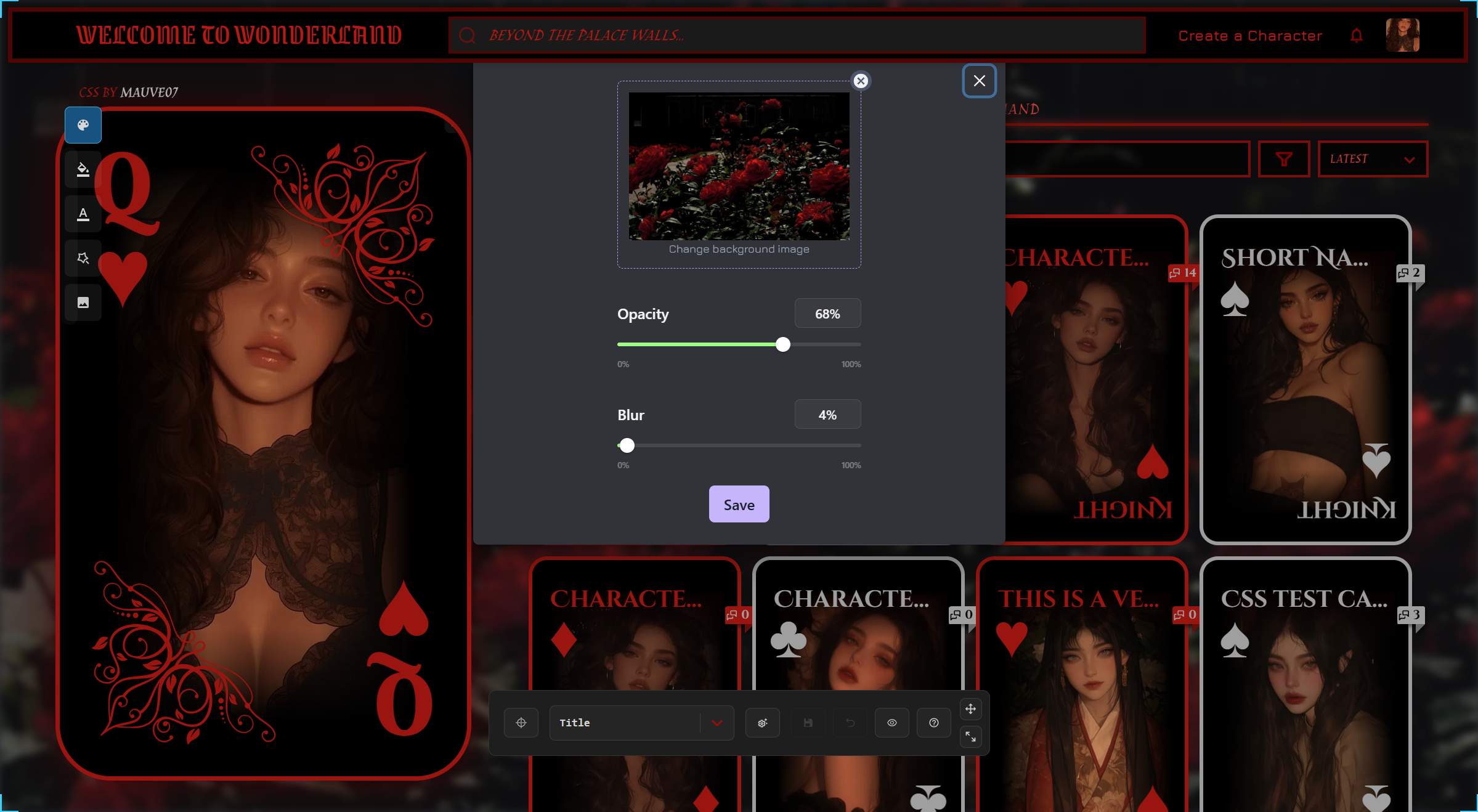
That's it! I hope you like this css template. If you have any questions, feel free to ask directly in the janitor announcement bot right here.
Love,
Mo