Realistic AI Parody - SDXL Getting Started
Basics DMD
- Have a computer with a graphics card. Preferably Nvidia - AMD can work, but will be slower. The faster the better, obvs, but anything from the last 10 years with at least 8GB VRAM should work.
- Download and install a Stable Diffusion UI. Forge or Fooocus are good for beginners. ComfyUI is more advanced. Stability Matrix is a "Multi-Platform Package Manager and Inference UI for AI Image Generation" which basically makes it pretty painless to try and use different UIs on windows mac and linux.
- Download Big Lust v1.6 and put it in the models subfolder.
- Download DMD2 and put it in the LoRAs subfolder.
nb: DMD2 improves speed of generating, at the cost of variety and prompt adherence. You must use it with certain settings (see below), and negative prompts do not work with it. - Download subject person LoRAs from CivArchive and others listed below. Loras trained on Big Lust work best, but any trained on SDXL will work to some extent. See below for a list of celeb lora creators.
- In your UI, select the Big Lust checkpoint, your DMD2 lora, and subject person lora, then set the following settings:
- Steps: 7
- CFG: 1.0
- Sampler: lcm
- Type in what you want to see and press 'Generate'.
Basics non-DMD
Follow the steps above except for the DMD stuff. I'm using BigLustyDonutMix as the example here because they provide "ideal" settings for using this model without DMD which means you can use negative prompts:
- Sampler: sdm++ 3m sde
- Scheduler: karras
- CFG: 2-9
- Steps: 30+
- prompting: keep it simple. booru tags.
If you get stuck, or need help, or your gens look weird, come back to the thread and post your settings, link a genned image on catbox so it includes the metadata. Someone might help you and the more info you provide the easier it will be to get help.
For Best Results
- Try and stick to the optimal SDXL resolutions.
- Use the bigASP tags list.
- Some LoRAs don't work well without their keywords. DMD2 doesn't have one, but most subject person LoRAs do. Check 'trigger words' on the page you got the lora from or using Xypher7's lora metadata viewer, and use them in your prompts.
- Detail on faces can be dodgy sometimes, the smaller the face is in the frame the worse it can get more or less. Learn to inpaint to correct problems with the finer details of your subject. Use of ADetailer or FaceDetailer (depending on your choice of UI) is basically automated inpainting at gen time to improve them rather than doing it manually.
forge: https://civitai.com/articles/6735/adetailer-enhance-any-image-with-these-few-steps-beginnerintermediate
comfyui: https://civitai.com/articles/14582/comfyui-workflow-sdxl-facedetailer-upscaler-and-batch-selection
Advanced
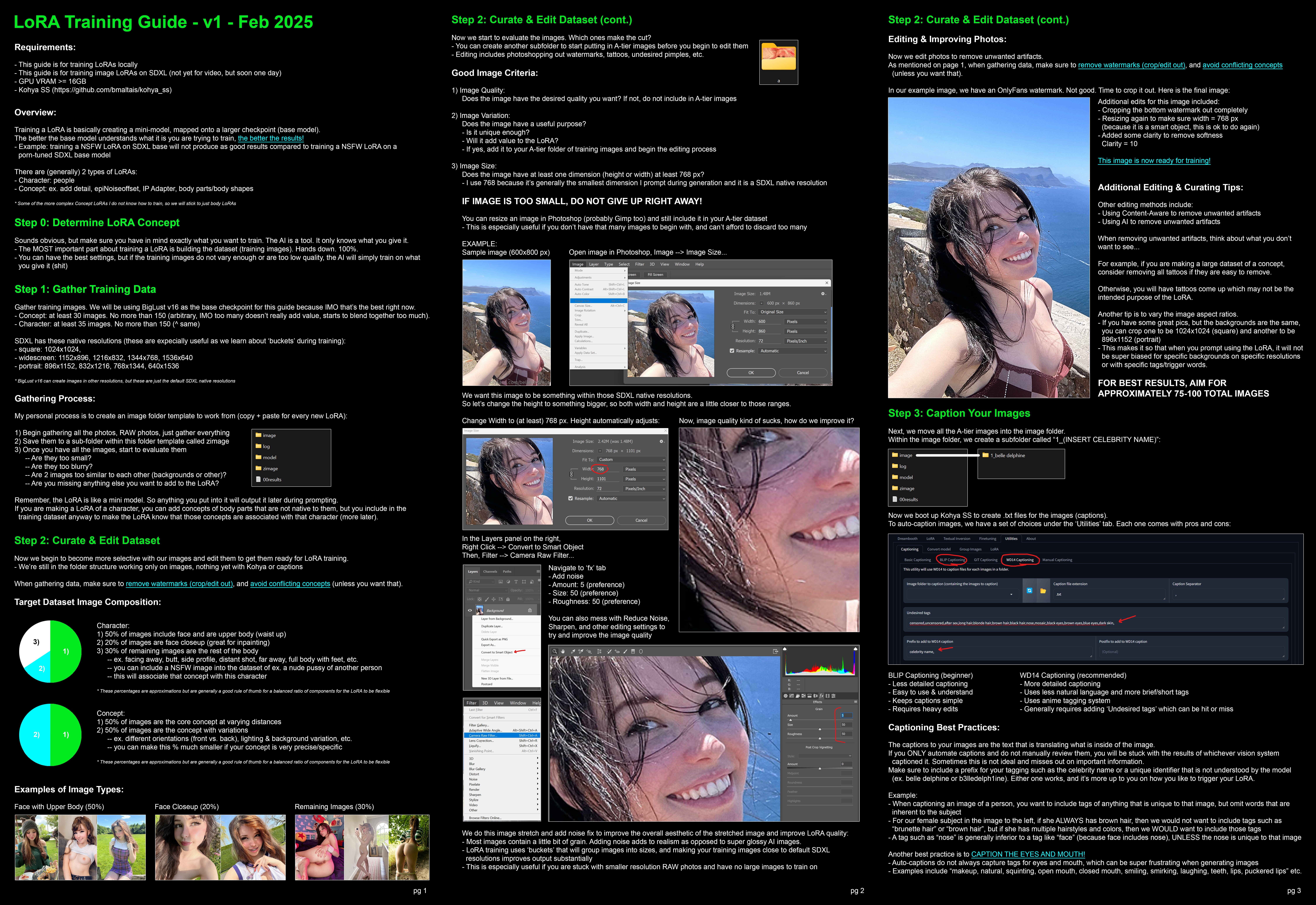
No LoRA available for the person you want to generate? Try training one yourself! The following resources should help you get started:
- LoRA Training Overview
- LoRA Training on Runpod for those with less-powerful GPUs
- Gathering and Captioning Training Images arguably the hardest, but most important, part of the process
Celeb LoRA creators
BertyDastid
cptdan
__deep
detdet
diaryph
DRZ3000
enzino
GoldenSacks
jc7890
MKUltra2025
mrmustard
peanutbutter_
rustyshackleford69420
SxRisen
ThatsARepost
toxicmuffin
aihotgirls (Jordyn Jones)
MachineMinded
MrME (JLaw)
Unshackled_AI (trains on lustify)
Yat99 - adds/publishes LORAs made by anon
others found on civarchive:
AIENGI
BertyDastid
dollrama126
heydixmcgee
Hikarias
images101
kamikazey
leisure_suit_larry
MacDonal
MakeThemComeAliveAIArt
Makimark
OmoshiroiHS2
ParanoidAmerican
Peli86 - mostly porn girls
razzz
sassytwinklol
Signalytix
steffangund
TheGoblinQueen
TheMainManFks
loradude - not great imo, do your own testing
malcolmrey
Sharing is Caring gofile - tons of loras and other resources, should be linked in OP
Sharing is Caring SDXL Celeb LORAs folder
Hugging Face LoRA Makers
https://huggingface.co/malcolmrey
https://civitai.com/user/malcolmrey/articles - how he do
https://civarchive.com/users/malcolmrey
https://huggingface.co/nphSi - actually tags the loras for z-image
https://huggingface.co/spaces/nphSi/Lookalike-LoRA-Index - visual index
More Questions About LoRAs?
Want to Make Videos?
https://rentry.co/wan21kjguide - outdated
https://boards.4chan.org/r/#s=ComfyUI+portable+for+newbies - guidance, workflows, and other help
https://archiveofsins.com/r/search/subject/ComfyUI%20portable%20for%20newbies/
Misc
https://rentry.co/sdg-z-image-turbo-prompting-guide
https://rentry.org/fakerycompendium
https://simpcity.cr/forums/workflows-guides-discussion.115/
https://fakersrealm.net/forum/
WAN Loras
https://civitai.red/search/models?baseModel=Wan%20Video&baseModel=Wan%20Video%202.2%20I2V-A14B&baseModel=Wan%20Video%202.2%20T2V-A14B&baseModel=Wan%20Video%2014B%20t2v&baseModel=Wan%20Video%2014B%20i2v%20720p&baseModel=Wan%20Video%2014B%20i2v%20480p&modelType=LORA&sortBy=models_v9%3AcreatedAt%3Adesc
https://civarchive.com/search?rating=explicit&base_model=Wan+Video%2CWan+Video+14B+i2v+480p%2CWan+Video+14B+i2v+720p%2CWan+Video+14B+t2v%2CWan+Video+2.2+I2V-A14B%2CWan+Video+2.2+T2V-A14B%2CWan+Video+2.2+TI2V-5B&sort=newest&type=Checkpoint%2CLORA
https://huggingface.co/models?other=base_model:adapter:Wan-AI%2FWan2.2-I2V-A14B&sort=created
undercooked pasta 26.03.13
title/subject:
Realistic Parody AI Nudes
>>>Guides<<<
Realistic AI Guide: https://rentry.co/SDXL-gettingstarted
General Wan 2: https://rentry.org/wan21kjguide
Wan 2 for weak GPUs (outdated): https://github.com/deepbeepmeep/Wan2GP
CPU ComfyUI: https://docs.comfy.org/installation/comfyui_portable_windows
>>>ComfyUI & WAN 2 info & support<<<
>>>/r/ComfyUI+portable+for+newbies
https://archiveofsins.com/r/search/subject/ComfyUI%20portable%20for%20newbies/
>>>Online generators<<<
Grok: https://x.com/i/grok/
Meta AI: https://www.meta.ai/
Reve: https://preview.reve.art/app
ImageFX: https://labs.google/fx/tools/image-fx
>>>Archive<<<
https://thebarchive.com/b/search/subject/Realistic
https://archiveofsins.com/r/search/subject/Realistic
>>>Share anon's archive<<<
https://gofile.io/d/BhUUAU
>>>Celeb Loras<<<
https://civarchive.com/search?type=LORA&base_model=SDXL+1.0%2CZImageBase%2CZImageTurbo&sort=top&platform=all&q=emma
https://huggingface.co/malcolmrey
https://huggingface.co/nphSi
>>>Professor Penguin WAN 2.2 loras<<<
https://huggingface.co/profpeng/models
>>>Tip for requesting, if there are not loras try to gather some images, lets say about 50, but more is even better, clean face, no glasses or shit blocking the face, several angles and please good light. Zip them and share gofile, some Genanon might like the girl/concep/request and train a lora to gen.<<<
Previous: >>THREADNUMBER