SillyTavern image gen with image reference conditioning
What is this?
After so many years of using ST, I was finally coerced into trying out its image generation utility. And then was subsequently inspired to improve upon it, because of how shitty it is. To have a mission statement: as of 2026-03-01, ST image generation is either so inconsistent that it fails its purpose or requires so much micromanagement that its use becomes cumbersome.
My proposal to this issue is this: use a ComfyUI workflow that allows using a reference image as a condition. Such as omingen. However, this requires the ability to pass such an image to ComfyUI, that the current ST image gen templates do not have. To overcome this limitation, we must implement a custom ST solution (an extension or similar JS tool) that allows this. For ease of access, the majority of the network traffic orchestration is delegated to a proxy server between ST and CUI, so that the ST solution can only be concerned with using the appropriate ST logic (ie.: the image carousel) to handle gen requests and image responses.
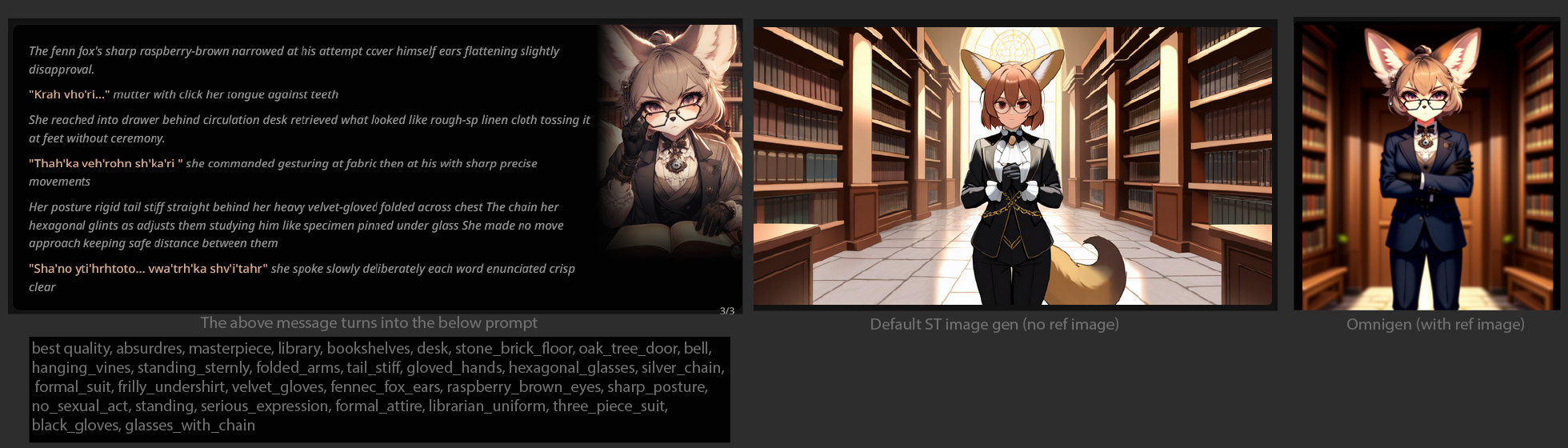
Notice that in this example, the head of the character is copied almost 1:1. Even the necklace is!
Dev Tools
Some years back I made a TamperMonkey script that makes hacking into ST easier. We'll be using it to implement this new feature. You can find the script here.
Proof of concept
How to initiate the gen call
Using the Dev Tools linked above, we can use the JS execution util to run a script like this:
In place of http://127.0.0.1:3000/generate you will want to point to your own proxy server API. Alternatively you can forego the proxy server entirely and interface with the CUI API, but it's a bit more involved.
The proxy server
Here's the code I have on my server (it's very much far from perfect):
1 2 3 4 5 6 7 8 9 10 11 12 13 14 15 16 17 18 19 20 21 22 23 24 25 26 27 28 29 30 31 32 33 34 35 36 37 38 39 40 41 42 43 44 45 46 47 48 49 50 51 52 53 54 55 56 57 58 59 60 61 62 63 64 65 66 67 68 69 70 71 72 73 74 75 76 77 78 79 80 81 82 83 84 85 86 87 88 89 90 91 92 93 94 95 96 97 98 99 100 101 102 103 104 105 106 107 108 109 110 111 112 113 114 115 116 117 118 119 120 121 122 123 124 125 126 127 128 129 130 131 132 133 134 135 136 137 138 139 140 141 142 143 144 145 146 147 148 149 150 151 152 153 154 155 156 157 158 159 160 161 162 163 164 165 166 167 168 169 170 171 172 173 174 175 176 177 178 179 180 181 182 183 184 185 186 187 188 189 190 191 192 193 194 195 196 197 198 199 200 201 202 203 204 205 206 207 208 209 210 211 212 213 214 215 216 217 218 219 220 221 222 223 224 225 226 227 228 229 230 231 232 233 234 235 236 237 238 239 240 241 242 243 244 245 246 247 248 249 250 251 252 253 254 255 256 257 258 259 260 261 262 263 264 265 266 267 268 269 270 271 272 273 274 275 276 277 278 279 280 281 282 283 284 285 286 287 288 289 290 291 292 293 294 295 296 297 298 299 300 301 302 303 304 305 306 307 308 309 310 311 312 313 314 315 316 317 318 319 320 321 322 323 324 325 326 327 328 329 330 331 332 333 334 335 336 337 338 339 340 341 342 343 344 345 346 347 348 349 350 351 352 353 354 355 356 357 358 359 360 361 362 363 364 365 366 367 368 369 370 371 372 373 374 375 | const express = require('express')
const axios = require('axios');
const cors = require('cors');
const app = express()
const port = 3000
app.use(express.json());
app.use(cors());
const COMFYUI_SERVER_URL = "http://127.0.0.1:8188";
const IMAGE = "Test.png";
const RETRY_DELAY_MS = 15 * 1000;
const MAX_RETRIES = 10;
const getRandomArbitrary = (min, max) => {
return Math.random() * (max - min) + min;
}
const getOmnigenWorkflow = ({
positivePrompt = "1girl",
negativePrompt = "lowres, bad anatomy, bad hands, text, error, cropped, worst quality, low quality, normal quality, jpeg artifacts, signature, watermark, username, blurry, deformed, over saturation, disfigured, poorly drawn face, mutation, mutated, extra_limb, ugly, poorly drawn hands, fused fingers, messy drawing, broken legs, censor, censored, censor_bar",
seed = getRandomArbitrary(0, 18446744073709551615),
steps = 24,
cfg = 7,
sampler = "euler",
scheduler = "simple",
textEncoder = "qwen_2.5_vl_fp16.safetensors",
unetModel = "omnigen2_fp16.safetensors",
vae = "ae.safetensors",
}) => `
{
"prompt": {
"6": {
"inputs": {
"text": "best quality, absurdres, masterpiece, ${positivePrompt}",
"clip": [
"10",
0
]
},
"class_type": "CLIPTextEncode",
"_meta": {
"title": "CLIP Text Encode (Prompt)"
}
},
"7": {
"inputs": {
"text": "${negativePrompt}",
"clip": [
"10",
0
]
},
"class_type": "CLIPTextEncode",
"_meta": {
"title": "CLIP Text Encode (Prompt)"
}
},
"8": {
"inputs": {
"samples": [
"28",
0
],
"vae": [
"13",
0
]
},
"class_type": "VAEDecode",
"_meta": {
"title": "VAE Decode"
}
},
"9": {
"inputs": {
"filename_prefix": "ComfyUI",
"images": [
"8",
0
]
},
"class_type": "SaveImage",
"_meta": {
"title": "Save Image"
}
},
"10": {
"inputs": {
"clip_name": "${textEncoder}",
"type": "omnigen2",
"device": "default"
},
"class_type": "CLIPLoader",
"_meta": {
"title": "Load CLIP"
}
},
"11": {
"inputs": {
"width": [
"32",
0
],
"height": [
"32",
1
],
"batch_size": 1
},
"class_type": "EmptyLatentImage",
"_meta": {
"title": "EmptyLatentImage"
}
},
"12": {
"inputs": {
"unet_name": "${unetModel}",
"weight_dtype": "default"
},
"class_type": "UNETLoader",
"_meta": {
"title": "Load Diffusion Model"
}
},
"13": {
"inputs": {
"vae_name": "${vae}"
},
"class_type": "VAELoader",
"_meta": {
"title": "Load VAE"
}
},
"14": {
"inputs": {
"pixels": [
"17",
0
],
"vae": [
"13",
0
]
},
"class_type": "VAEEncode",
"_meta": {
"title": "VAE Encode"
}
},
"15": {
"inputs": {
"conditioning": [
"6",
0
],
"latent": [
"14",
0
]
},
"class_type": "ReferenceLatent",
"_meta": {
"title": "ReferenceLatent"
}
},
"16": {
"inputs": {
"image": "${IMAGE}"
},
"class_type": "LoadImage",
"_meta": {
"title": "Load Image"
}
},
"17": {
"inputs": {
"upscale_method": "area",
"megapixels": 1,
"resolution_steps": 1,
"image": [
"16",
0
]
},
"class_type": "ImageScaleToTotalPixels",
"_meta": {
"title": "ImageScaleToTotalPixels"
}
},
"20": {
"inputs": {
"sampler_name": "${sampler}"
},
"class_type": "KSamplerSelect",
"_meta": {
"title": "KSamplerSelect"
}
},
"21": {
"inputs": {
"noise_seed": ${seed}
},
"class_type": "RandomNoise",
"_meta": {
"title": "RandomNoise"
}
},
"23": {
"inputs": {
"scheduler": "${scheduler}",
"steps": ${steps},
"denoise": 1,
"model": [
"12",
0
]
},
"class_type": "BasicScheduler",
"_meta": {
"title": "BasicScheduler"
}
},
"27": {
"inputs": {
"cfg_conds": ${cfg},
"cfg_cond2_negative": 2,
"style": "regular",
"model": [
"12",
0
],
"cond1": [
"15",
0
],
"cond2": [
"29",
0
],
"negative": [
"7",
0
]
},
"class_type": "DualCFGGuider",
"_meta": {
"title": "DualCFGGuider"
}
},
"28": {
"inputs": {
"noise": [
"21",
0
],
"guider": [
"27",
0
],
"sampler": [
"20",
0
],
"sigmas": [
"23",
0
],
"latent_image": [
"11",
0
]
},
"class_type": "SamplerCustomAdvanced",
"_meta": {
"title": "SamplerCustomAdvanced"
}
},
"29": {
"inputs": {
"conditioning": [
"7",
0
],
"latent": [
"14",
0
]
},
"class_type": "ReferenceLatent",
"_meta": {
"title": "ReferenceLatent"
}
},
"32": {
"inputs": {
"image": [
"17",
0
]
},
"class_type": "GetImageSize",
"_meta": {
"title": "Get Image Size"
}
}
}
}
`;
app.get('/', (req, res) => {
res.send('Hello World!')
})
app.post("/generate", async (req, res) => {
console.log(req.body);
const workflow = getOmnigenWorkflow(req.body);
const { data: promptResponse } = await axios.post(`${COMFYUI_SERVER_URL}/prompt`, JSON.parse(workflow));
const { prompt_id: promptId } = promptResponse;
console.log(promptId);
for (let retries = MAX_RETRIES; retries >= 0; retries--) {
try {
if (retries <= 0) {
return;
}
await new Promise(r => setTimeout(r, RETRY_DELAY_MS));
const { data: historyResponse } = await axios.get(`${COMFYUI_SERVER_URL}/history/${promptId}`);
// because in the workflow SaveImage is 9
const outputFilename = historyResponse[promptId].outputs["9"].images[0].filename;
if (outputFilename) {
console.log(outputFilename);
const { data: imageStream } = await axios.get(`${COMFYUI_SERVER_URL}/view?filename=${outputFilename}`, { responseType: "stream" });
retries = 0;
res.set("Content-Type", "image/png");
imageStream.pipe(res);
imageStream.on("end", () => {
res.send(imageStream);
res.end();
});
}
} catch {
// noop
}
}
});
app.post("/test/image", async (req, res) => {
const imageUrl = "https://raw.githubusercontent.com/test-images/png/refs/heads/main/202105/cs-black-000.png";
const { data: stream } = await axios.get(imageUrl, { responseType: "stream" });
stream.pipe(res);
stream.on("end", () => {
res.set("Content-Type", "image/png").send(stream);
res.end();
});
});
app.listen(port, () => {
console.log(`Example app listening on port ${port}`)
})
|
With this proof of concept, you can use the CUI API /upload/image endpoint to make the reference image available to CUI, and change the value of the IMAGE constant to change between these images.
The huge omnigen workflow string produced by getOmnigenWorkflow works out of the box and should require no configuration within CUI itself. It's based on the official CUI omnigen example.
Where to get a proper img gen prompt
In this implementation, whatever you pass in the dev tools script executor positivePrompt field is what CUI will us (besides the reference image) to render your image. This can be a comma separated list of keywords, or when using the models I have specified as fallbacks in getOmnigenWorkflow you can use human-readable language.
To get either, for now I use /sd last to get the popup, and copy over its contents. The template I have is this:
(kudos to that one /v/ anon whose template I based this on)
Examples
TODO