Hello! This will be a tutorial on how to navigate the Tetratto site.
I won't be explaining any Tet culture things here or any problematic users, this is simply a tutorial on how to use the site. If anything is missing or if you are still confused, you are free to ask anyone on the site. Someone is bound to respond. :V
I also didn't explain some things because they either: Have their own explanation on the site, or they are very self explanatory.
For any screenreaders, I have added text below each image to help. Hopefully it works well, but if it doesn't, please tell me in my inbox (@ectobiologist)!
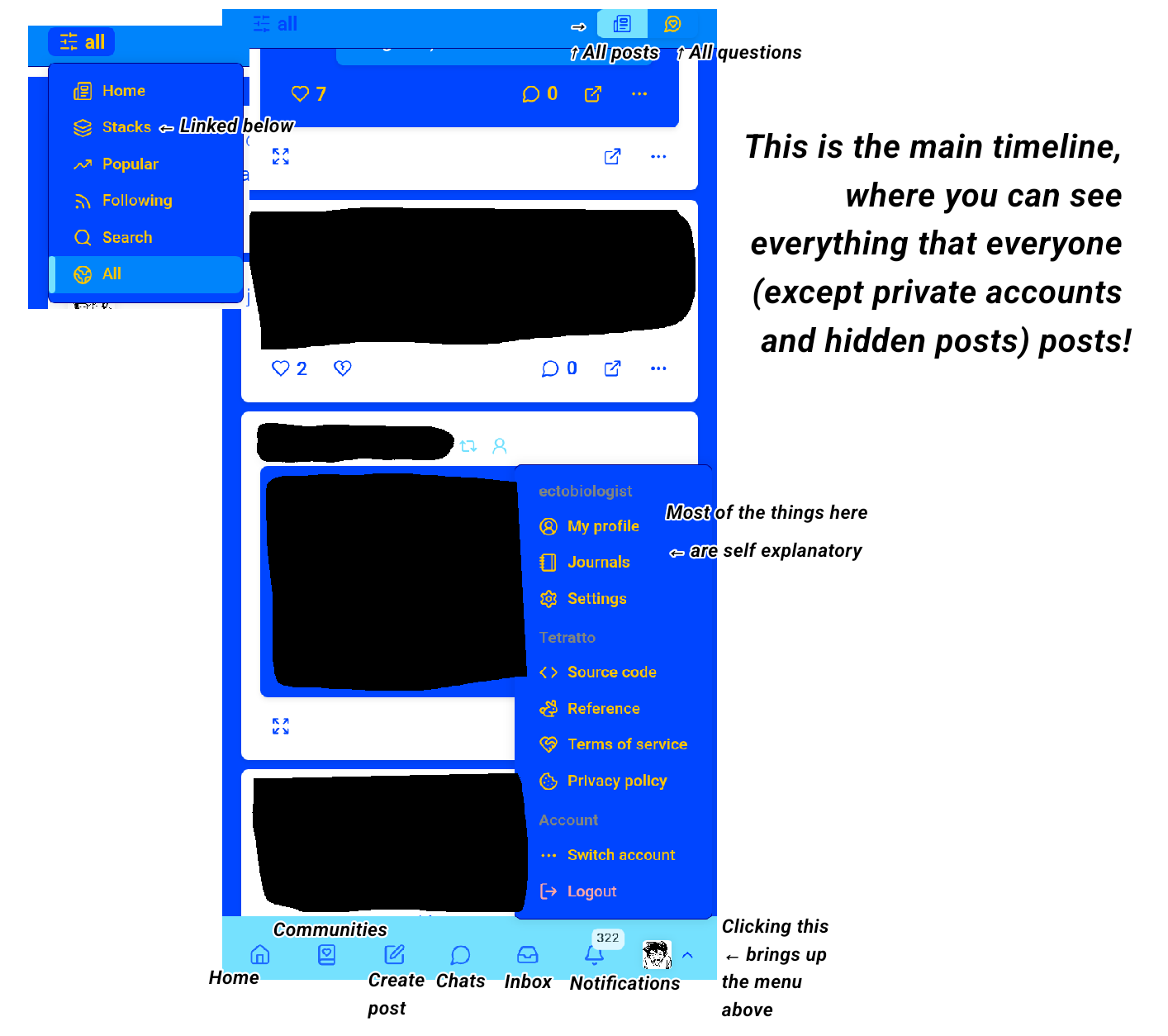
This is the main section of the site where you will be to see others posts.
Clicking the "All" section on the top left will lead you to 6 options, those being Home, Stacks, Popular, Following, Search and All. Whichever one you would like to look at, you can click.
At the top right, there is an option to see "All posts from every user" and next to it is to see "All questions from every user + any question in any community".
At the very bottom, the symbols go as such (left to right):
Home, Communities, Create Post, Chats, Inbox, Notifications and Profile (Which will bring up a section for you to see your own profile, settings, information about the site and the ability to switch accounts).
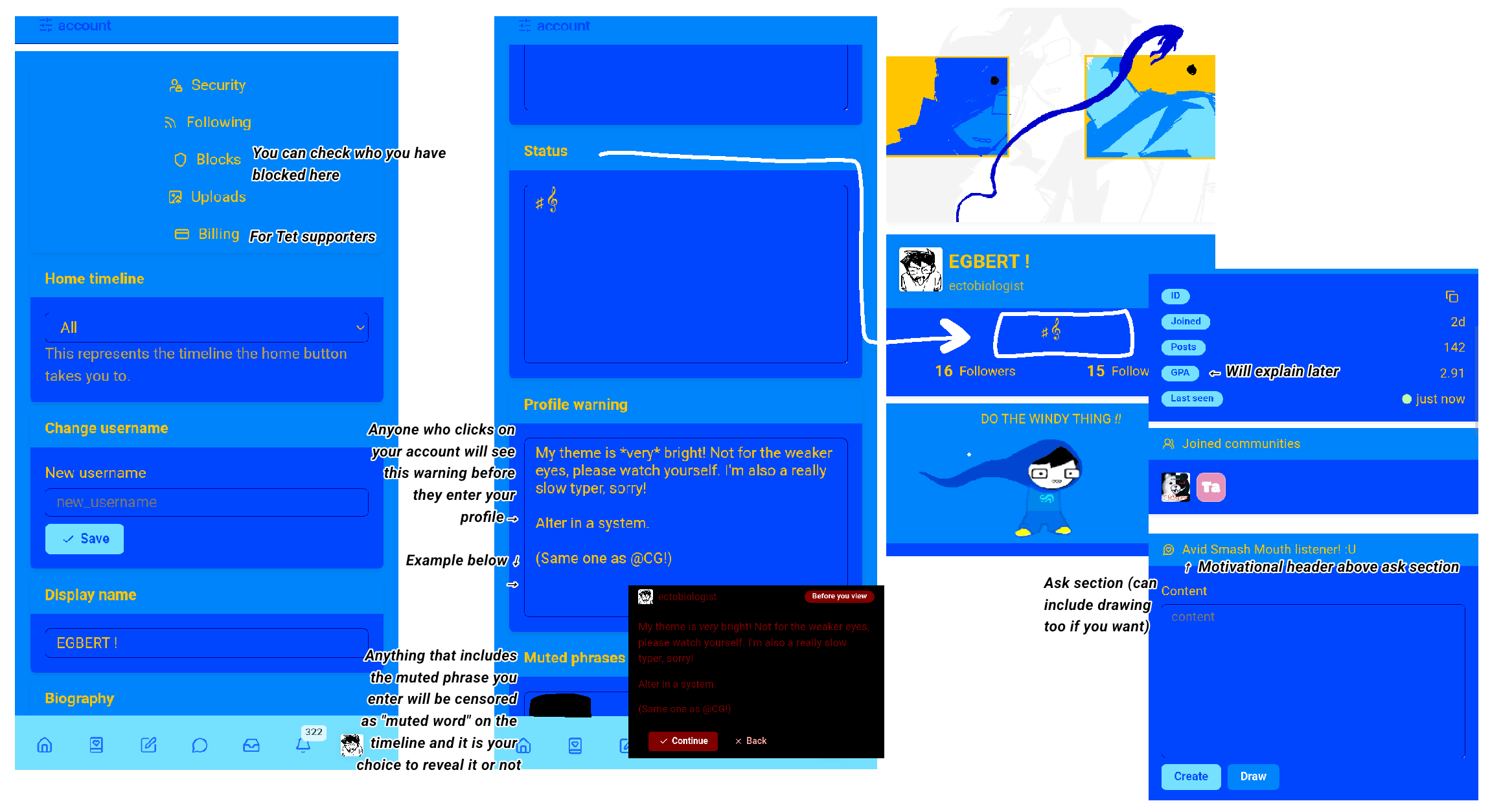
When clicking on settings, you will be brought to the "account" section. This section includes the options of changing your main profile (aka; username, display name, banner, avatar, ect.). It also has 5 buttons at the top for: Security, Following, Blocks, Uploads and Billing.
For the section in account that has a part called "Account warning", this is a warning that will appear on your account before anyone enters. This is a good place to put DNI, TW's or anything of the sort.
Below that is "Muted phrases". This works similar to Twitter with muted words, except it will instead put a warning on any post that has the muted phrase with "Contains muted phrase". This will be your choice whether you want to click on it or not.
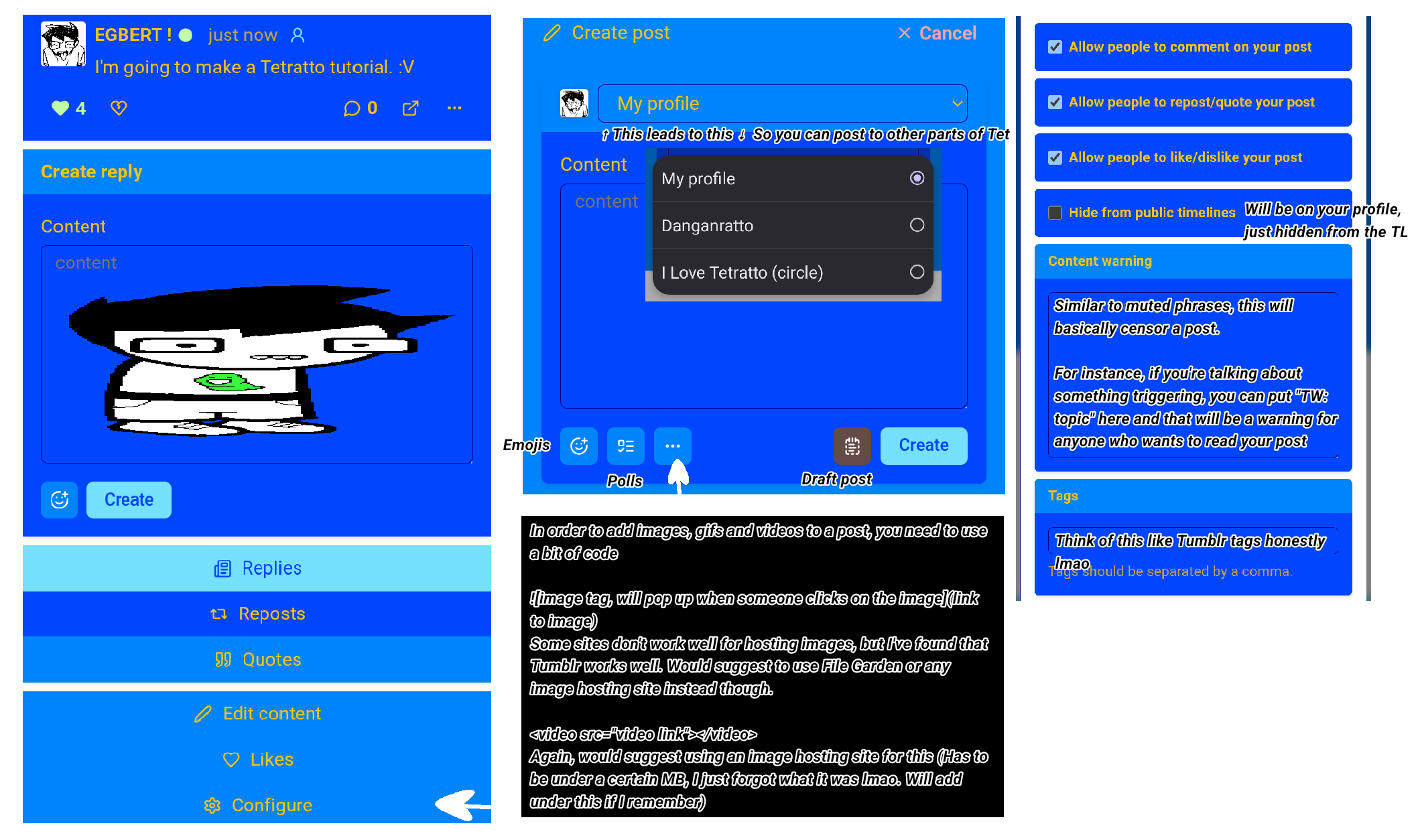
When making a post, there is a button on the left side with three dots (···) to be able to configure the post. This is very important (Also, beside that, there is an emoji and poll option on the left with a draft section on the right beside the "create post" option).
Going from up to down:
You can choose if people can comment (1), quote/repost (2) and like (3) your post or not. Under those is a choice to hide your post from public timelines or not, which just means the TL won't be able to see, but it will still appear on your profile.
The configure section is also where you can pin posts to your profile.
For the "Content warning" section, this works similar to "Muted phrases" from earlier. This gives a warning on what you have posted. For instance, if you are talking about something triggering, you can put "TW: topic" and that will be the posts warning.
Underneath that, "Tags" are for what you'd expect. I say they're quite similar to Tumblr ones honestly.
In order to put images or gifa into a post, you need to use a specific line of code, which is:
 The same on this site!
<video src="LINK TO VIDEO"></video>
I would suggest to use image hosting sites for images since some sites don't work very well (Twitter, Discord, ect).
Catbox (Image hosting site) doesn't work!
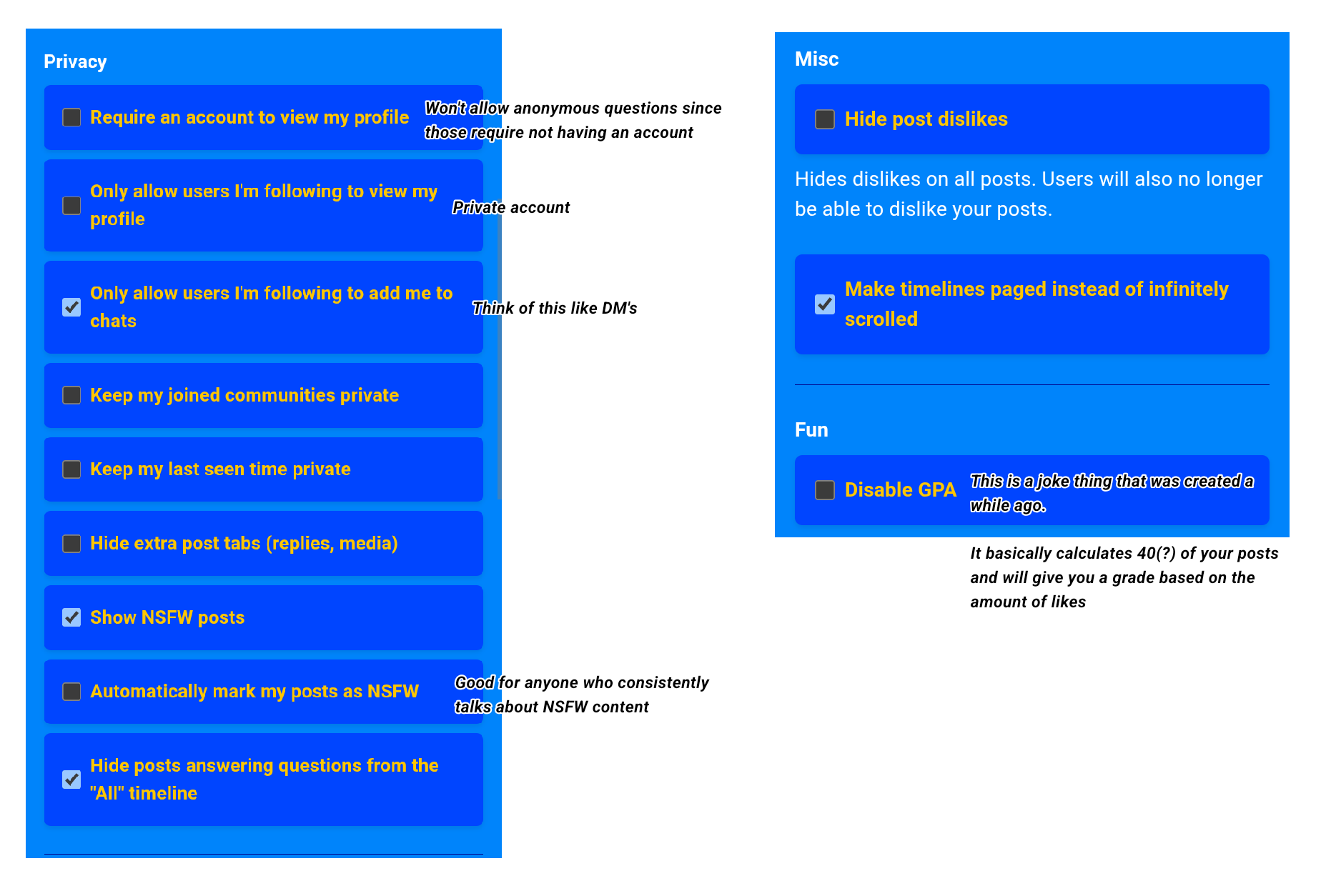
Under the profile section of the "Settings", there are quite a few things here that are important for curating your.. profile.
In the privacy section, I will explain a few of these.
Require an account to view my profile: Won't allow any anonymous questions and won't let anyone who doesn't have a Tetratto account to see your profile.
Only allow users I'm following to see my profile: This is the equivalent of making your account private. People will have to request to follow you.
Only allow users I'm following to add me to chats: If you don't want people DMing you then this is what you should check.
Automatically mark my posts as NSFW: If you talk about NSFW content a lot, this is what you should check.
Hide posts answering questions from the "All" timeline: If you don't want to see people answering a million questions, then check this.
Under the "Misc" section, there is one thing to point out.
GPA is a thing that was added a while back. It is a joke thing that calculates your posts (up to 40 if I remember right) and will give you a grade for 4.0 (best) to 0.0 (worst). Don't take this thing seriously. :P
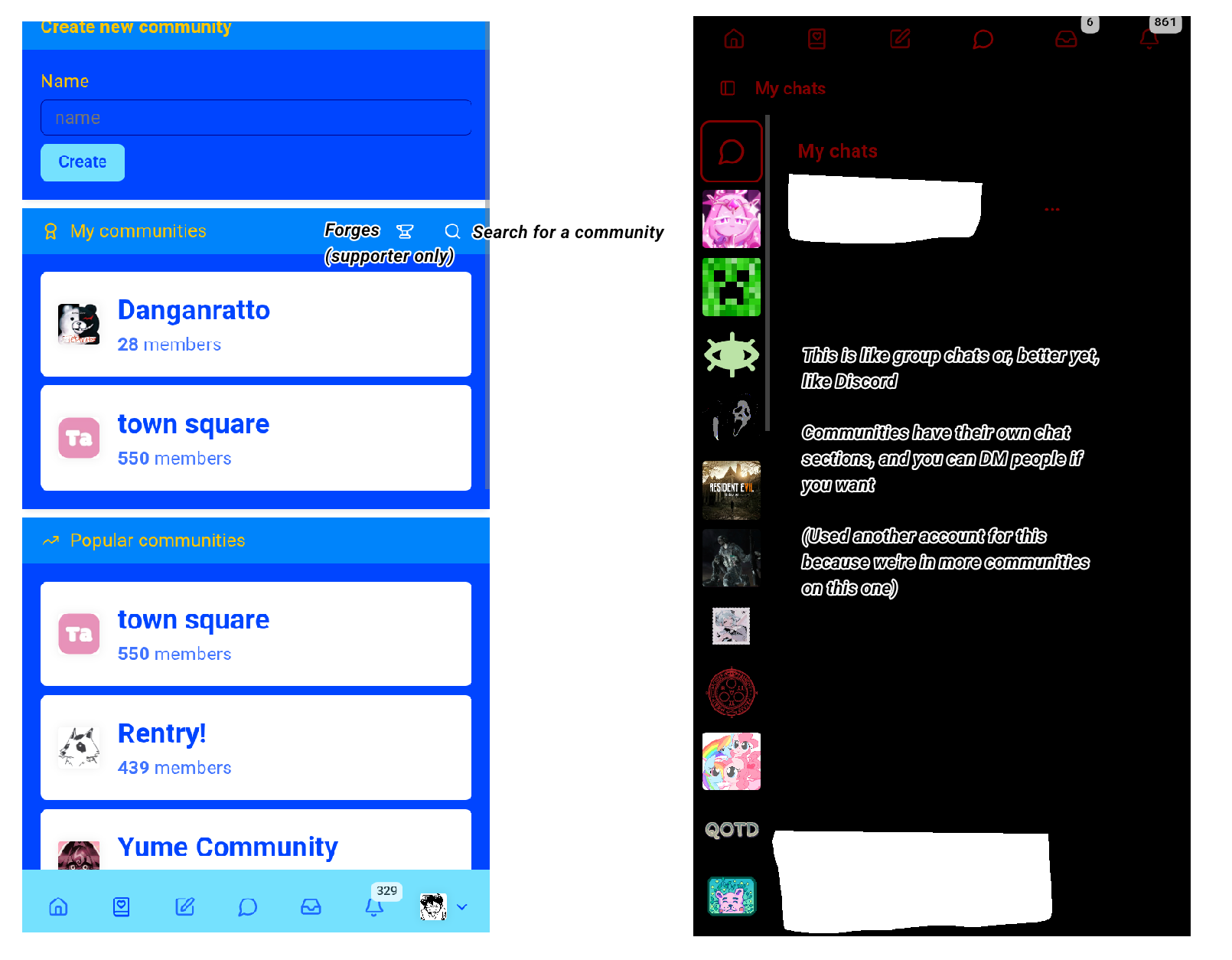
This last section is for the "Community" and "Chat" sections at the bottom area of the site, as well as Journals and Stacks which will be explained last.
First, let's go over Communities!
Communities are a great tool for curating fandom spaces. For example, one of the most popular ones is the Rentry community, all about Rentry posting. Communities are great for asking about specific things related to the community! Also really good for finding out if people like a media/thing you like.
In the Community section, there is also a "Forges" section that can only be created by supporters. This will be explained by a mod because I personally have no idea how this works:
"theyre basically just communities but posts are more like tickets that you can open/close! not really more useful than a regular community if you arent looking for that functionality"
In the "Chat" section, this is for messaging! Very good for DM's but there is another part to this. With communities, you automatically have a chat for aaid community. Every single community has one! Think of it like a Discord server, basically. Not everyone uses these, but they can be pretty cool.
For Stacks, read this, and for Journals, it is explained below by the same user as above:
"journals can be used as kind of like a blog or diary, you can create them & create notes (kind of like posts) inside of them, & they can be set to private or public & you can share them if they're public by copypasting their link!"