Deepseek Tutorial on Janitor for beginners from Delsa
My favorite little stars, I’ve written a tutorial just for you! A lot of it is borrowed from the Janitor Discord server—those of you who are there can check it out for yourselves too.
Why am I doing this? JLLM is a great free model. I started with it myself, and back in the day, it felt like the peak of roleplaying perfection. But there are alternatives out there. Sure, there are paid options like GPT or Claude—some people love them, others don’t. But you and I are here for a free and accessible option!
Why bother? I want you to try something new because modern models from big companies can do more—they’re better at holding a storyline, keeping a character’s personality consistent, sticking to a specific speech style, and following prompts more closely. But as they say, seeing is believing, right?
My JAI: @Delsa
Let’s get started!
Update
April 5: My prompt got a major upgrade!
Today, we’re going to try out Deepseek. Why Deepseek? Right now, this new model is free to use. It’s pretty fast, smart, has enough memory for roleplaying, and can hold its own against big players in the market like GPT, Gemini, and Claude.
Deepseek isn’t perfect, though:
- Servers can get overloaded or unstable (but things are better now than they were at launch).
- It might lean toward a negative bias (which some see as a plus since it handles DDDNE, gore, and similar stuff well).
- While it’s good at logic, it can still trip over small details, get confused, or loop in the process (fixable with prompts).
So, if you’re ready to give it a shot, follow these steps:
- Sign up at https://openrouter.ai. It’s free, though you can pay to use premium models if you want. But today, we’re all about free AI!
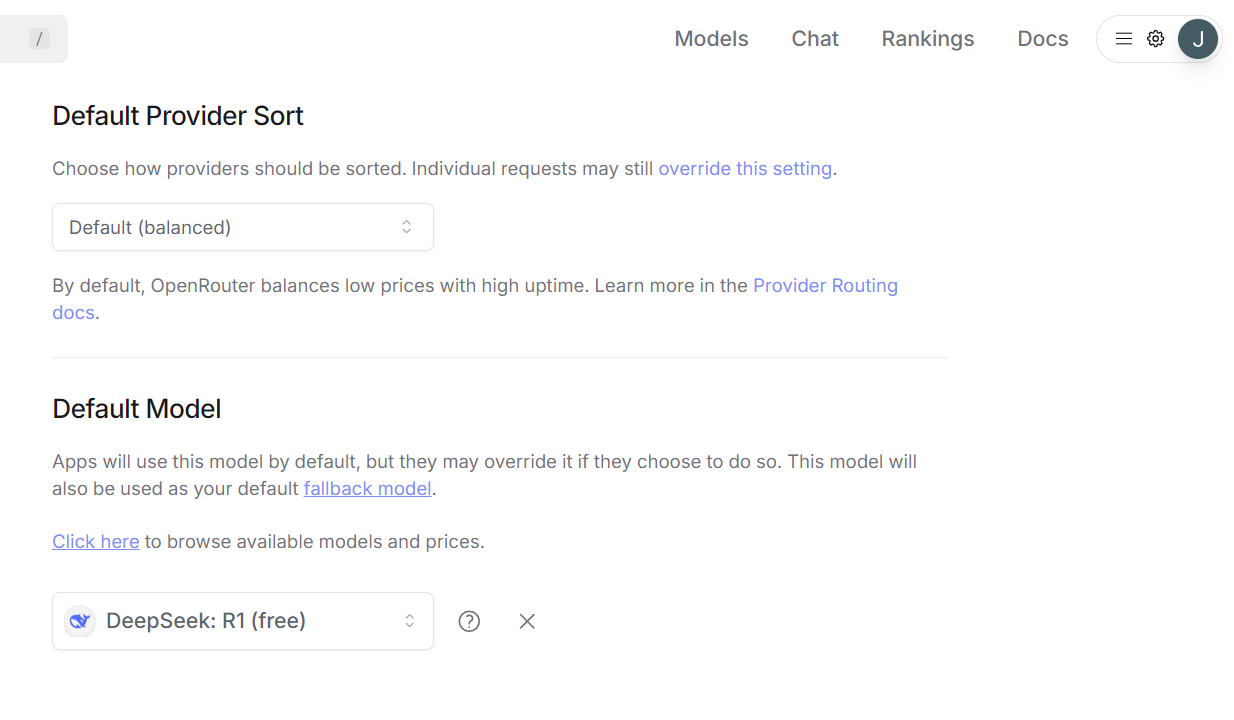
- Go to Settings, scroll to the bottom where it says Default Model. From the list, pick Deepseek R1 (free).
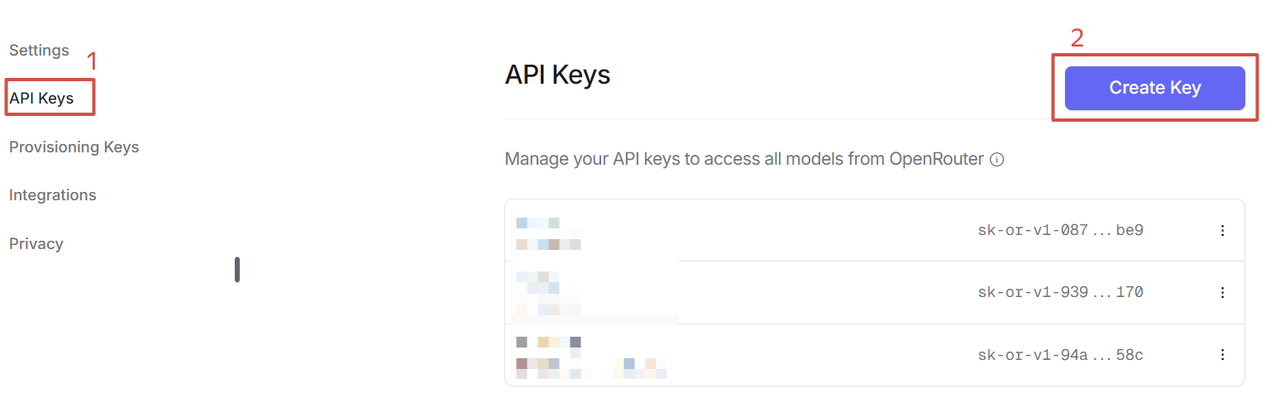
- In the same Settings menu, go to the API Keys section. Click Create Key, name it whatever you like, but make sure to copy it right away (!) because once you close the pop-up, you won’t be able to see the full key again.
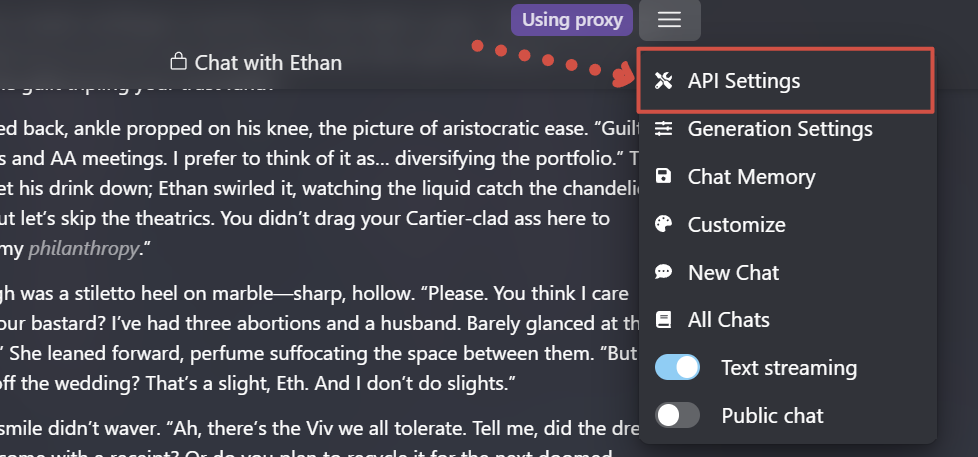
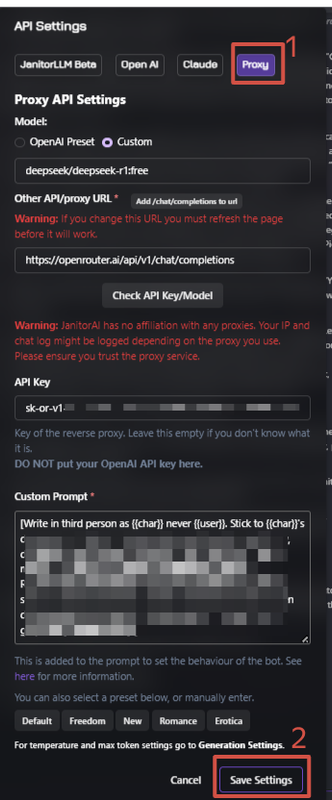
- Now head to Janitor, open any chat. Click the three horizontal lines for settings, go to API Settings > Proxy tab. Enter the model name as
deepseek/deepseek-r1:free, paste this URL into the second line:https://openrouter.ai/api/v1/chat/completions, and in the third line, paste the API Key from Step 3. You can (and I recommend) add a prompt here too—more on that later. Save your settings!
- Back out and go to Generation Settings. I suggest setting the temperature between 0.65 and 1.0, but feel free to experiment. Higher values mean more creative writing—sounds cool, right? But it can mess with logic and lead to nonsense. Lower temperature = more obedience.
- Max new tokens: Set it to 0 or 1000. This controls the length of the generated response; at 0, the model decides for itself.
- Context size: Between 16,000 and 52,000 tokens. Pretty big, huh? For my heavy roleplay sessions with 1000+ token outputs (I love long text), 16,000 tokens is about 30 messages. That’s how many recent messages it’ll remember.
Don’t forget to save and refresh the page!
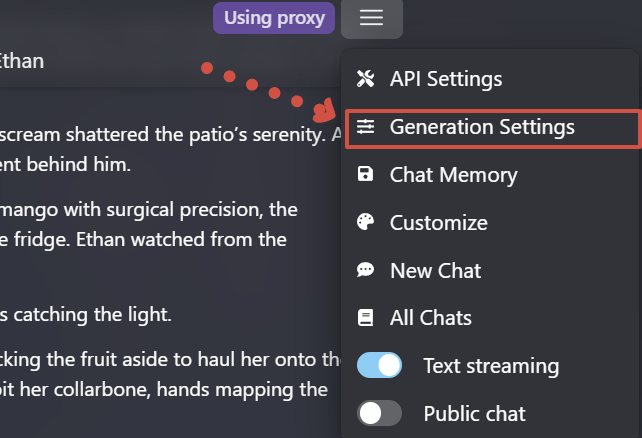
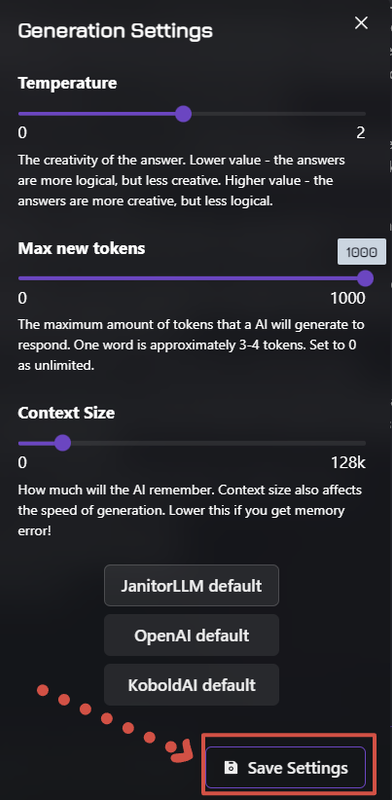
- Now you’re ready to test the bot!
Troubleshooting: Sometimes generation fails, and you’ll see a red error pop-up about the API. Double-check your steps. If everything’s correct, it might be an issue with the model.
You can check if the model is down here: https://openrouter.ai/deepseek/deepseek-r1:free/uptime
Prompts
Now let’s talk about prompts. I always recommend writing your own prompts, tailored to what you like. But sometimes it’s easier to lean on those who’ve already tested things out and come up with solutions.
For you, I’ve gathered some prompts that are currently available for Deepseek.
Here’s the one I use
NEW PROMPT FROM ME
This prompt is what I’m using now, after some testing.
Its main perks:
- an interesting, more artistic writing style;
- writes less for you;
Most important! As of April 5, 2025, I’ve noticed that at a temperature of 0 (specifically in JAI, haven’t tested in ST yet), the bots follow instructions WAY better. Plus, logic holds up stronger—like, the bot remembers what it or you are wearing, what happened earlier, and the setting. Narrative quality doesn’t take a hit from it either.
Current settings:
- Temperature: 0
- Tokens: 1000
- Memory: 32,000
Possible common issues with R1 and their fixes:
- The character dips out mid-scene (some event pulls them away, or they just bolt).
Fix: Add a line to the prompt like [{{char}} is forbidden from leaving the scene. Scenes can’t be interrupted by sudden events]. It might tone down the issue, but won’t kill it completely. - The bot still writes for me.
Fix: Reroll, or delete the chunks where it speaks for you. You can also try rating “good” responses with 5 stars to nudge it. - I don’t like the bot’s reply.
Fix: Reroll. Or toss in (ooc: [write here what you want from the bot, like an out-of-character hint]). - The bot gets stuck on one thing (repeating terms or actions, like twirling a chain in every message).
Fix: Reroll, or cut out the annoying sentences or paragraphs.
Look, prompts can’t control everything. Sometimes you’ve gotta tweak it by hand, but it’s worth it.
Old version
Forgot to mention, my prompt often ends up writing for the user. I’m working on fixing it, but just keep that in mind if you use it.
One by @hydw_i (Discord)
One by @𝐌𝐎𝐋𝐄𝐊 (Discord)
https://rentry.co/molekmodularprompts#𓄹-modules-by-molek
One by @saturnines (Discord)
But trust me, you’re perfectly capable of creating a working prompt that suits your taste—like if you want hardcore DDDNE or a specific writing style. Basically, don’t be afraid to experiment!
⭐⭐⭐
And that’s the whole tutorial, my darlings! I’ll be tweaking and adding to it, so keep an eye out for updates. I hope you enjoy your roleplaying. Be sure to leave comments under my bots with logs, questions, or whatever else!
How to get interesting responses from bots and stop the LLM from writing for me
Models often write for the user for a few reasons:
- The user is mentioned in the description.
- The user is referenced in the character’s first message.
- The first message speaks for the user.
- The prompt doesn’t restrict this behavior.
Why can’t creators just fix this once and for all? For example, by never mentioning the user anywhere or in any way.
First, in story-driven bots where your role or relationship with the character is predefined, if we don’t specify it, the bot will forget, get confused, or start making things up on its own.
Second, it’s not a dealbreaker—it can be handled with prompts or tweaking the bot’s first message if the user is mentioned there.
But that’s not what we’re focusing on today. Instead, let’s talk about how to craft your responses so that roleplay stays fun, the bot doesn’t write for you, and you enjoy the whole experience.
You don’t need to be a writer—just get into the story and have an idea!
Here’s a simple formula: Reaction - Description/Setting/Emotion - Dialogue/Response.
Most creators leave a "hook" at the end of their message to give you something to latch onto and ease into the roleplay.
So, don’t skimp on words—give the bot something to work with. Imagine you’re writing… an essay? I strongly advise against sticking to just dialogue without any descriptions, emotions, or context.
Note: Make sure to flesh out your persona well—appearance, scent, quirks (though it’s better not to define their personality too much, so the LLM doesn’t assume it needs to act for them).
Meet Nova, a green-eyed, nerdy student who’s unlucky enough to end up at a Zetta Kappa party (yep, Chris Hausman’s bot). She’s completely oblivious to how Chris’s breath catches when she’s near. Right now, she’s more worried about the length of the dress her dorm roommate lent her.
“Having fun?” Chris asks her at the end of his first message—that’s the hook.
Next, I lean into the vibe of Nova, my persona for this roleplay. How does she feel? What does she look like? What does she want to say to Chris? What’s around her?
Note: I prefer writing in the third person, and I recommend you do too—fewer bot slip-ups that way.
So, what’s our response?
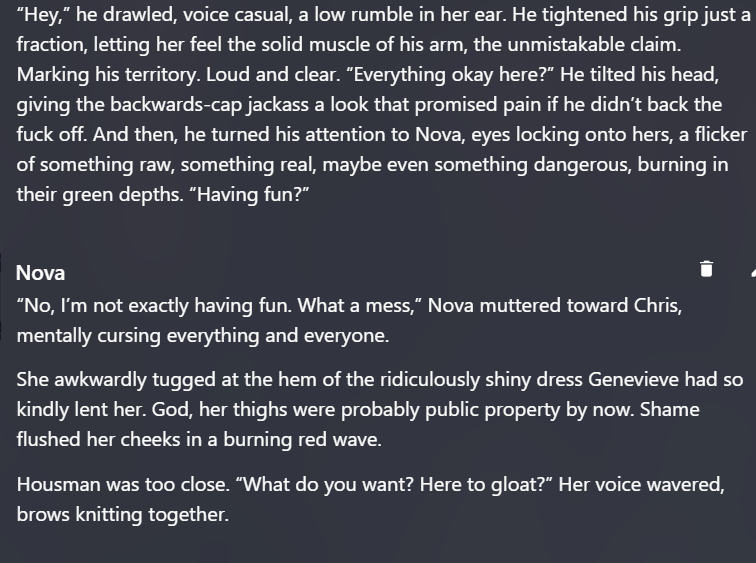
Here’s the response we get from Chris (Deepseek LLM, temperature 0.65):
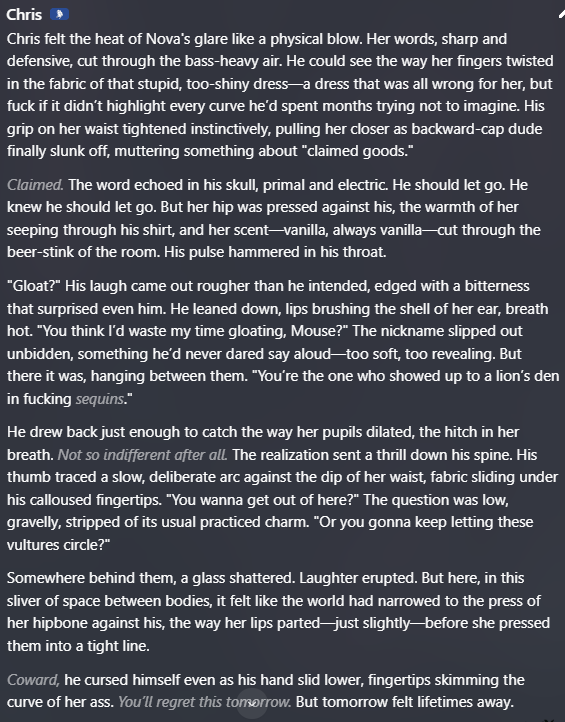
What if we replied like this with Anna’s persona (who, by the way, has a short description):
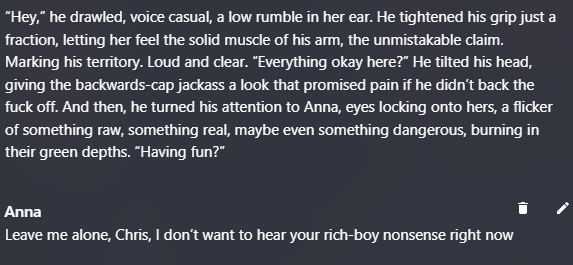
Chris responds like this (Deepseek LLM, temperature 0.65):
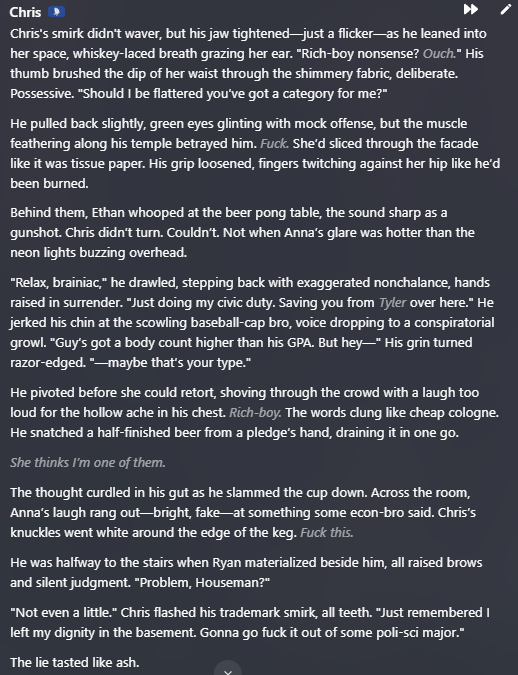
The plot twist is great (thanks to Deepseek, and thanks to me for the well-written greeting and Chris’s description), but personally, I find it hard to keep working with this continuation. Plus, the bot made up that Anna was already giggling with someone, which doesn’t fit the nerdy girl’s character.
Let’s move on. Want the bot to pay more attention to you? Highlight yourself, don’t hold back on adjectives. It works especially well in erotic scenes:
- The blouse stretched tightly over her chest.
- A piercing glinted in her plump lip.
- She crossed her long, tanned legs in those sharp stilettos.
Want more descriptions of sensations and emotions from the bot? Take the lead. Describe what your persona feels.
Example? Sure. Here’s Nova’s next message (I want to build tension between the characters):
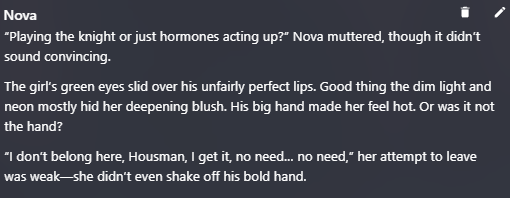
And here’s how Chris responded. It seems Nova’s reply provoked him into action. Perfect!
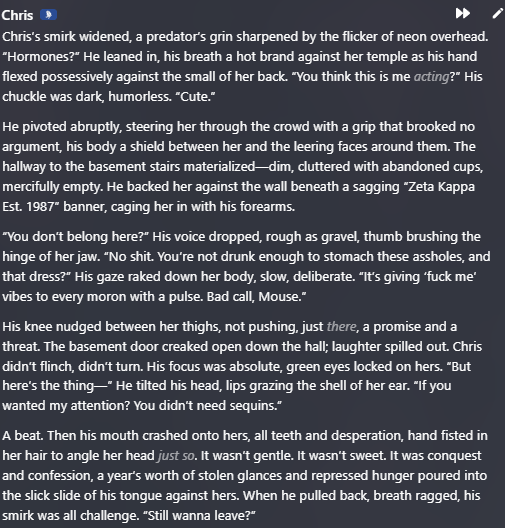
You might say, “It’s easy for you to talk, you’re a creator, you don’t mind writing so much.” Fair point. But I’m just a person like you, not even a writer.
For a good response from the bot, all you need is a solid 3-4 sentences.
Remember, the bot learns from your messages too. If you reply shortly and dryly, it’ll slide into that pattern, even with a good prompt. This is especially true for JLLM, which is very sensitive to user responses.