] manual marquee
for this I'll use my existent marquee code from my website:
i'll explain how to manually change each component and to increase some customisation features I haven't touched in the website.
⨳ text
adding text is easy.
put your text between brackets as much as you want. the more text, the more it takes the animation to scroll through
⨳ color
look for the fill option in the code, shall look something like that:
in URI encoding, %23 stands before a color code, meaning #! so basically if you want to use a custom color code, just add %23. colors with names like red or blue don't require the %23 before, so simply you would do:
Don't forget the ; after it so the code could work!
⨳ speed
search for this section
the number 6 preceeded by s means 6 seconds. the smaller the number, the faster the text goes. decimals work here.
example of 10 seconds speed

example of 0.5 seconds speed

⨳ font size
search for this section:
like in rentry, it's self explanatory how font size works. you can use rem and vh too.
i do recommend pixels due to the position of the marquee:
don't forget to change the position why here equal to the changed font-size:
similarly, the text boldness is determined by:
the normal value is 400, higher is bolder. you can also just use font-weight: bold;
⨳ font family
natively, google fonts use an import or out-sourced, and for performance and security reason and cannot be used on rentry. you can still use a plethora of in-built fonts, namely called "safe fonts" that are widely used by any OS. you can find a list of safe fonts here and how they looked rendered on rentry.
changing font is like in css, find the font section:
now, instead of Georgia we might wanna use Century Gothic. you can pretty much safely put the font without any extra symbols:

it's a good pratice to leave a fallback font here in case the first font fails to be shown by website, especially on older browsers. the priority font is the font that's first listed.

if someone claims rentry is broken or they know a way, it's either they don't understand why this limitation exist or they simply would exploit vulnerabilities in the website's code, which is fundamentally wrong.
you can also just use a family:
⨳ font styles
you can do a lot with some easy features and properties. let's focus on the text class for now:
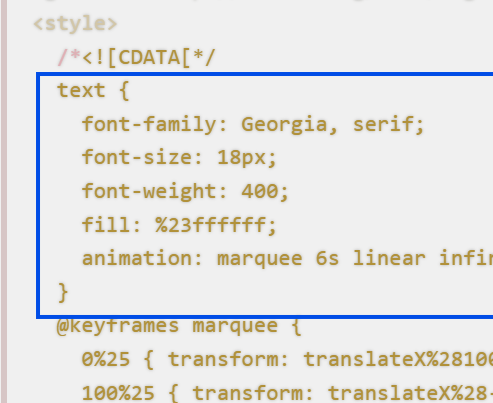
the blue container is the only one we need to edit.
- italic
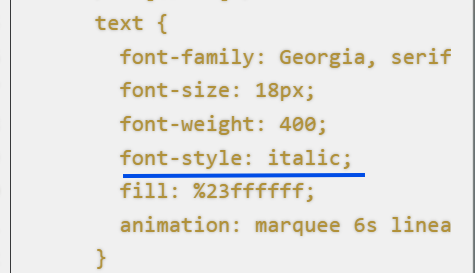
add the following property to the container make your text italic
- like this:
- small caps
makes the text  look like this:
- shadows
the x represents how far away in horizontal is the shadow away, y is on vertical axis and the XXXXXX is your color code.
Blur is optional but represents the degree of blur for the shadow.
Here is different versions!
Examples


- underline and overline
add the following property to the blue container or text style:
- same-color underline
- same color overline:
- combine both:
- different color and style:
There are 5 styles: solid, double, underline, wavy and dashed.
Check examples here
⨳ squishy text
do you want this?
 the box is squished <3
this is more easily but since the marquee behaves like an image (mostly), using parameters {30%:29}, whereas first place is the width which is 30% of the container's size and 29, it's height, you can elegantly squish the damned text how you want.
example of {100%:10}

example of {50px:18}
⨳ faded ends
if you got the gist of basic editing, here are is a fun way to make your marque prettier with faded ends:

the code below is used which adds the effect of faded ends:
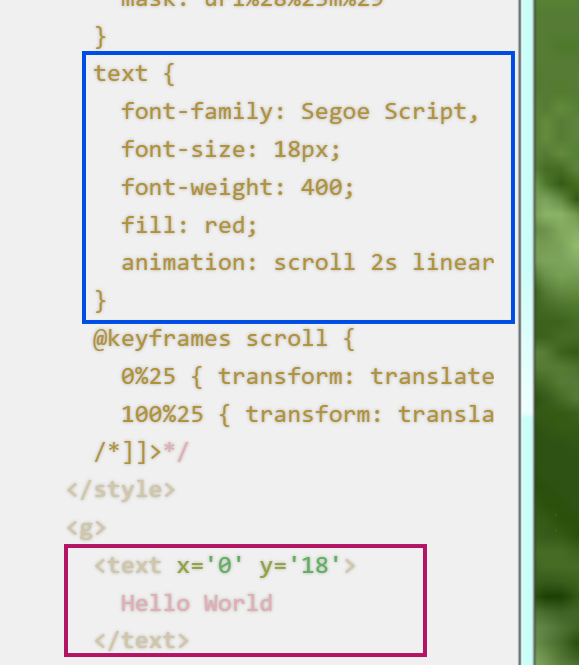
using previous information, only edit the blue box for color. the other mentions of color in the code are masks, not the actual color of the code. the pink box is where your text goes: