Piracy guide for only fans

it is best to be both loved and feared see doxing.

Part of the collection process for INFO

Actual motive: A science, thanks Crystal et al.

Specifically tell Crystal this for me thx <3 (see Vigenere Table).

Cryptography

-----BEGIN PGP SIGNED MESSAGE-----
Hash: SHA512

PREAMBLE
-----BEGIN PGP SIGNATURE-----

iHUEARYKAB0WIQRjw9mQfjoRfIvIfMgdFnKjKia4xQUCabPlLgAKCRAdFnKjKia4
xdAgAQDJjev4HVu9DFFHRn7MFmOnnWKuGm+ii4s539CHHyynFwEAjk34SbNI9/3c
nOUS7+zs4nRRG1nyF6DIhwUitjurdgI=
=I7Yf
-----END PGP SIGNATURE-----
Vigenere Table:
A B C D E F G H I J K L M N O P Q R S T U V W X Y Z
B C D E F G H I J K L M N O P Q R S T U V W X Y Z A
C D E F G H I J K L M N O P Q R S T U V W X Y Z A B
D E F G H I J K L M N O P Q R S T U V W X Y Z A B C
E F G H I J K L M N O P Q R S T U V W X Y Z A B C D
F G H I J K L M N O P Q R S T U V W X Y Z A B C D E
G H I J K L M N O P Q R S T U V W X Y Z A B C D E F
H I J K L M N O P Q R S T U V W X Y Z A B C D E F G
I J K L M N O P Q R S T U V W X Y Z A B C D E F G H
J K L M N O P Q R S T U V W X Y Z A B C D E F G H I
K L M N O P Q R S T U V W X Y Z A B C D E F G H I J
L M N O P Q R S T U V W X Y Z A B C D E F G H I J K
M N O P Q R S T U V W X Y Z A B C D E F G H I J K L
N O P Q R S T U V W X Y Z A B C D E F G H I J K L M
O P Q R S T U V W X Y Z A B C D E F G H I J K L M N
P Q R S T U V W X Y Z A B C D E F G H I J K L M N O
Q R S T U V W X Y Z A B C D E F G H I J K L M N O P
R S T U V W X Y Z A B C D E F G H I J K L M N O P Q
S T U V W X Y Z A B C D E F G H I J K L M N O P Q R
T U V W X Y Z A B C D E F G H I J K L M N O P Q R S
U V W X Y Z A B C D E F G H I J K L M N O P Q R S T
V W X Y Z A B C D E F G H I J K L M N O P Q R S T U
W X Y Z A B C D E F G H I J K L M N O P Q R S T U V
X Y Z A B C D E F G H I J K L M N O P Q R S T U V W
Y Z A B C D E F G H I J K L M N O P Q R S T U V W X
Z A B C D E F G H I J K L M N O P Q R S T U V W X Y


Key:    L G V F K N P Y L N X R U H A C T A N D L J S Q P (secret)

Cipher: Q A I E A F K E E K Y Q N V D X L G E C M E N I O (cipher)

cksum, sha256sum, MD5

cksum computes a basic CRC checksum (32-bit), byte count, and filename for files—great for quick integrity checks on transfers. Output looks like: 123456789 1024 filename.txt (checksum, bytes, name).

sha256sum generates a secure 256-bit SHA-256 hash, ideal for verifying downloads against tampering or corruption. Output: e3b0c44298fc1c149afbf4c8996fb92427ae41e4649b934ca495991b7852b855 filename.txt (hash, filename).

Basic Usage

Run on a single file:

command integrity security checks Great to check for
cksum Yes No Only for corruption of files
sha256sum Yes Yes Tampering of files and corruption of files
MD5sum Yes No Quick Integrity check.

Both work on stdin too: echo "test" | cksum or echo "test" | sha256sum.

Verify Checksums

Generate first: sha256sum bigfile.iso > checksum.txt (saves hash to file).

Check: sha256sum -c checksum.txt—says "OK" if matches, warns on mismatch (exit code 1 for scripting).

cksum supports --check similarly but is less collision-resistant; prefer sha256sum for security.

Quick Tip

  • Multiple files: sha256sum *.txt lists all.
  • Compare manually: Copy the hash, run command, eyeball it.

file hashing guide:
Quick script to verify (shebang):

  • Will show partial hashes
  • Should work with file types for file hosts
  • IT GLOWS

the filenames also contain a MD5 hash or a hash of some kind when imported with data whores. you may also look at the filenames, example

86d1581e1200494710266bfa812c82e4

#!/bin/bash

# checksum.sh — Generate or verify checksums
# Usage:
#   To generate checksums: ./checksum.sh generate
#   To verify: ./checksum.sh verify checksums.txt

MODE=$1
REF_FILE=$2

generate_checksums() {
    echo "--- Generating checksums for JPEG, video, and RAR files ---"
    > checksums.txt
    echo "# cksum hashes" >> checksums.txt
    cksum *.{jpeg,jpg,png,mp4,mkv,avi,webm,rar} 2>/dev/null >> checksums.txt
    echo "# sha256 hashes" >> checksums.txt
    sha256sum *.{jpeg,jpg,png,mp4,mkv,avi,webm,rar} 2>/dev/null >> checksums.txt
    echo "Checksums written to checksums.txt"
}

verify_files() {
    REF_FILE=$1

    if [ -z "$REF_FILE" ]; then
        echo "Error: Please provide a reference file."
        exit 1
    fi

    if [ ! -f "$REF_FILE" ]; then
        echo "Error: Reference file '$REF_FILE' not found."
        exit 1
    fi

    echo "--- Starting Smart Verification ---"
    echo "Checking which original part each file corresponds to"
    echo "------------------------------------------------------"

    shopt -s nullglob 2>/dev/null || true
    files=( *.{jpeg,jpg,png,mp4,mkv,avi,webm,rar} )

    if [ ${#files[@]} -eq 0 ]; then
        echo "No image, video, or RAR files found in this directory."
    else
        for file in "${files[@]}"; do
            [ -f "$file" ] || continue
            sha_val=$(sha256sum "$file" | awk '{print $1}')
            ck_val=$(cksum "$file" | awk '{print $1}')
            size=$(stat -c %s "$file" 2>/dev/null || stat -f %z "$file" 2>/dev/null)

            # Look up by SHA first, then cksum
            matched_line=$(grep "$sha_val" "$REF_FILE" | head -1)
            if [ -z "$matched_line" ]; then
                matched_line=$(grep "$ck_val" "$REF_FILE" | head -1)
            fi

            if [ -n "$matched_line" ]; then
                original_name=$(echo "$matched_line" | awk '{print $NF}')
                short_sha=$(echo "$sha_val" | cut -c1-8)
                echo -e "\e[32m✓ $file\e[0m → $original_name (SHA: $short_sha, Size: $size bytes)"
            else
                short_sha=$(echo "$sha_val" | cut -c1-8)
                short_ck=$(echo "$ck_val" | cut -c1-8)
                echo -e "\e[31m✗ $file\e[0m - No matching hash found."
                echo "  SHA (partial): $short_sha"
                echo "  CKSUM (partial): $short_ck"
            fi
        done
    fi

    echo "------------------------------------------------------"
    echo "Verification complete."
}

case "$MODE" in
    generate)
        generate_checksums
        ;;
    verify)
        verify_files "$REF_FILE"
        ;;
    *)
        echo "Usage:"
        echo "  ./checksum.sh generate"
        echo "  ./checksum.sh verify checksums.txt"
        exit 1
        ;;
esac

Verification example:

818685619837df9e37acba3760d69692f7bd75e49a33724322d1b3aba5b625a7  Videos.part01.rar
fcc99f4709e62b18e8dcfb201fef0336468a3e7faa012742ca1582a4f5125116  Videos.part02.rar
3bb805dccac4330055282bb9e4ec1eee8f34c1a5ce04b264ce5ac8cf8f41697c  Videos.part03.rar
edb7068faa4995065a79ca49299e49dfbc981d55b3abde1c4839cf9b736fc38c  Videos.part04.rar
8fc1c6168dcf8ef76cf57e2ebd3bc51ade64a60bc73e0d0f7178d66377197267  Videos.part05.rar
a72ebdf64e3dcd8e058119be445bd58110b492785c5c0d959e57e71391882441  Videos.part06.rar
126b946d2d7e3dbb2f48f8d01566e8dc1ebe0356d77a0f9606b61f79921fbaeb  Videos.part07.rar
7e96b0b2d2b062bd061219695ebe5a56f3a6f022318db69796145338ef590cf7  Videos.part08.rar
5476ee5772b6777637072726ac3356f129db617929dad5f1c4de1953d3ddf925  Videos.part09.rar
9787942ca4e7938f0a10b4e9e08ba4ce0defed865e3015ff9dd7f782534b4436  Videos.part10.rar
a6b620fecf6472949d31225ba24f7ba49f78eb6f6e4cbffd495b94a92dd184be  Videos.part11.rar
aa81e4c6b2b22a6b883e9ca14b940a9dca2088d8d75ab0ffaca253dbadba65b4  Videos.part12.rar
dcbe379c30b15f4d25b9e66bcd52cf0d839b85931f1d3bc004144d430d6af6a7  Videos.part13.rar
ce9d598f2f1b212ecc80644155e085b109acfc039c32d6b47a4fe1afe45bcbd3  Videos.part14.rar
f4592b7c7bb7567926f535fcf05675d8af31d74449dbfa74e90b6d191d042990  Videos.part15.rar

3858384470 209715200 Videos.part01.rar
1806361138 209715200 Videos.part02.rar
3962459451 209715200 Videos.part03.rar
656176106 209715200 Videos.part04.rar
3246287787 209715200 Videos.part05.rar
958825508 209715200 Videos.part06.rar
2236850233 209715200 Videos.part07.rar
3169408941 209715200 Videos.part08.rar
858133467 209715200 Videos.part09.rar
3510469290 209715200 Videos.part10.rar
4217100611 209715200 Videos.part11.rar
823605320 209715200 Videos.part12.rar
289583675 209715200 Videos.part13.rar
3357929346 209715200 Videos.part14.rar
1687462788 30862299 Videos.part15.rar

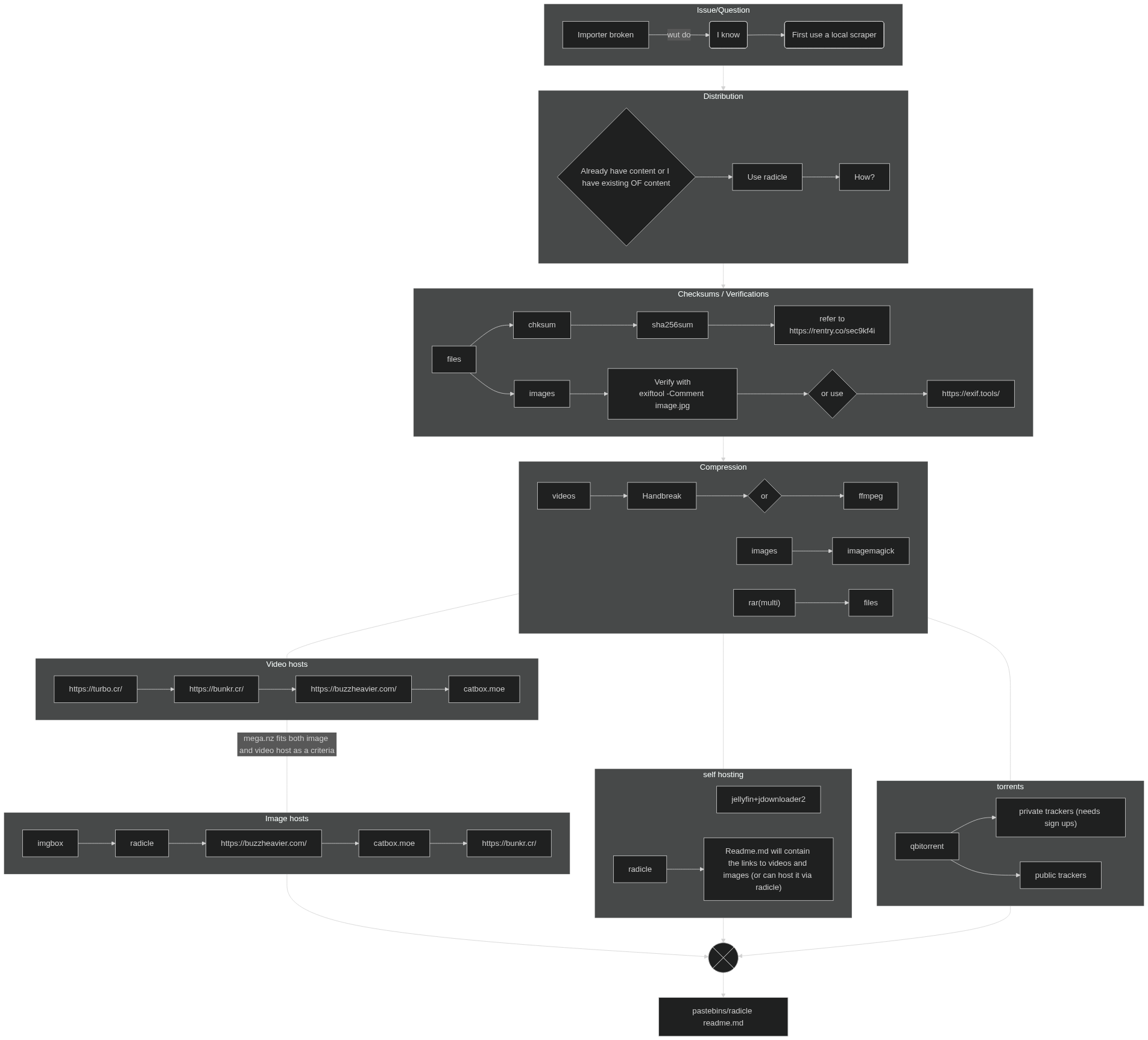
These can be inside radicle as links.txt with catbox as a multirar. (see Rename to right files from terminal)

Image files

to add into image files:

WARNING RETARD!!!! THIS WILL DO THIS IN EVERY FILE IN A DIR IF DONE WRONG!!!

can do this with videos, just append *.mp4 and rename the text file to video_hashes.txt

Export your hashes from the images when veryfying

sha256sum *.jpeg > image_hashes.txt

sha256sum --check image_hashes.txt

add this into the readme.md or into a textfile inside radicle (if using a filehost).

uploading scripts

Catbox uploader modified

# A modified catbox uploader, more clean and less messy.
import os
import requests
from datetime import datetime

credits="""
This program is made and maintained by Andrew
This program is open source and free to use
MIT @ 2025 
Support me by Starring the project & following me on Github:
- https://github.com/Andrewgxgx/catbox.moe
- https://github.com/Andrewgxgx
"""
api = "https://catbox.moe/user/api.php"
api_litterbox="https://litterbox.catbox.moe/resources/internals/api.php"
os_unix="/"
os_windows="\\"
control=0
start=0
formatting = 2  # Default formatting
user_os = os_unix  # Default OS

def get_user_preferences():
    global user_os, control
    while True:
        print("""Please choose your OS:
          1. Windows
          2. Unix (Linux, MacOS)
          3. Temple OS 
          4. Other
          Type the number of your choice.
        """)
        Preferences = input("Enter a number 1 to 4: ")
        if Preferences == "1":
            user_os = os_windows
            break
        elif Preferences == "2":
            user_os = os_unix
            break
        elif Preferences == "3":
            print("Hello Terry Davis, We currently don't support Temple OS")
            print("Exiting...")
            control = 1
            exit()
        elif Preferences == "4":
            user_os = os_unix
            print("Using Unix-style paths as default")
            break
        else:
            print("Please type 1, 2, 3, or 4")

def format():
    global formatting, start
    print("""
          How would you like to format your links?
          1. <file path>: <link>
          2. <link>
          3. <numbered list>. <link>
          4. <Timestamp (hh:mm:ss)> : <File path> : <Link>
          5. <custom string (user input)> : <link> 
          """)
    try:
        formatting = int(input("Enter a number 1 to 5: "))
        start = 0
    except ValueError:
        print("Invalid input, using default format (link only)")
        formatting = 2

def check_upload_folder():
    """Check if upload folder exists and warn if empty"""
    folder_path = f".{user_os}upload"
    if not os.path.exists(folder_path):
        print(f"Warning: Folder '{folder_path}' does not exist!")
        create = input("Create it now? (Y/N): ")
        if create.upper() in ["Y", "YES", "YE"]:
            os.makedirs(folder_path)
            print(f"Created {folder_path}. Please add files to upload and run again.")
            exit()
        else:
            print("Exiting...")
            exit()
    return folder_path

def save_links_to_file(content):
    """Save links, ALWAYS overwriting the existing file"""
    try:
        with open("uploaded_links.txt", "w", encoding='utf-8') as f:
            f.write(content)
        print(" Links saved to uploaded_links.txt (file overwritten)")
    except Exception as e:
        print(f" Error saving to file: {str(e)}")

def get_files_from_folder():
    """Get list of files from upload folder"""
    folder_path = check_upload_folder()
    files_to_upload = []

    print("\nScanning for files...")
    for root, dirs, files in os.walk(folder_path):
        for file in files:
            file_path = os.path.join(root, file)
            print(f"Found: {file_path}")
            files_to_upload.append(file_path)

    if not files_to_upload:
        print("No files found in upload folder!")
        return []

    print(f"\nFound {len(files_to_upload)} file(s)")
    confirm = input("Upload these files? (Y/N): ")

    if confirm.upper() in ["Y", "YES", "YE", "YEAH"]:
        return files_to_upload
    return []

def upload_to_service(api_url, data, files):
    """Wrapper for requests.post"""
    try:
        return requests.post(api_url, data=data, files=files)
    except Exception as e:
        print(f"Network error: {str(e)}")
        return None

def process_uploads(files_to_upload, upload_function, additional_data=None):
    """Generic upload processor"""
    global start, formatting

    all_links = ""
    total_files = len(files_to_upload)

    for idx, file_path in enumerate(files_to_upload, 1):
        print(f"Uploading [{idx}/{total_files}]: {file_path}")

        try:
            with open(file_path, "rb") as item:
                files = {"fileToUpload": item}
                data = {"reqtype": "fileupload"}
                if additional_data:
                    data.update(additional_data)

                response = upload_function(data, files)

            if response and response.status_code == 200:
                link = response.text.strip()

                if formatting == 1:
                    formatting_write = f'"{file_path}" : {link}\n'
                elif formatting == 2:
                    formatting_write = f"{link}\n"
                elif formatting == 3:
                    start += 1
                    formatting_write = f"{start}. {link}\n"
                elif formatting == 4:
                    current_time = datetime.now().strftime("%H:%M:%S")
                    formatting_write = f"[{current_time}]: {file_path} : {link}\n"
                elif formatting == 5:
                    write = input("Put text before the link: ")
                    formatting_write = f"{write} : {link}\n"
                else:
                    formatting_write = f"{link}\n"

                all_links += formatting_write
                print(f"✓ Uploaded: {link}")
            else:
                print(f"✗ Failed to upload: {file_path}")

        except Exception as e:
            print(f"✗ Error uploading {file_path}: {str(e)}")

    if all_links:
        save_links_to_file(all_links)
        print(f"\n Successfully uploaded {len(files_to_upload)} files")
    else:
        print("\n No files were uploaded successfully")

def upload_links():
    """Handle URL uploads - ALWAYS OVERWRITES the file"""
    all_links = ""
    print("\nEnter links to upload (type 'done' when finished):")
    while True:
        enter_links = input("Link: ")
        if enter_links.lower() == "done":
            break

        data = {"reqtype": "urlupload", "url": enter_links}
        response = upload_to_service(api, data, None)

        if response and response.status_code == 200:
            print(f"✓ Uploaded: {response.text}")
            all_links += f"{response.text}\n"
        else:
            print("✗ Failed to upload link")

    if all_links:
        save_links_to_file(all_links)
    else:
        print("No links were uploaded")

def upload_links_with_account(account):
    """Handle URL uploads with account - ALWAYS OVERWRITES the file"""
    all_links = ""
    print("\nEnter links to upload (type 'done' when finished):")
    while True:
        enter_links = input("Link: ")
        if enter_links.lower() == "done":
            break

        data = {
            "reqtype": "urlupload",
            "userhash": account,
            "url": enter_links
        }
        response = upload_to_service(api, data, None)

        if response and response.status_code == 200:
            print(f"✓ Uploaded: {response.text}")
            all_links += f"{response.text}\n"
        else:
            print("✗ Failed to upload link")

    if all_links:
        save_links_to_file(all_links)
    else:
        print("No links were uploaded")

def catbox_no_acc():
    linkornot = input("Upload via link? (Y/N): ")

    if linkornot.upper() in ["Y", "YE", "YES"]:
        upload_links()
    else:
        files_to_upload = get_files_from_folder()
        if files_to_upload:
            format()
            process_uploads(
                files_to_upload,
                lambda d, f: upload_to_service(api, d, f)
            )

def catbox_with_acc():
    account = input("Enter your account hash: ")
    if not account:
        print("Account hash required!")
        return

    linkornot = input("Upload via link? (Y/N): ")

    if linkornot.upper() in ["Y", "YE", "YES"]:
        upload_links_with_account(account)
    else:
        files_to_upload = get_files_from_folder()
        if files_to_upload:
            format()
            process_uploads(
                files_to_upload,
                lambda d, f: upload_to_service(api, d, f),
                {"userhash": account}
            )

def litterbox():
    files_to_upload = get_files_from_folder()
    if not files_to_upload:
        return

    time_options = {"1h", "12h", "24h", "72h"}
    while True:
        time = input("Upload duration? (1h, 12h, 24h, 72h): ").lower()
        if time in time_options:
            break
        print("Invalid duration. Please enter 1h, 12h, 24h, or 72h")

    format()
    process_uploads(
        files_to_upload,
        lambda d, f: upload_to_service(api_litterbox, d, f),
        {"time": time}
    )

def menu():
    global control
    print(f"""
{credits}
=========
Welcome to CATBOX & Litterbox Uploader!
Choose your options! 
1. Upload to Catbox.moe (No account, perma)
2. Upload to Catbox.moe (with account)
3. Upload to Litterbox (temp upload)
4. Exit / Stop program
====
Note: uploaded_links.txt will be OVERWRITTEN each time you upload!
""")

    try:
        opt = int(input("Type 1,2,3 or 4: "))
        if opt == 1:
            print("Catbox - no account")
            catbox_no_acc()
        elif opt == 2:
            print("Catbox - with account")
            catbox_with_acc()
        elif opt == 3:
            print("Upload to LitterBox")
            litterbox()
        elif opt == 4:
            print("Exiting...")
            control = 1
        else:
            print("Invalid option. Please enter 1-4")
    except ValueError:
        print("Please enter a valid number")

# Main program
if __name__ == "__main__":
    print(credits)
    print("Welcome to the Catbox Uploader")
    print("Please choose your OS first, before getting started")
    get_user_preferences()

    folder_path = f".{user_os}upload"
    if not os.path.exists(folder_path):
        os.makedirs(folder_path)
        print(f"Created upload folder: {folder_path}")
        print("Please add files to upload and run again.")
        exit()

    while control == 0:
        menu()
        if control != 1:
            input("\nPress Enter to continue...")

    print("\n" + credits)
    print("Thank you for using the Catbox Uploader")
    print("Exiting...")

OS of choice

Can be any distro, server can work well enough as everything stored in tmpfs is not written inside/to the disk itself.

if you're gonna use a server, use Debian or Ubuntu but don't use a rolling distro.

create a tmpfs partition scheme, replace /home/user/folder with something else to where the user (YOU) can write in

This will generate a new radicle identifier each time a docker image is built, everything on temp will be nuked upon reboot as it's stored in the system ram.

tmpfs   /home/user/folder    tmpfs  rw,size=1G,nr_inodes=5k,noexec,nodev,nosuid,uid=1000,gid=1000,mode=700 0 0

do NOT and I mean DO NOT store the docker container in /tmp as that's system wide.

Docker (radicle)

version: '3.8'

services:
    radicle:
    image: ff0x/radicle:latest
    container_name: radicle-seed
    restart: unless-stopped
    environment:
    * RAD_ALIAS=anon
    volumes:
    * radicle-data:/app/radicle
    # Mount with read-write permissions to a physical drive
    * /home/<user>/folder/:/var/lib/radicle/targetdir:rw
    ports:
    * "8776:8776"
    * "8777:8777"
    networks:
    * radicle-network

volumes:
    radicle-data:
    name: radicle-data

networks:
    radicle-network:
    name: radicle-network
    driver: bridge

radicle commit:

I wouldn't change the following fields:

  • the dir, that is the name of the repo initialized with git and radicle. This would reduce noise (Think DID key/account re-generation).
  • description
  • name/email
  • commit message
  • Don't place yml file outside tmpfs and build it, otherwise you'd have written data to a potentially unsecure device (unless if it's encrypted).
  • Radicle also tracks commit messages and history so be mindful of what you do with git and don't be an idiot.
#!/bin/sh

# Be sure you're not in the target dir, just in the home dir please.
mkdir ~/init && cd ~/init && cp -R ~/targetdir/* ./

# Initialize git repository (in current directory /var/lib/radicle/init)
git init

# Set git global config
git branch -m main
git config --global user.email "[email protected]"
git config --global user.name "Your Name"

# Increase buffer size
git config --global http.postBuffer 524288000

# this commit message can be anything really.
# add the shit you need with git add
git add readme.md Images cksum.sh
git commit -m "."

# THEN: Run rad init
rad init

sleep 20
rad self
sleep 20
rad node status

to build/run everything do this:

docker compose up -d && docker exec -it radicle-seed /bin/ash

shut it down goyim.

docker compose down

Rename to right files from terminal (catbox)

i=1; for f in *.rar; do [ -f "$f" ] || continue; mv "$f" "$(printf "Videos.part%03d.rar" $i)"; i=$((i+1)); done

fix the container on the host drive for the directory it's mounted on docker.

Suppose container runs as UID 1000, GID 1000

First verify, if it's ID 1000, GID 1000 it isn't owned by the container.

ls -lh

Then do this

sudo chown -R 1000:1000 /folder && sudo chmod -R 777 /folder

for a shit load of images use imgbox + imagemagick, use this command (or upload straight to radicle with the links in the readme.md):

Optimal settings for imgbox (and possibly radicle)

magick montage -define jpeg:size=512x512 *.jpeg -geometry 256x256+2+2 -tile 4x4 output.jpg

7G ram

magick montage -limit memory 1MiB -limit map 1MiB -define jpeg:size=256x256 *.jpeg -geometry 256x256+2+2 -tile 4x4 output.jpg

Below are other settings

replace 256x256 output.jpg with 256x256+2+2 -tile 4x4 output.jpg if you must.


magick montage -define jpeg:size=512x512 *.jpeg -geometry 256x256 output.jpg

magick montage -background black -define jpeg:size=512x512 *.jpeg -geometry 256x256 output.jpg

magick montage -background transparent -define jpeg:size=512x512 *.jpeg -geometry 256x256 output.png

magick montage -limit memory 1MiB -limit map 1MiB -define jpeg:size=256x256 *.jpeg -geometry 256x256 output.jpg

it depends on system resources, results may vary but I'd try as seen below.

To diagnose enter this command, useful for running on 7GB Force Disk-Based Processing. Be sure to hit ctrl+c after a few minutes

free -h -s 10 >> mem.txt | magick montage -limit memory 1MiB -limit map 1MiB -define jpeg:size=256x256 *.jpeg -geometry 256x256+2+2 -tile 4x4 output.jpg

Mem stats:

CLI:

               total        used        free      shared  buff/cache   available
Mem:            31Gi       2.0Gi        20Gi        51Mi       9.1Gi        29Gi
Swap:          2.0Gi          0B       2.0Gi

               total        used        free      shared  buff/cache   available
Mem:            31Gi       3.8Gi        18Gi        51Mi       9.1Gi        27Gi
Swap:          2.0Gi          0B       2.0Gi

               total        used        free      shared  buff/cache   available
Mem:            31Gi       6.3Gi        16Gi        51Mi       9.1Gi        24Gi
Swap:          2.0Gi          0B       2.0Gi

               total        used        free      shared  buff/cache   available
Mem:            31Gi       7.8Gi        14Gi        51Mi       9.1Gi        23Gi
Swap:          2.0Gi          0B       2.0Gi

               total        used        free      shared  buff/cache   available
Mem:            31Gi       6.2Gi        16Gi        51Mi       9.2Gi        25Gi
Swap:          2.0Gi          0B       2.0Gi

               total        used        free      shared  buff/cache   available
Mem:            31Gi       3.5Gi        19Gi        51Mi       9.2Gi        27Gi
Swap:          2.0Gi          0B       2.0Gi

               total        used        free      shared  buff/cache   available
Mem:            31Gi       2.2Gi        20Gi        51Mi       9.2Gi        29Gi
Swap:          2.0Gi          0B       2.0Gi

with a desktop env like kde plasma.

               total        used        free      shared  buff/cache   available
Mem:            31Gi       4.0Gi        19Gi        97Mi       8.6Gi        27Gi
Swap:          2.0Gi        63Mi       1.9Gi

               total        used        free      shared  buff/cache   available
Mem:            31Gi       7.2Gi        15Gi        97Mi       8.6Gi        24Gi
Swap:          2.0Gi        63Mi       1.9Gi

               total        used        free      shared  buff/cache   available
Mem:            31Gi       8.9Gi        14Gi        97Mi       8.6Gi        22Gi
Swap:          2.0Gi        63Mi       1.9Gi

               total        used        free      shared  buff/cache   available
Mem:            31Gi        10Gi        12Gi        97Mi       8.6Gi        20Gi
Swap:          2.0Gi        63Mi       1.9Gi

               total        used        free      shared  buff/cache   available
Mem:            31Gi        11Gi        11Gi        97Mi       8.6Gi        19Gi
Swap:          2.0Gi        63Mi       1.9Gi

               total        used        free      shared  buff/cache   available
Mem:            31Gi       4.3Gi        18Gi        97Mi       8.6Gi        26Gi
Swap:          2.0Gi        63Mi       1.9Gi

               total        used        free      shared  buff/cache   available
Mem:            31Gi       4.1Gi        19Gi        97Mi       8.7Gi        27Gi
Swap:          2.0Gi        63Mi       1.9Gi

               total        used        free      shared  buff/cache   available
Mem:            31Gi       3.9Gi        19Gi        97Mi       8.7Gi        27Gi
Swap:          2.0Gi        63Mi       1.9Gi

This isn't optimal with imgbox or possibly radicle

with magick montage -limit memory 1MiB -limit map 1MiB -define jpeg:size=256x256 *.jpeg -geometry 256x256 output.jpg

               total        used        free      shared  buff/cache   available
Mem:            31Gi       4.7Gi        17Gi       106Mi       9.1Gi        26Gi
Swap:          2.0Gi        69Mi       1.9Gi

               total        used        free      shared  buff/cache   available
Mem:            31Gi       5.7Gi        16Gi       1.1Gi        10Gi        25Gi
Swap:          2.0Gi        70Mi       1.9Gi

               total        used        free      shared  buff/cache   available
Mem:            31Gi       6.6Gi        16Gi       1.9Gi        10Gi        24Gi
Swap:          2.0Gi        74Mi       1.9Gi

               total        used        free      shared  buff/cache   available
Mem:            31Gi       6.7Gi        15Gi       2.1Gi        11Gi        24Gi
Swap:          2.0Gi        74Mi       1.9Gi

               total        used        free      shared  buff/cache   available
Mem:            31Gi       6.7Gi        16Gi       2.0Gi        10Gi        24Gi
Swap:          2.0Gi        74Mi       1.9Gi

               total        used        free      shared  buff/cache   available
Mem:            31Gi       6.6Gi        16Gi       1.9Gi        10Gi        24Gi
Swap:          2.0Gi        74Mi       1.9Gi

               total        used        free      shared  buff/cache   available
Mem:            31Gi       6.5Gi        16Gi       1.8Gi        10Gi        24Gi
Swap:          2.0Gi        74Mi       1.9Gi

               total        used        free      shared  buff/cache   available
Mem:            31Gi       6.3Gi        16Gi       1.7Gi        10Gi        24Gi
Swap:          2.0Gi        74Mi       1.9Gi

               total        used        free      shared  buff/cache   available
Mem:            31Gi       6.1Gi        16Gi       1.5Gi        10Gi        25Gi
Swap:          2.0Gi        74Mi       1.9Gi

               total        used        free      shared  buff/cache   available
Mem:            31Gi       5.9Gi        16Gi       1.3Gi        10Gi        25Gi
Swap:          2.0Gi        74Mi       1.9Gi

               total        used        free      shared  buff/cache   available
Mem:            31Gi       5.7Gi        16Gi       1.1Gi        10Gi        25Gi
Swap:          2.0Gi        74Mi       1.9Gi

               total        used        free      shared  buff/cache   available
Mem:            31Gi       5.5Gi        17Gi       945Mi       9.9Gi        25Gi
Swap:          2.0Gi        74Mi       1.9Gi

               total        used        free      shared  buff/cache   available
Mem:            31Gi       6.6Gi        16Gi       1.9Gi        10Gi        24Gi
Swap:          2.0Gi        74Mi       1.9Gi

               total        used        free      shared  buff/cache   available
Mem:            31Gi       4.7Gi        17Gi       120Mi       9.1Gi        26Gi
Swap:          2.0Gi        74Mi       1.9Gi

               total        used        free      shared  buff/cache   available
Mem:            31Gi       4.8Gi        17Gi       120Mi       9.1Gi        26Gi
Swap:          2.0Gi        74Mi       1.9Gi

               total        used        free      shared  buff/cache   available
Mem:            31Gi       4.8Gi        17Gi       120Mi       9.1Gi        26Gi
Swap:          2.0Gi        73Mi       1.9Gi

               total        used        free      shared  buff/cache   available
Mem:            31Gi       4.8Gi        17Gi       120Mi       9.1Gi        26Gi
Swap:          2.0Gi        73Mi       1.9Gi

               total        used        free      shared  buff/cache   available
Mem:            31Gi       4.8Gi        17Gi       120Mi       9.1Gi        26Gi
Swap:          2.0Gi        73Mi       1.9Gi

Take this information and commands as you will, this will and should be able to help you.

Trouble shooting:

to show

docker network ls

docker volume ls

docker container ls

Remove

docker container ls

docker volume ls

docker network ls

see what's running

docker ps -all

for all the commands issue the command in the respected command such as rad or docker.

from the coomer board:

Copies off coomer:

https://leakedzone.com/

Curated list(s) of everything known to man:

https://www.zerobin.net/?1d980b20c690ead0#Zr3uv+UJz57qUHyz+u1GvXgGwFIo/PPry6VoW9Qlsq0=

pw: FMHY (yes use all caps)

https://fmhy.net

https://fmhy.net/video-tools

https://fmhy.net/video-tools#processing-encoding

Scrapers and searches from github/rad

https://search.radicle.xyz/

https://github.com/datawhores/OF-Scraper

https://github.com/M-rcus/OnlyFans-Cookie-Helper/releases

https://github.com/patrickkfkan/patreon-dl

https://github.com/search?q=fansly&type=repositories

Wikis

https://wiki.archiveteam.org

Archival

https://archivebox.io/

https://archive.today

https://web.archive.org

TPB (please post if current node goes down, build src: https://git.sr.ht/~kycklingar/PBooru)

https://fmhy.xyz/internet-tools#archiving

Video hosts / file

https://turbo.cr/

https://buzzheavier.com/

https://catbox.moe

https://bunkr.cr (use bunkr-albums if it's down)

Archiving tools (zips/rars/etc for multirar)

Winrar OR 7zip

Linux:

https://apps.kde.org/ark/

Messaging apps

discord replacement:

https://github.com/fluxerapp/fluxer

private messaging apps:

signal + simplex

DO NOT EVER and I mean EVER use telegram unless if you like 'p.

Filehosts

udrop can be up to 50 GB but can get taken down, thotpacks is membersonly same with empornium and sexy-egirls I'm not sure about re-uploading content but you may try; seems to be a piracy site itself.

https://www.udrop.com/

https://thotpacks.xyz/

http://about.empornium.ph/

https://sexy-egirls.com/

https://www.reddit.com/r/Piracy/comments/rsxpyn/onlyfan_torrentpiracy/

Mega, 20 GB storage (can get unlimited with tools apparently)

mega.io/

https://fmhy.net/file-tools#cloud-storage

Account creation tools for mega:

https://fmhy.net/file-tools#mega-tools

Catbox uploader (see above):

https://github.com/karimawi/CatboxUploader

Self hosting:

https://radicle.xyz

https://bin.salvatorenoschese.it (private bin instance, also supports pics but not vids you may clone contents directly)

https://fmhy.net/linux-macos#server-selfhosting

jellyfin + yt-dlp for anything else (pornhub etc)

https://github.com/yt-dlp/yt-dlp/blob/master/supportedsites.md

Jellyfin + jdownloader2

https://jhx7.de/blog/media-hosting-locally-with-jd-and-jellyfin/

docs + tailscale:

https://jellyfin.org/docs/general/post-install/networking/

https://tailscale.com/mullvad

lossless videos (editing etc)

https://github.com/mifi/lossless-cut

tl;dr use HandBrake for lossless encoding for a smaller file size.

email gen (cock-li)

https://gitlab.com/grrfe/cockli-gen

Doesn't like cock.li, use proton+keepassxc for a random username+pass.

Alternatively use this for simple username and quick password generation:

https://addons.mozilla.org/en-US/firefox/addon/username-generator/

doesn't need email for an account? use keepassxc for username/password generation.

VPNs:

proton VPN = partial

privateinternetaccess = supports port forwards fully but is owned by Kape.

for mullvad port forwards get tailscale.

https://archive.ph/2BaoE

https://archive.ph/https://chan.kemono.party/coomer/res/9766.html

https://chan.kemono.party/coomer/res/9766.html#q9922

https://www.activism.net/cypherpunk/manifesto.html

https://rentry.org/The-Piracy-Glossary

https://fmhy.net/misc#porn-quitting

Resource:

https://app.radicle.xyz/nodes/rosa.radicle.xyz/rad%3Az4QvchvB1mtepVTSoMDkMmrDS3ipi

https://docs-archive.freebsd.org/doc/13.0-RELEASE/usr/local/share/doc/freebsd/en/books/handbook/swap-encrypting.html

https://docs.redhat.com/en/documentation/red_hat_enterprise_linux/5/html/installation_guide/ch29s02

https://gitlab.com/cryptsetup/cryptsetup/-/wikis/DMCrypt

https://gitlab.com/cryptsetup/cryptsetup

https://man.archlinux.org/man/core/cryptsetup/cryptsetup.8.en

https://wiki.archlinux.org/title/Dm-crypt

https://web.archive.org/web/20171217093017/http://www.zdnet.com/article/rolling-release-vs-fixed-release-linux/

https://web.archive.org/web/20180623004742/https://www.wisegeek.com/what-is-a-rolling-release.htm

https://www.geeksforgeeks.org/linux-unix/rolling-vs-fixed-release-linux-distros/

https://rentry.co/sec9kf4i

Moreno address:

-----BEGIN PGP SIGNED MESSAGE-----
Hash: SHA512

8BPdcsLtA5iWLNTWvYzUVyTWtQkM62e8r7xqAuwjXTSC4RcoSWqpmtyLsMYvz3QNZtT1rbgPUnmVpMAudhxTn6zkRxUFcZN
-----BEGIN PGP SIGNATURE-----

iHUEARYKAB0WIQRjw9mQfjoRfIvIfMgdFnKjKia4xQUCabPgKwAKCRAdFnKjKia4
xZxqAQCmtrO8w+JpcWM8z1JIhNTP3Jn6/vCRccLSoRFUltXFAwEA+AXDvtfclgfz
fJ21UcLZt3MNY4qFll3YzUNugmDWMwo=
=kVwN
-----END PGP SIGNATURE-----

key

lost edit key to https://rentry.co/3c6t5zsr

  • Zodiac
Edit

Pub: 13 Mar 2026 10:04 UTC

Edit: 13 Mar 2026 14:33 UTC

Views: 83
