by ace!! - janitorai link boop!
for the lost souls who just installed ST and are now staring at it like 👁👄👁
✦ WHAT ARE EXTENSIONS??
okay so imagine SillyTavern is a pizza 🍕
it's already good on its own right?? but extensions are the toppings. extra cheese. pepperoni. maybe pineapple (no judgment... im a fan myself)
extensions = community-made add-ons that snap into your ST and give it new powers!! things like:
⊹ pretty typing indicators with sound effects
⊹ stat trackers for your RP
⊹ theme managers so you can hoard 500 themes (relatable)
⊹ image generation right inside your chat
⊹ story tools, plot drivers, notebooks, etc etc
they don't change ST's core code — they just add to it. like mods but polite ૮₍ ´ ꒳ `₎ა
✦ WHY ARE EXTENSIONS??
"vanilla ST works fine though??" yes and you could also eat plain rice every day. but why would you.
extensions exist because:
⊹ the community is cracked — people keep making amazing tools and sharing them for free
⊹ everyone's ST setup is different — pick only what YOU need, skip what you don't
⊹ they make RP better — trackers, story tools, visual upgrades... the vibes go UP
⊹ quality of life — little things like quick persona switching or emoji pickers that you don't realize you need until you have them
basically: extensions turn "this is fine" into "THIS IS MY BEAUTIFUL BABY AND I LOVE HER"
✦ HOW TO GET TO THE EXTENSIONS TAB
step 1: find the cube icon
look at the top menu bar in ST. see that lil cube? ╰┈➤ that's your extensions tab!!
📸 SCREENSHOT: top bar with the cube icon highlighted
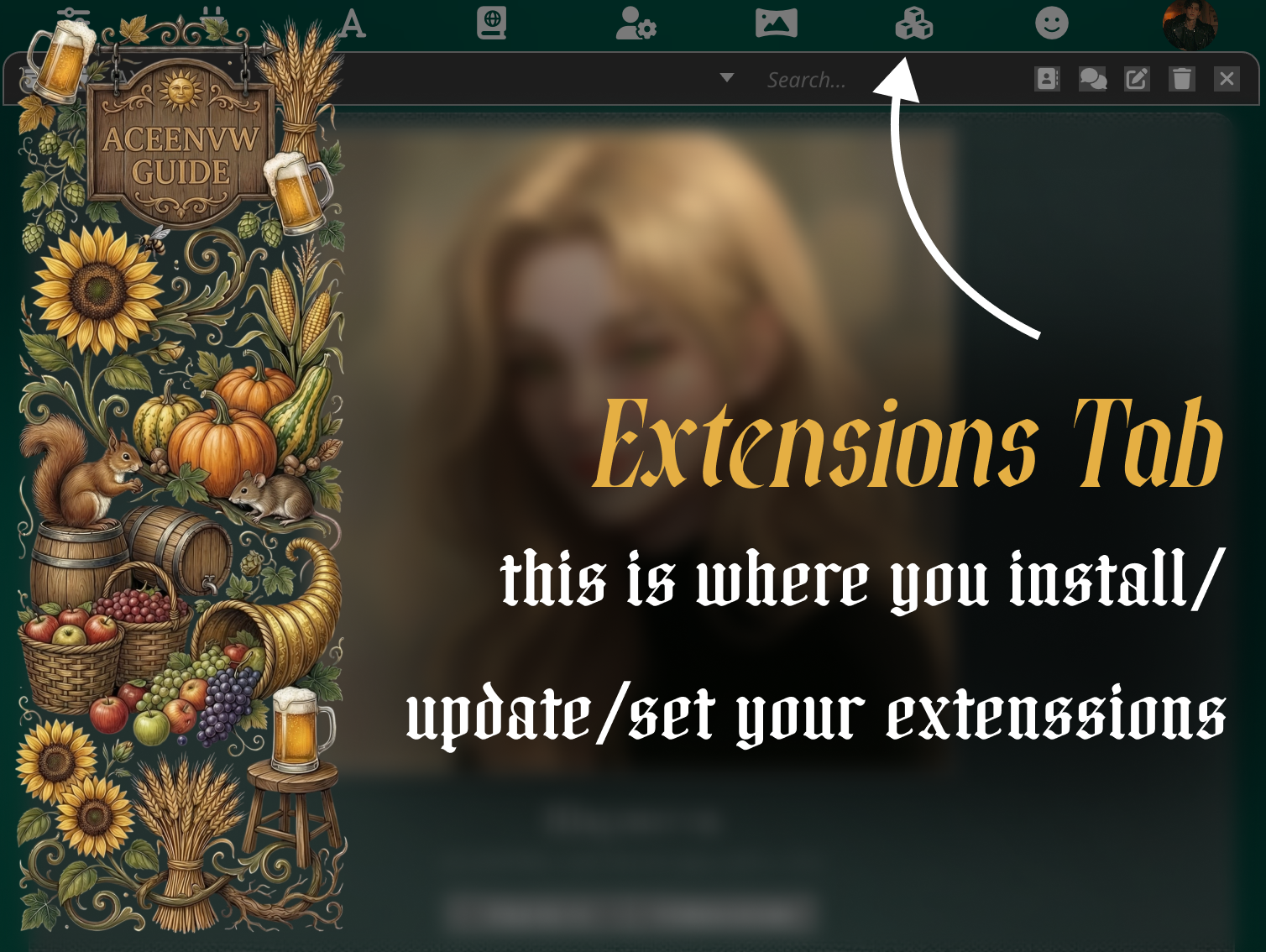
click it and you'll see a panel open up. this is your Extensions Management page — the control center for everything extension-related.
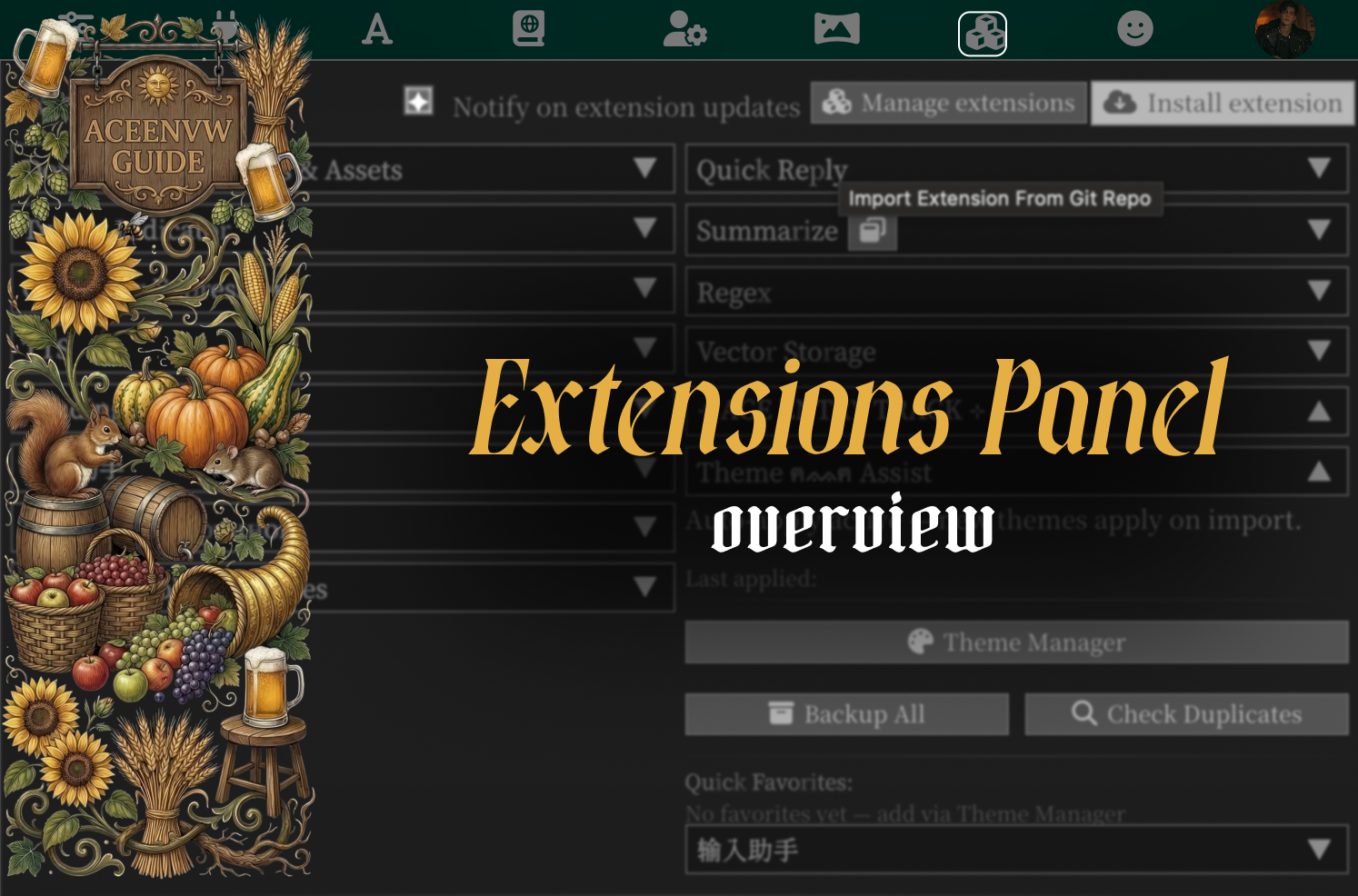
✦ THE EXTENSIONS TAB — YOUR NEW BEST FRIEND
this panel has two important buttons. let me break it down:
🔧 manage extensions
this shows every extension you currently have. each one has:
⊹ a toggle to enable/disable it (without uninstalling!!)
⊹ version info
⊹ a delete button (if you ever wanna break up with an extension... it happens)
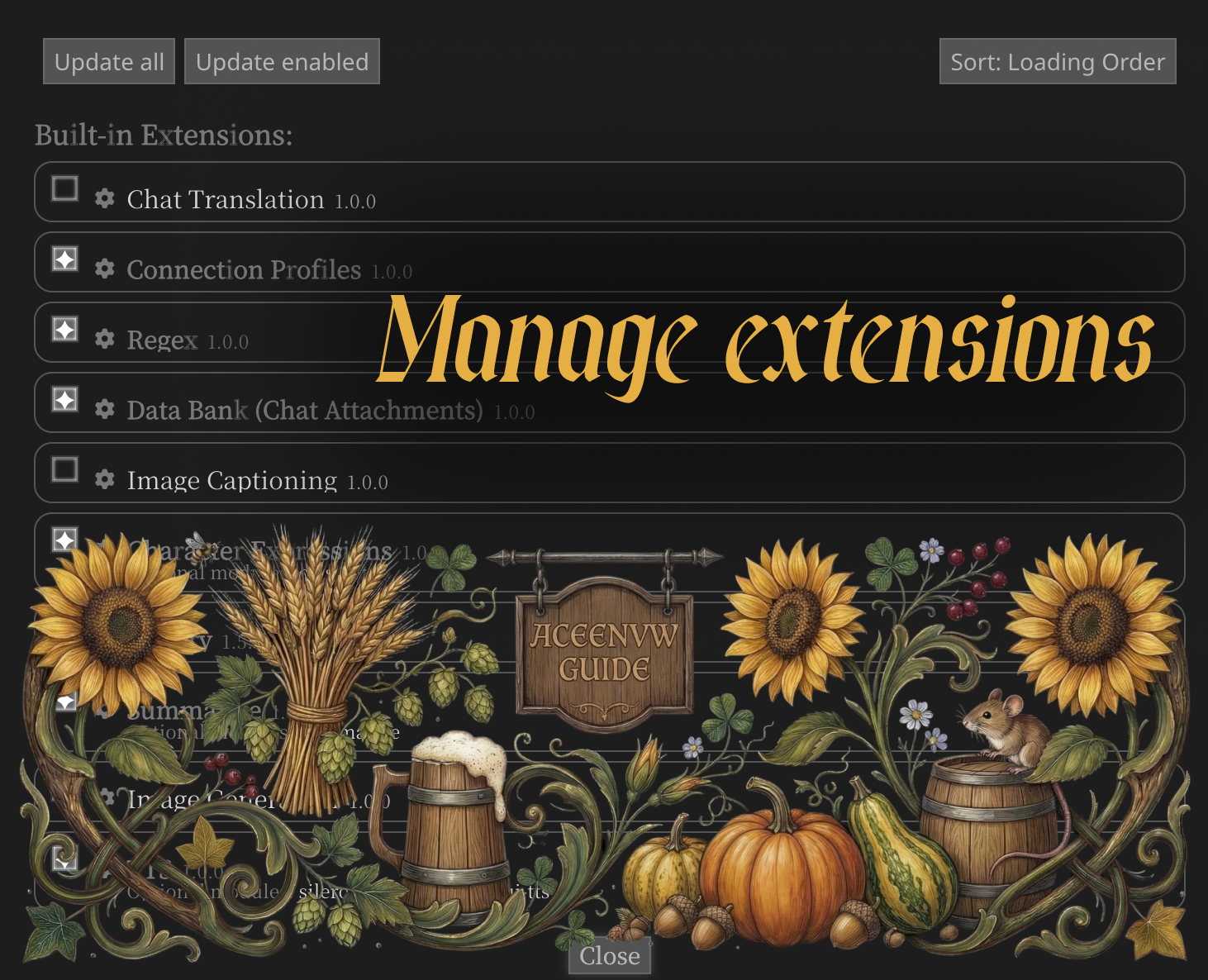
📸 SCREENSHOT: installed extensions list with toggles visible]
📥 install extension
at the top you'll see an input field where you can paste a GitHub URL to install a new extension. this is the main way to add stuff!!
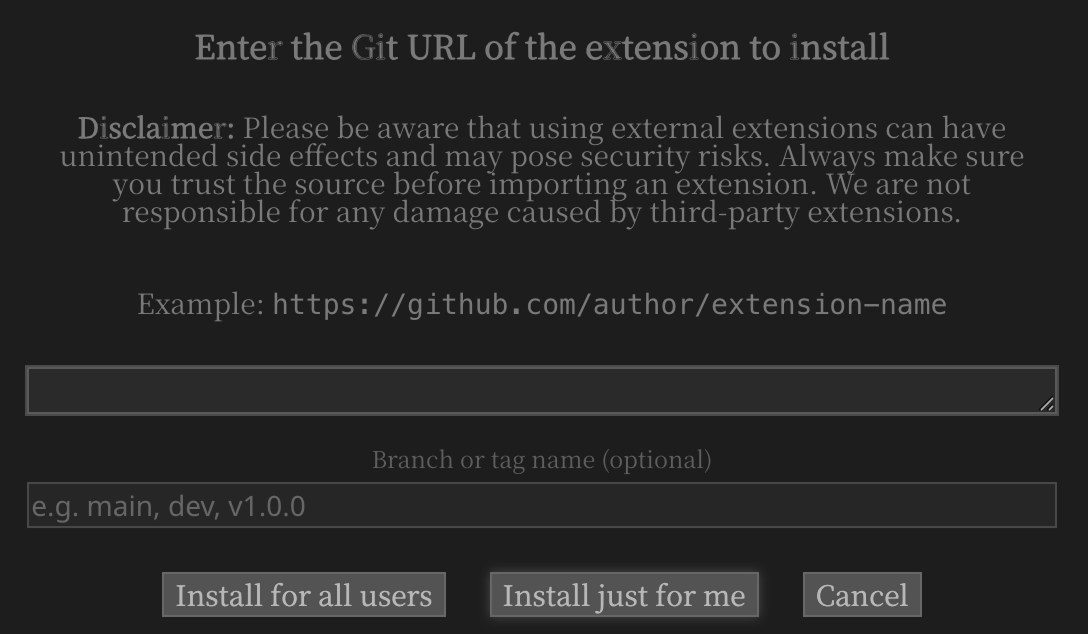
📸 SCREENSHOT: the install extension input field
✦ HOW TO INSTALL AN EXTENSION
okay here's the fun part!! it's literally so easy:
step 1: find an extension you want
someone shares a GitHub link like:
(you'll find these on discord, reddit, github, or from my recs list hehe)
step 2: copy the URL
just... copy it. ctrl+c. you got this i believe in you ૮ ․ ․ ྀིა
step 3: paste it in the install field
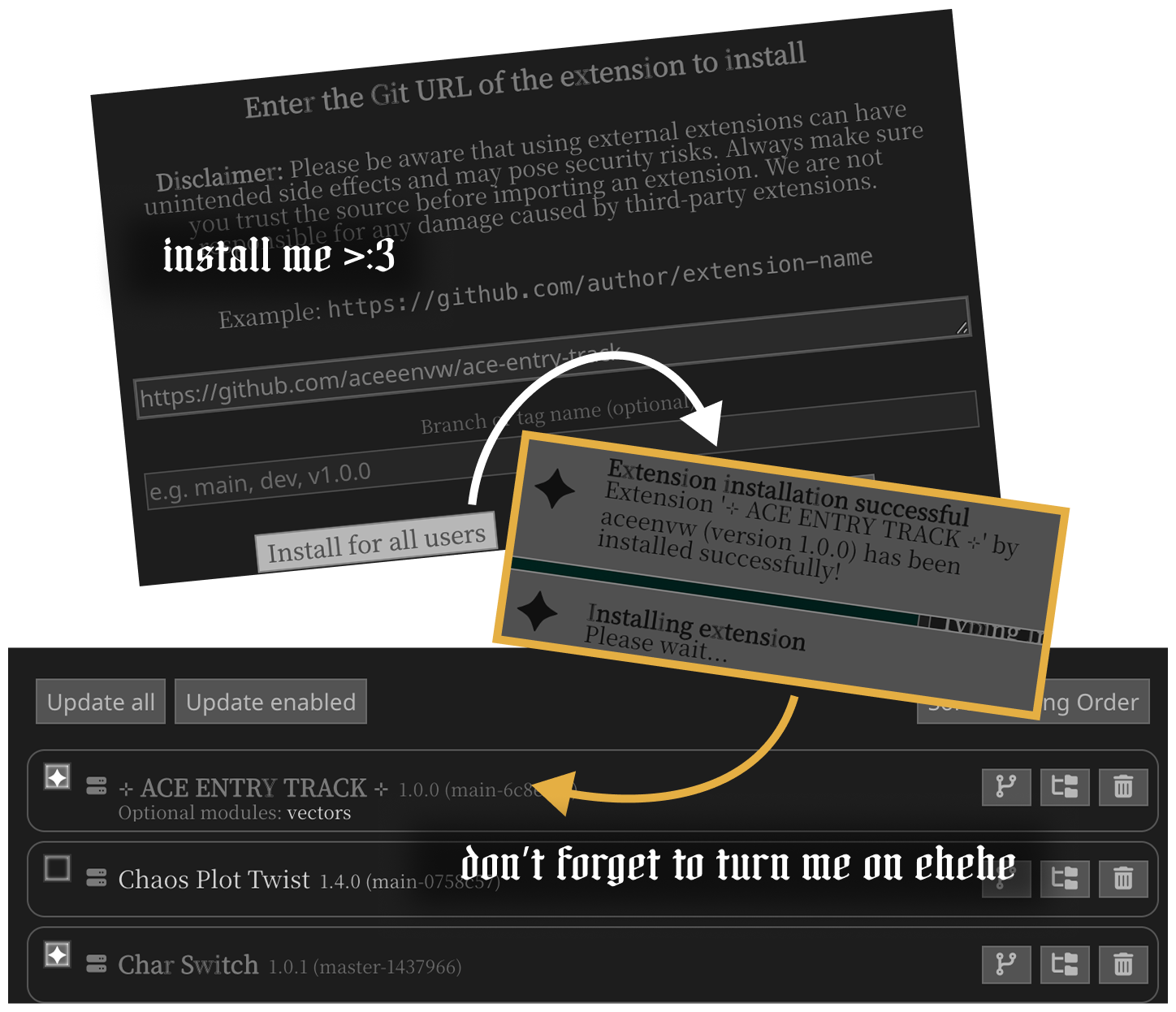
go to your Extensions tab → find the "Install extension" area → paste the URL → hit the install for all users button
step 4: wait a sec...
ST will download it. you'll see a success message if everything went well!!
step 5: check your extensions list
the new extension should appear in your installed list. make sure it's enabled (toggle ON)!!
some extensions also add their own settings panel — look for new sections in the extensions tab or new icons/buttons in your ST interface ✦
✦ HOW TO UPDATE EXTENSIONS
extensions get updates too!! the dev fixes bugs, adds features, etc. here's how to stay fresh:
option 1: the update button
in the extensions tab, there may be a "Check for updates" or update button. click it and ST will pull the latest version from GitHub.
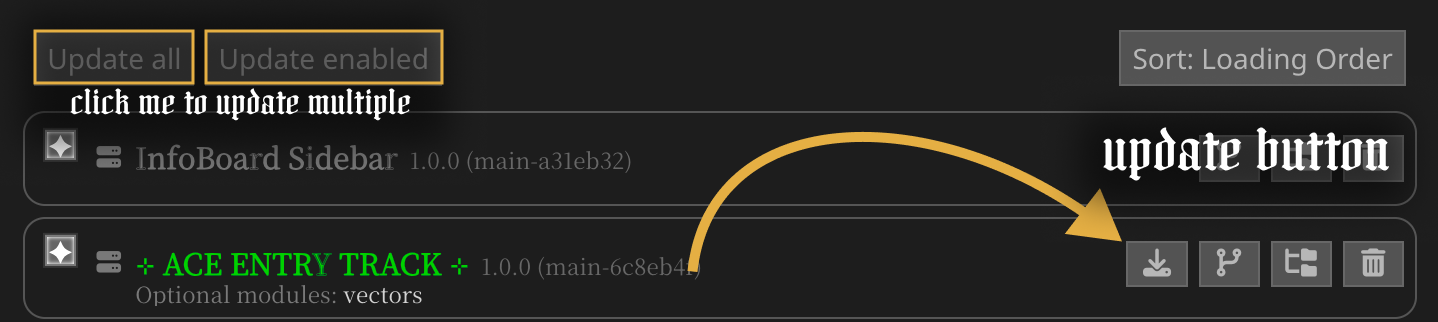
📸 SCREENSHOT: update button / check updates area
option 2: reinstall
if updating is acting weird, you can always just:
⊹ delete the extension
⊹ reinstall it from the same GitHub URL
boom. fresh copy. problem solved ✦
✦ HOW TO DISABLE OR REMOVE
disable (but keep installed):
just flip the toggle OFF next to the extension name. it stays installed but won't run. good for troubleshooting or if something is being dramatic
remove completely:
hit the delete/trash button next to the extension. it's gone. poof. you can always reinstall later tho so don't stress
✦ TIPS & GOOD-TO-KNOWS ⋆౨ৎ˚
⊹ not all extensions play nice together — if something breaks after installing a new one, try disabling it first. 9 times out of 10 that's the issue
⊹ check the extension's GitHub README — most devs write setup instructions, settings explanations, or compatibility notes there. READ THEM!! i know reading is hard but it saves so much pain
⊹ some extensions need specific ST versions — if an extension isn't working, make sure your SillyTavern is up to date!!
⊹ extensions can have their own settings — after installing, look around your ST interface for new icons, panels, or sections in the extensions tab. they like to hide sometimes
⊹ if ST is acting weird after installing something — disable all extensions → re-enable them one by one → find the troublemaker → either report it to the dev or yeet it
⊹ the community is helpful — if you're stuck, ask in discord!! someone has probably had the same problem and already fixed it
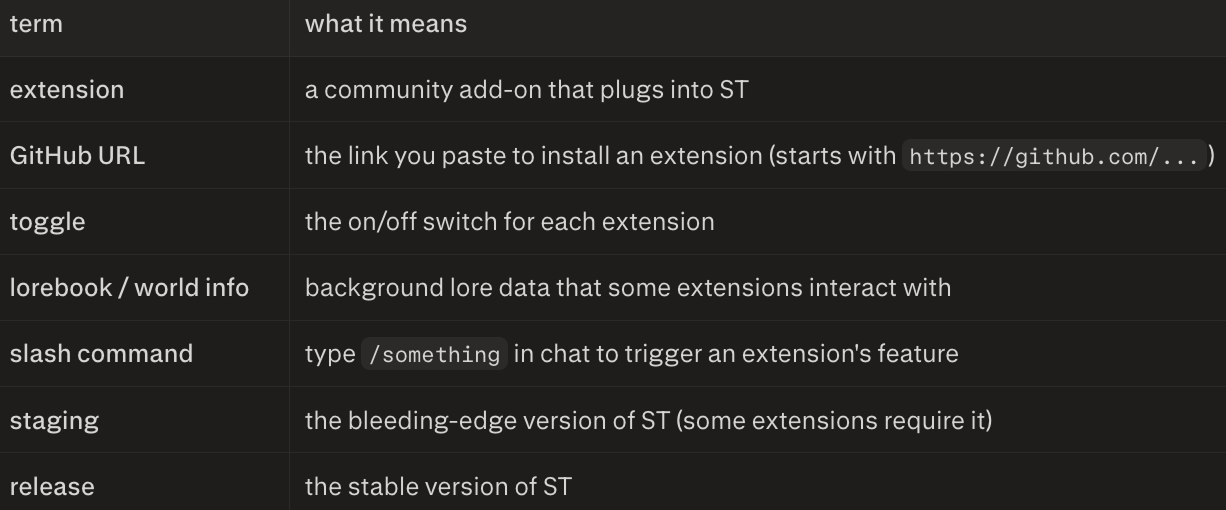
✦ QUICK GLOSSARY FOR THE CONFUSED
now go install some extensions and make your ST beautiful ✦˖ ࣪⋆
remember: if it breaks, just blame the last thing you installed!!
⋆౨ৎ˚⟡˖ ࣪ MY SILLYTAVERN EXTENSIONS RECS ⟡˖ ࣪⋆౨ৎ˚
here's my personal collection of ST extensions i use & recommend (except for mine ehehe which you can find either on my janitorai profile or straight up github)
most of these are from my friend Kamoi lmao i'm not biased....
- Top Info Bar by Cohee1207 - Adds a top bar to the chat window with shortcuts to quick actions.
- Image Manager by Nufahi/Kamoi - Manager for SillyTavern's images folders — browse, hide, bulk-delete and clean old chat & generated images.
- Memory Books by aikohanasaki - Saves SillyTavern chat memories to lorebooks.
- My Lorebook Manager by Nufahi/Kamoi - A visual manager for lorebooks / World Info files.
- Quotes by Nufahi/Kamoi - Quotes & bookmarks: highlight text, color it, organize per bot → per chat, add notes.
- Smart Notify by Nufahi/Kamoi - Smart notification manager for SillyTavern: mute toasts by text/regex/type, view a live log, and customize toast position/size/duration.
- Guard by Nufahi/Kamoi - Security scanner and leftover cleaner for extensions.
hope this helps someone find smth cool!! feel free to ask me about stuff in my telegram channel or in discord (i live in Night Drive)!!
though god bless you not the technical stuff im a baby vibecoder.....