Eris Void's guide to buying BTC for HRT
*******This may not be the best way, there are plenty of others that are better I'm sure.*******
Table of Contents:
- General Info
- First Step - Electrum Setup
- Second Step - Bitcoin.com Account Setup
- Third Step - Making a Receiving Address
- Fourth Step - Making a Cart on Otokonoko
- Fifth Step - Finalizing the Sale on Bitcoin.com
- Sixth Step - Finalizing the Sale on Otokonoko
- Seventh Step - Sending the Money with Electrum
- Eighth Step - Sending Confirmation to Otokonoko
- Done!
- Troubleshooting
General Info
Hello! I am the same Eris Void from my Whats and Whys of what I do for HRT. This is a much better prepared guide from my reddit post.
I wrote out this detailed step-by-step for people as I couldn't quickly find a good one online. If you need help, DM me on Reddit, and I will try to help.
I go over buying bitcoin from bitcoin.com and using Electrum to send money to Otokonoko Pharmaceuticals. Almost everything here should be able to be interchangeable if you find part of the process that doesn't suit you. However, I have only used this process, so anything not on here I really can't help a lot with.
A quick video explainer on what happens behind the scenes can be found here. This can help understand what happens without it being technical. This whole process can take time, especially when you try to save money. Things may take hours, this is fine and something you have to get comfortable with. It's not ideal and I personally hate all crypto, but this is what we have. It could be worse, you could be having to send money orders which take even longer.
There are links to sites I use, none are affiliate links.
Context
This is made more for people in the USA to buy bitcoin, but I hope to be fleshing it out for other English speaking areas. This guide is also not for anonymity. That is outside the scope of what I am trying to achieve with this. If you want anonymity in buying cryptocurrency, I cannot help you. However look into Monero.
OMG I hate this!
Completely agree, everything about this sucks and is nerve wracking. I will say that this is a simple process once you have all the accounts setup. It's the setup initially that sucks the most.
Take Caution
Just take it slow, actually read things, and make sure information is correct before you click buttons and you'll be fine. There are portions that you cannot undo, but the process is more forgiving than you may think.
First Step - Electrum Setup
I use an Electrum wallet on my desktop computer. Though I believe there is an Electrum phone app.
Download and install Electrum, it'll help you make your wallet. Be slow and read the instructions. Electrum is a little weird to use, but the software is completely free, open-source, and does get things processed pretty quickly/cheaply.
- Choose "Standard Wallet", this will simplify the process and not lock you behind two-factor authentication (2FA). 2FA is a good idea, but I'm not sold on Electrum's implementation. It adds extra fees, and you have to make yet another account.
- Choose "Create a new seed". It will give you 12 words, write those down on paper.
- Retype those words into the box. It will not let you paste, so make sure you are using the words it previous gave you.
- Make a password. See the below warnings.
- Go to the data directory and make a back up of your wallet file.
- Congrats! You've made a crypto wallet!
Password Security
Make sure the password is very very strong. This password is the only standing between your money and an attacker. For passwords, longer (25+characters) and easier to remember is better then complicated and hard to remember. Here is a good guide on how to make a password. Finally, don't lose your electrum password, there is no way to get it back. I am a cybersecurity professional and don't mind if you write it down physically if you need to if it's super strong. Don't store it online though.
Second Step - Bitcoin.com Account Setup
While there are many places to buy bitcoin (BTC), I buy my bitcoin from Bitcoin.com. As websites tend to get updated over time, I won't have a step by step guide here.
Go to bitcoin.com and make an account following the process. It will ask you for your real, legal information. Yes, you do have to give them your real information, including SSN, and a bank account. This is not their choice and is required by the IRS and FTC. It is part of the Know Your Customer regulations and laws. It is possible to get around these, but for obvious reasons, I won't be going over those here.
Buying crypto with money (USD/$), will not incur a tax on you. However, pulling money out of your wallet to convert BTC to USD/$ will. So only put money in as you need.
Third Step - Making a Receiving Address
Now, in the Electrum app, you have to make a receiving address to get the number you need to give bitcoin.com.
- Go to the "Receive" tab.
- Click the "Create Request" button with nothing filled in.
- You can give it information if you want but don't put in an amount.
- It'll give you a wallet address which look something like this "bc1q8hatv3ssg55ldy3ldueacrp72nhj6dg53ya"
Fourth Step - Making a Cart on Otokonoko
Go to Otokonoko Pharmaceuticals and add the things you want in your cart. The total there should be close if not exactly what the charge will be. Use this for the amount of BTC you want to buy from Bitcoin.com.
Note that shipping may not be included in the price. With Otokonoko each order has a $20 shipping fee, it may be different for different stores and won't be reflected in the cart price.
Fifth Step - Finalizing the Sale on Bitcoin.com
After you have an account on bitcoin.com and have the receiving address from above, click "Buy Bitcoin" (or whatever) on Bitcoin.com. I usually get a little extra ($20) then my cart on Otokonoko because of fees and the quick market fluctuations. The extra will stay in your wallet for the next time you need to order.
Chillout and go watch an episode of a TV show that you like. It can take hours for the transaction to go through. It normally only takes ten minutes or so, but be patient.
Once Bitcoin.com sends the money you should get a desktop notification, and it should show up in your transaction history. It will look like this:

If it doesn't look exactly like this, wait a bit longer. The green check mark is the important thing. You won't have the money until there is a little confirmation check mark next to the date in the "Transactions" tab. Wait for that to happen before you try to send or you'll get errors. This is part of the waiting I mention earlier.
Sixth Step - Finalizing the Sale on Otokonoko
Now that you have the money in your wallet, go back to the Otokonoko site and checkout. Make sure to choose bitcoin (BTC) as the method.
Keep this window open, you'll need information from it.
Seventh Step - Sending the Money with Electrum
In Electrum, to send the money:
- Go to the "Send" tab.
- Put in the wallet address listed at the end of your purchase on the Otokonoko site (bottom right hand corner under the QR code).
- Put in the exact amount from the order page into Electrum in the BTC field. It will look something like "BTC0.00986156".
- Do NOT put in a cash amount. It complicates the process.
- Double check that the Otokonoko wallet address is right and the amount is right.
- Click "Pay...".
A new window will pop up to confirm that you want to send. There is a slider there, max it out. That slider dictates how fast you would like it processed and is a little more expensive (fees are normally <$2 maxed out, so just max it out. but not always, it'll tell you the estimated fee, make sure you're ok with that fee).
Here is an example of how this should look (amounts will be different):
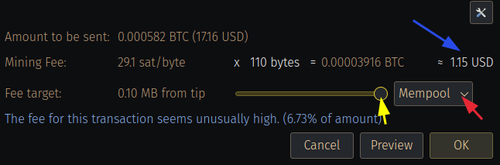
Yellow arrow is the slider. Blue arrow is the estimated fee (but it's normally close). The red arrow should read "Mempool".
Click OK and it'll ask you for your password. Put in your password, and click "Send".
This will again take a long time to fully be confirmed by the network. Chill out. It'll be fine, almost done.
Once it's confirmed, you'll get another desktop notification. The "Transactions" tab will look like this:

Eighth Step - Sending Confirmation to Otokonoko
- Right click on the transaction.
- Choose "Copy" then "Transaction ID".
- Send that to the email address listed on the site with your Otokonoko order number. This is so she can confirm it was sent.
- She'll get back to you in a day or so and tell you it's confirmed.
Once it's confirmed by her it will come, even if her system cancels the order. This happens to a lot of people.
Done!
Great job! You're done. Up to a week and a half later you'll get the shipping information email from FedEx.
Troubleshooting
If you are having issues, especially if your transactions aren't being processed, it could be that you missed a step. Never fear though, in most cases your money isn't gone. Of course if you send the money to the wrong address, which is pretty hard, most things can be recovered from.
For example, if your transaction to Otokonoko doesn't process within 24-48 hours, it will be returned to your wallet. So it may delay the process, but give it time. You're doing something that isn't an established process that isn't straightforward. This isn't Amazon, things take more time.
Again, if you need help, DM me on Reddit, and I will try to help.