YaoGuangSR Guide
1. Prerequisite
Download the 3.8.51 game client via your preferred source and method ( you can also try Aria2)
Open your Windows PowerShell and run the below in one go:
2. Install/Update
Place your StarRail_3.8.51 51GB game folder to your defaults Downloads folder and name it StarRail, it would look like this:
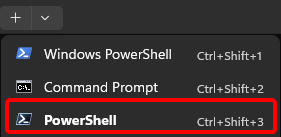
Open your Windows Terminal and open PowerShell instead of Windows PowerShell and run the below in one go:
Open YaoGuangSR as it's your shortcut now and enjoy
3. Config
Will write later, all of your stuffs are at C:\Users\Yourusername\AppData\Roaming\rero\yaoguang-sr
4. Uninstall
Open your Windows Terminal and open PowerShell instead of Windows PowerShell and run the below in one go: