 . ೃ Content ࿙ : Shading Tips,
 Adblocker, Dictionary, Disclaimers, Commands, Regiments and Scouts, Locations, Games and Activities, Grass Codes, ࿙ (๑˃ᴗ˂)ﻭ ︵︵︵ Home ︵︵︵
Progress Log。 Creator。 Contributors。Atabook。 FAQ
original here!
Step 1:
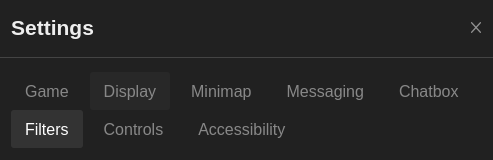
go to settings and look for the "filters" tab
Step 2:
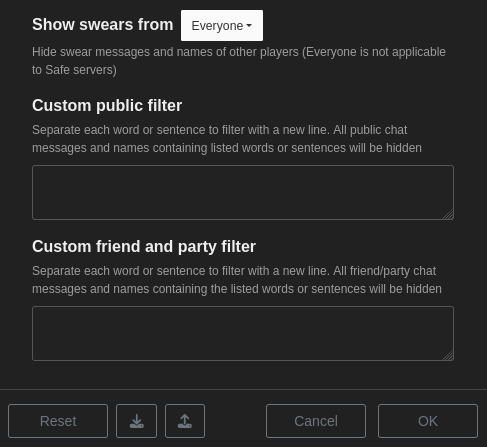
to filter ads out of public chat, make sure you paste the filter list into the TOP box, "custom public filter"
Step 3:
paste the filter into the top box and press "OK" afterwards. ads should disappear after changes have been applied
if you want to see ads again you can remove the filter and apply changes again to see ads
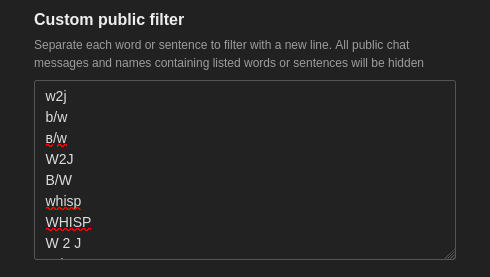
PLEASE NOTE: when the filter is applied, it filters out people's names and censors them too if they have any of the following filter words in their names. you'll still see their messages so long as they don't use words in the filter the filter is not case sensitive, if you have a word in your filter that's in all lower case, the capitalised word will also be filtered out remove filter words that you don't mind seeing to suit yourself if needed
direct pasting:
1 2 3 4 5 6 7 8 9 10 11 12 13 14 15 16 17 18 19 20 21 22 23 24 25 26 27 28 29 30 31 32 33 34 35 36 37 38 39 40 41 42 43 44 45 46 47 48 49 50 51 52 53 54 55 56 57 58 59 60 61 62 63 64 65 66 67 68 69 70 71 72 73 74 75 76 77 78 79 80 81 82 83 84 85 86 87 88 89 90 91 92 93 94 95 96 97 98 99 100 101 102 103 104 105 106 107 108 109 110 111 112 113 114 | a:
a :
a;
a ;
whisper/boop
boop/whisper
w2j
w2p
w/j
w\j
b/w
b\w
b\\w
w \ b
b \ w
b//w
b / w
b // w
b.w
w.b
b,w
w,b
b♡w
ʙ/ᴡ
ʙ♡ᴡ
w2j
w 2 j
w/b2j
w/bj2
w/b
w//b
w / b
w // b
w or b
whisp to
wisp to
whisptojoin
whispto join
whisper to
whisper to join
whisper and join
whisper 2 join
whisper2 join
whisper 2 j
whisper2 j
whisp2 join
whisp 2 join
w2 join
ᴡʜɪsᴘᴇʀ
ᴡʜɪsᴘ
ᴡɪsᴘ
bw2j
b/wtj
w2join
в/ω
ᴡ2ᴊ
ω/в
13+
14+
15+
18+
and discord req
discord required
disc req
and disc req
disc req
spam:
spam :
spam#
spam #
n:
n :
n#
n #
note:
note :
note#
note #
b00p t0
boop t0
b00p to
b00p 2
boop 2
boop for
b00p for
rp]
rp}
rp)
invite code:
invitecode:
inv code:
inv:
code:
code :
invite code :
invitecode :
inv code :
inv :
tier 4
tier 4 supporter needed
tier 4 supporter help
tier 4 supporter for build limit
tier 4 supporter 4 build limit
tier 2 or higher
supporter build
supporter help
doing anon whispers
anon whisp
whisper your hot takes
hot takes
spam;
spam ;
spam:
spam :
|